I get masses of text . What am i looking for?
Hi Ponce-de-Leon, I'm not sure what you want me to try. I don't have Bluetooth and rfkill list says nothing blocked.
I'm not sure, found this solution in another thread for this driver. I think when there is shown something then the module is recognized and you can do the next step to load the module.
Ah. I missed the bit about no internet, sorry.
As you say wifi was ok then now is not working. That smells a little bit like a software update (linux kernel update) may be the cause.
I would try rolling back to a previous kernel version.
From startup grub menu, select "additional Options for Zorin" and select the previous kernel generic version. Boot with that and test.
If that works, there are ways to hold on to that older kernel to prevent updating to the one that is a problem.
1 Like
He has tried that already. No change.
1 Like
OK. I see that now.
1 Like
Can You post the Output of it?
Output of what?
It's all a bit difficult to post outputs, as I'm testing a laptop with no WIFI and currently no way of taking screenshots (unless there's a hidden app in the basic Zorin setup - maybe there is?) and no email set up, then transferring it to another computer with Internet access. I have to cut and paste the output into a Text editor, then transfer it to a USB key and move to the other computer and cut and paste it into here...
Yes, you can make screenshots when you click on the quick settings in the taskbar and choose the camera there:
1 Like
I'm getting a bit lost in all of the options. I ran whatever it was and got a lot of output, then ran the next step in case it loaded the module, but it made no difference.
Are there no nice simple tools in Linux to test and repair stuff, as in Windows? I'm completely out of my depth here.
Unfortunately there are no such tools, sorry. I'm at a loss at the moment. Sometimes problems are solved next day when the computer has rested...
1 Like
From that:
Simply press the Print Key and You can make a Screenshot. Of Course, You can copy the Text in a Text File and put it on a USB Stick.
1 Like
Here it is (hopefully)
ath9k
vermagic: 6.8.0-79-generic SMP preempt mod_unload modversions
sig_id: PKCS#7
signer: Build time autogenerated kernel key
sig_key: 57:D5:7E:46:6C:41:A1:E1:19:14:0B:08:FD:F8:28:29:ED:E9:31:F1
sig_hashalgo: sha512
signature: 5F:45:E6:1D:8B:7E:0F:94:FB:81:4A:33:03:EF:2E:3B:FB:D5:8B:AE:
3A:00:E3:5A:F9:45:CD:25:12:76:B3:53:AA:C7:16:94:F0:8E:9A:38:
31:8D:97:64:94:D0:2B:E1:D2:4D:F1:23:E7:15:0D:7E:F3:24:3B:34:
8E:36:2A:7D:2F:5B:CA:BA:E0:DF:B6:48:30:2B:E0:AC:5B:0A:AE:DA:
A4:20:30:3B:3C:CC:DF:30:34:84:75:1E:80:5D:BC:80:27:CF:83:78:
63:F6:D6:6C:07:C9:26:19:2D:29:1F:8C:46:05:C9:B0:12:78:C7:DA:
8F:5D:25:0B:F8:0E:45:E7:A2:23:69:4A:7F:6E:5A:70:F6:2E:7E:07:
0C:DA:EE:46:FD:8C:EE:F9:9A:CC:87:49:49:28:17:23:67:C3:2B:7E:
83:D2:5D:91:42:F1:6C:F3:5D:E9:41:B8:B0:6B:B4:AA:E3:CA:85:60:
0A:CD:53:7A:ED:11:3C:10:42:3B:E9:15:99:69:68:62:73:D3:3A:3B:
F7:6C:8E:47:F3:D5:CB:A2:91:7C:42:43:E9:A0:F2:F8:3C:4B:B4:2C:
15:B7:7B:D1:F5:6C:6B:D0:B0:29:6F:68:7D:ED:23:1F:A2:21:94:92:
C8:38:A0:9C:87:06:FB:D2:8A:A5:92:C1:9D:E2:90:C0:50:E7:48:FF:
67:3F:84:95:64:B7:7F:BA:FC:E2:EB:BB:32:F8:86:5F:AD:94:5C:D2:
2C:5C:BA:E9:8D:F0:06:1E:05:B0:2A:61:BB:6B:1B:DE:B5:2D:2A:67:
25:D4:D0:F8:CF:D0:70:96:FA:AD:FD:84:1C:E1:AE:D5:CE:6A:38:EF:
1C:F0:2F:3B:4C:37:00:39:8D:6B:9F:9A:34:79:8B:B6:CA:99:A8:D7:
46:71:64:22:94:CA:8B:BD:CB:2B:11:31:DA:7B:59:C4:FB:76:6C:2A:
10:1D:53:C8:91:4D:CD:50:F9:29:03:A9:7E:E4:EB:9D:0F:7E:1B:37:
FD:1B:33:2B:EB:4B:BD:E5:AE:FD:47:1A:C7:DB:BB:0E:B4:39:78:9F:
CF:4E:6E:96:BE:D8:83:14:F5:D0:3A:51:C6:AB:E2:1F:E8:5B:4C:F7:
D2:0E:37:ED:5F:94:DD:CB:46:D1:33:C0:0E:32:39:E6:B7:3F:92:80:
9F:49:B2:E0:B6:06:E6:BB:23:B8:70:9A:55:C2:8E:CC:3E:5B:35:C6:
ED:AD:CA:91:E1:7F:C7:E0:9E:93:A1:D5:D7:AC:08:A2:3A:6C:91:F6:
7B:6B:81:A0:27:AA:D9:E3:E6:72:9E:CD:25:E9:C4:0A:BC:C8:7D:B3:
F5:18:DE:18:8D:4F:BF:90:EC:03:E1:2B
parm: debug:Debugging mask (uint)
parm: nohwcrypt:Disable hardware encryption (int)
parm: blink:Enable LED blink on activity (int)
parm: led_active_high:Invert LED polarity (int)
parm: btcoex_enable:Enable wifi-BT coexistence (int)
parm: bt_ant_diversity:Enable WLAN/BT RX antenna diversity (int)
parm: ps_enable:Enable WLAN PowerSave (int)
parm: use_chanctx:Enable channel context for concurrency (int)
parm: use_msi:Use MSI instead of INTx if possible (int)
tom@tom-SATELLITE-PRO-NB10t-A-11G:~$ modinfo ath9k
Sorry for my ignorance about laptops - can the wifi gadget have died? How do I test it? How do I sort it?
Alternatively, you can access the screenshot & screen recording interface by clicking on the indicator icons on the right side of the panel to open the indicators menu and pressing the camera icon.
Thanks - I didn't even know that icon was a camera!
1 Like
Just a side comment here. I had a Fritzbox! DSL and recently a Fritzbox! AX model after upgrading with Zen internet to cheapest fibre package. I was surprised you were able to get a connection. My personal experience of Fritzbox!
Having just looked on Fritz! website they only have one model with antenna that Zen does not provide. When I first started with Zen their wifi coverage was poor, so I used an Archer (TP-Link) router until that died - because I didn't find out until after the latter died that in 2021 TP-Link stopped providing firmware updates via download to updating via ISP! When this occurred I got my DSL Fritzbox out of storage. Wifi was non-existent and my good lady needed to connect to work and her notebook was inches away from the router. Even using ethernet directly to the router would not work. I had to go out and buy an ASUS router but had to disable WiFi 6 as none of the mobile phones in the house were WiFi 6 compatible. GNU/Linux does have tools which have been given in this thread to help you. Remember a lot of hardware is built for that other OS and volunteers in the Linux kernel community have had to do reverse engineering to write drivers for such things as USB dongles. Have you tried power-cycling the notebook? I would power off the notebook, unplug power supply from the socket, remove the battery from the notebook, and afterward, hold the power button for 30 seconds to discharge any power in the system, then put battery back in, reconnect to power supply then boot. I am also wondering if after an update power saving of wifi has been re enabled which needs to be changed to a different setting using TLP:
1 Like
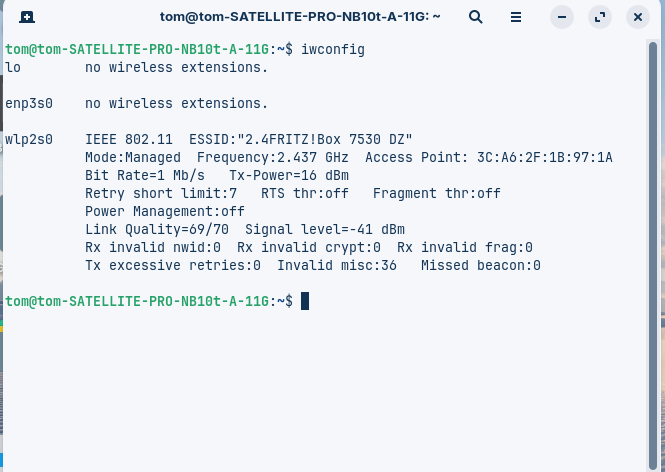
Sure can Your Wifi Module get break. Depending how it is built in, it should be possible to change it if neccessary.
Didn't You wrote that You don't have Bluetooth?
That could be a Point. Take a Look at this and try it:
1 Like
If you have installed net-tools (whilst it is deprecated it still has useful stuff like ifconfig.
So if you don't know the hardware id in hexadecimal, using:
sudo ifconfig -a
will list all network devices and there hexadecimal IDs.
Have you tried entering the router's interface (192.168.1.1) via a browser? I seem to remember you can add 'allowed hardware' but you need to add the hardware ID. See if that picks it up.
1 Like
Tried this - still got the problem
I can use 192.168.178.1 on my tablet and connect, but it doesn't connect on the Zorin laptop. On the Android tablet, the network page doesn't show the Linux laptop
I've tried pressing what I assume is the WiFi button with or without F2.
Works fine on Ethernet.