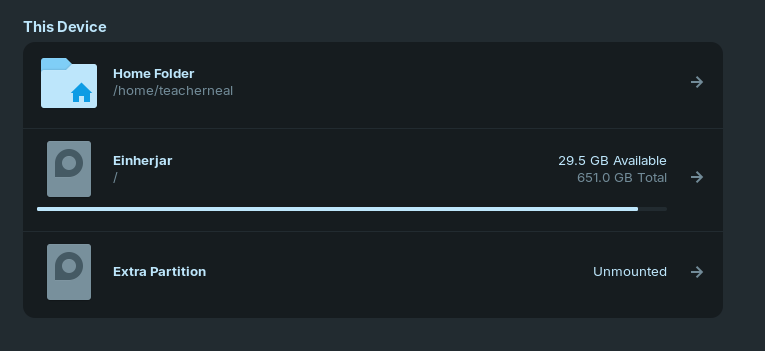
Yesterday, I got a big surprise when I started getting messages warning me: Low Disk Space on "Filesystem root" The volume "Filesystem root" has only 58.6 MB disk space remaining. Somehow, the disk usage jumped from about 60% to 95% in a matter of days.
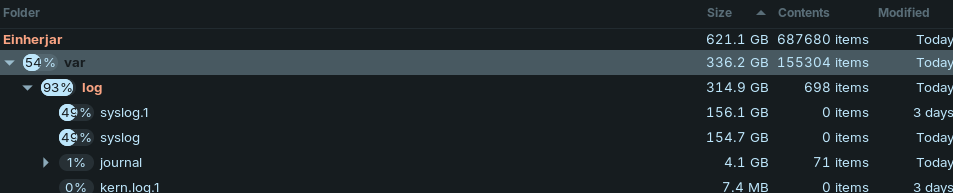
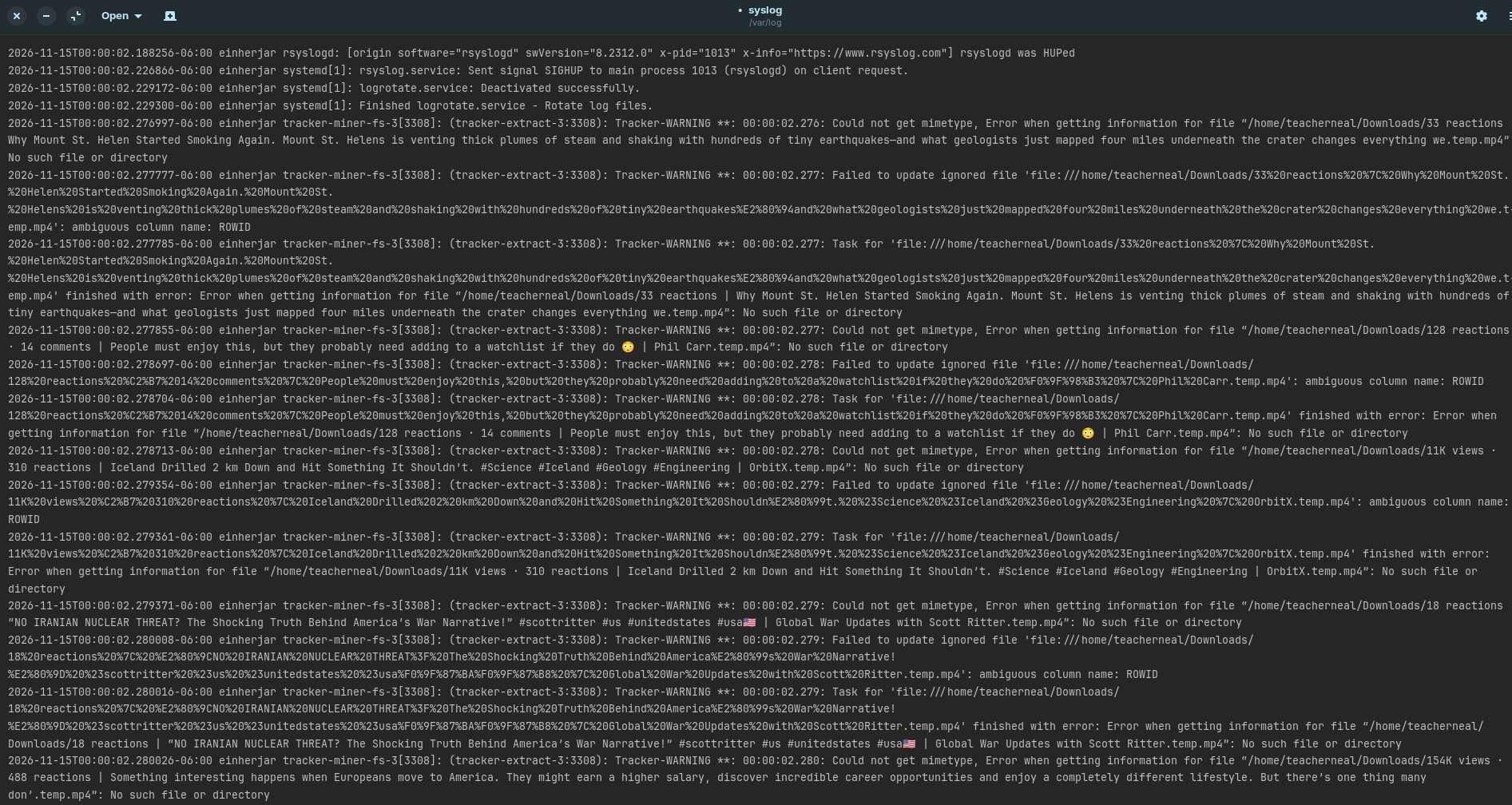
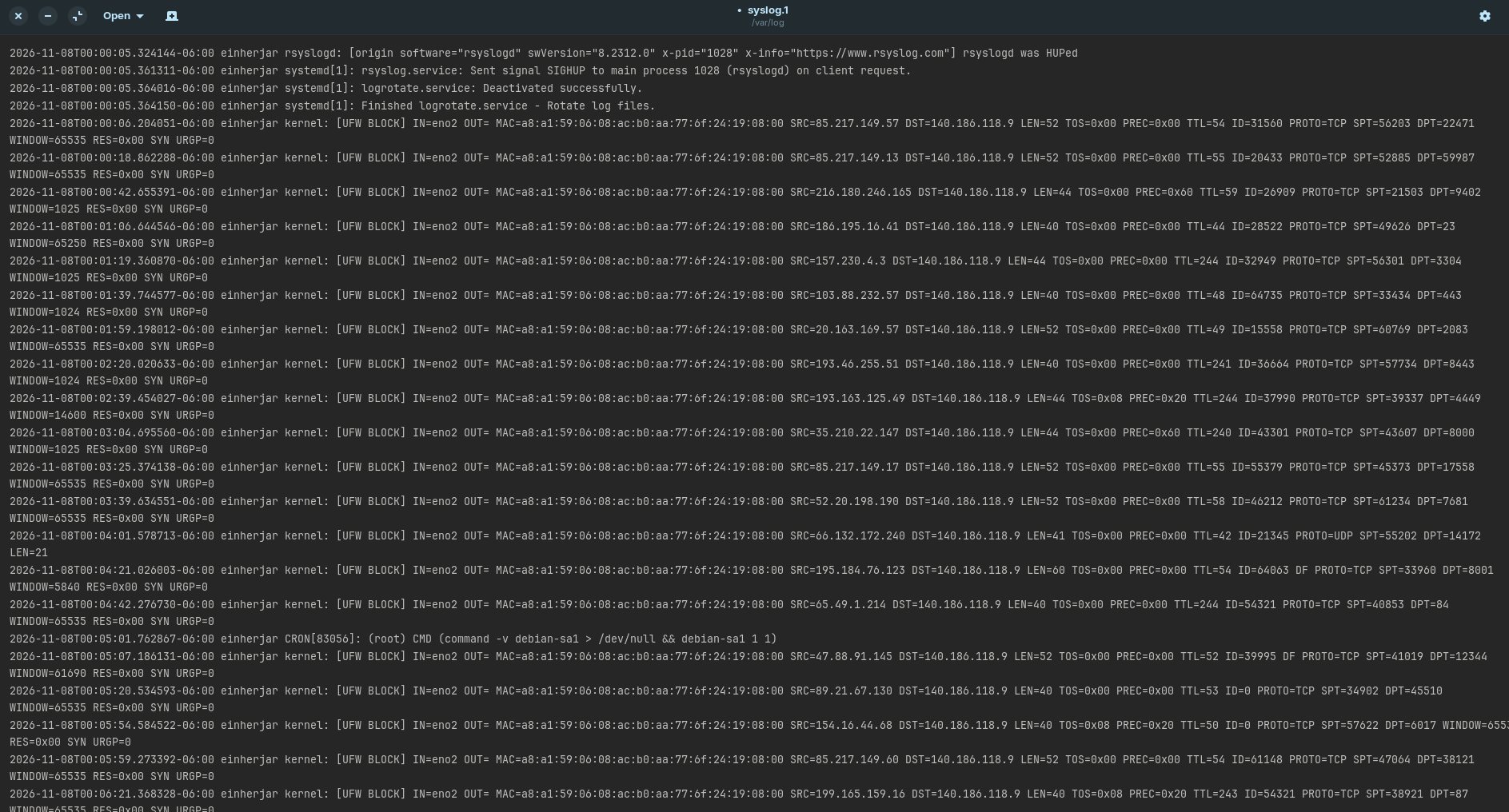
I was able to recover some space, about 30 GB and the drive went from 95% full to 90% full. But today, the process continues and something in the background has eaten up 30 GB just today. When I clicked on the error message and looked inside to see what was going on, this is what I found (4 attached screenshots).
The thing that shocked me was the gargantuan size of var, as my understanding that the var folder is composed of text messages of variable length.
Four days ago, my Timeshift backup ran and ran and wouldn't stop. Something in the backup was eating up space at a prodigious rate and the external disk partition I used for Timeshift was full. So I unmounted and unallocated the partition, and switched the Timeshift backup location to an Extra Partition on the internal drive, keeping two backups each week, but Extra Partition wouldn't store a second backup as something ate up a lot of space. The size of the backup on Extra Partition is 208 GB, which is about the same size as the unexpected jump in usage of the boot partition. Could the two be related?
In the attached screenshots, syslog.1 measures 156 GB but is nothing but endless repititions of a message with almost identical timestamp from Nov. 8
(I am awaiting delivery of a 2GB external drive, which I will start using with Timeshift, after which I will delete and unallocate the Extra Partition with the Timeshift backup from Nov. 14)
I hope I don't have everyone totally confused by this convoluted situation and I hope someone can shed light on this situation as it obviously makes no sense to a kinda' noob like me who, if he wasn't bald, would be tearing his hair out in frustration.
At the second step when editing rsyslog, add a line, e.g. after the line rotate 4: size 100M
and keep all other lines of the file. Rotate 4 and compress should already be set in the file.
Then press ctrl+o to save, enter to confirm and ctrl+x to exit the nano editor.
I would recommend to limit the max size of logs of journald, too, by editing the file
/etc/systemd/journald.conf
Maybe someone else can help you figure out what's causing this flood of logs.
Thought I would search for what to do if anyone hits a point where the system won't boot. Wish I new this when I lost a Devuan installation:
" Yes , a full /var partition preventing boot can be cleaned using a Live USB or Live ISO of the affected distribution.
Boot and Mount : Boot from the Live USB, open a terminal, identify the root partition (e.g., /dev/sda1 ), and mount it to a directory like /mnt .
Clean Space : Navigate to the mounted system (e.g., cd /mnt ) and remove large files from /var/log , clear package caches, or delete unnecessary data using commands like sudo rm -rf /mnt/var/log/* or sudo du -sh /mnt/var/* to identify targets.
Alternative Recovery : If the system can access the GRUB menu, selecting Recovery Mode and using the Clean option can also free space without needing external media.
Unfortunately, these recommendations are beyond my knowledge and expertise.
There seems to be a process or processes that keeps iterating endlessly and filling up space. I opened a Terminal window, typed in "top" and the top three entries are rsyslogd tracker-miner-f and systemd-journal. rsyslogd is listed as running 150 %CPU and my machine is running hotter than normal.
Is there any way to stop this insane process and clear out the syslog and syslog.1 in /var and get the system running back to normal?
I'm on the verge of wiping the drive and reinstalling Zorin Core 18.1
Or he can also on occasion do journal cleanup with a few simple commands in terminal:
Find out how much space journal is taking:
journalctl --disk-usage
First thing you should do is to rotate journal files. This will mark the currently active journal logs as archive and create fresh new logs. It’s optional but a good practice to do so.
sudo journalctl --rotate
Restrict logs to certain size. This will delete the journal log files until the disk space taken by journal logs falls below the size you specified.
sudo journalctl --vacuum-size=100M
Let’s say you want to keep the log history of just two days. To delete all entries older than two days, use the journalctl vacuum-time command:
sudo journalctl --vacuum-time=2d
Personally I only do the two commands which is rotate and 100m vacuum size.
I typed journalctl --disk-usage and it says that archived and active journal logs are only taking up 4.1 GB. The problem is with syslog and syslog.1 which together are taking up over 310 GB
Right. I'm aware. Journal is a small chunk but it's still a chunk.
Not sure if someone has suggested this but have you considered running 18.1 in live boot for a little while and checking if the same hog space thing (syslog) is happening there?
error: destination /var/log/syslog.1.gz already exists, renaming to /var/log/syslog.1.gz-2026111916.backup
I also installed Bleachbit, and under "System" it said that there are 165 GB of "Rotated logs" of which 160 GB of space could be recovered. But when I ran it, all 157 files returned the message "Access denied". I'm not brave enough to relax the guardrails by turning on "Expert Mode" and running it that way.
I ran the tail command and the problem seems to be with "tracker-miner-fs-3[3975]" not being able to get the mime type for Facebook Reels which I had downloaded and saved as H264 and mp4AAC using an app called "Parabolic." I've used Parabolic for many months and previously downloaded thousands of Facebook Reels (so I could upload them to a USB stick which I plug in to my Roku TV using audio and video mime types which Roku can recognize) and never had any problem until several days ago when the notifications started that the drive was full. Even after I delete the .mp4 files it still generates an error "Error when getting information for file ____" I deleted and reinstalled Parabolic yesterday and the Downloads folder is now empty, but syslog is still filling up with errors. The Terminal window won't allow copying or cutting in order to paste.
The disk usage dropped from 97% down to 71% when I truncated syslog, and it dropped again to 47% when I truncated syslog.1 47% disk usage was in the ballpark of where it should be, as I recall.
I just now ran the command "kill -9 3975" and noticed that the CPU is running much cooler now that the insane logging interations have stopped.
But: Will this permanently kill the process, or will things start to go haywire again after the next restart? Is it safe to start using Parabolic again?