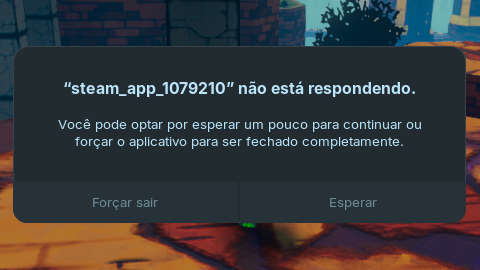
I recently installed Zorin on a Acer gaming laptop, and I'm having a problem where when I share my screen via Discord and try to open a Steam game, the game freezes and the only way to close it is to restart the system.
I read that it can help to disable the integrated gpu if you have one or to use not full screen but window and have other windows opened while sharing.
But in the case of Steam, I installed it but I can't open or uninstall it.
With a message saying that it was not possible to uninstall it, with the following details:
The following packages have unmet dependencies:
steam-libs: Depende: libnm0 but it is not going to be installed
Depende: libva2 but it is not going to be installed
Depende: libva-x11-2 but it is not going to be installed
Depende: libxinerama1 but it is not going to be installed
Recomenda: libasound2-plugins but it is not going to be installed
Recomenda: libfontconfig1 but it is not going to be installed
Recomenda: libva-drm2 but it is not going to be installed
Recomenda: libva-glx2 but it is not going to be installed
Recomenda: libxfixes3 but it is not going to be installed
Recomenda: libxss1 but it is not going to be installed
Recomenda: steam-devices
Recomenda: va-driver-all but it is not going to be installed or
va-driver
libcolord2: Depende: libglib2.0-0t64 (>= 2.79.0) but it is not going to be installed
libxcursor1: Depende: libxfixes3 but it is not going to be installed
Depende: libxrender1 but it is not going to be installed
libcups2t64: Depende: libgnutls30t64 (>= 3.8.1) but it is not going to be installed
libatspi2.0-0t64: Depende: libglib2.0-0t64 (>= 2.79.0) but it is not going to be installed
libxrandr2: Depende: libxrender1 but it is not going to be installed
libdecor-0-plugin-1-gtk: Depende: libcairo2 (>= 1.14.0) but it is not going to be installed
Depende: libglib2.0-0t64 (>= 2.12.0) but it is not going to be installed
libatk1.0-0t64: Depende: libglib2.0-0t64 (>= 2.79.0) but it is not going to be installed
libsdl2-2.0-0: Depende: libasound2t64 (>= 1.0.27) but it is not going to be installed
Depende: libpulse0 (>= 5.0) but it is not going to be installed
Depende: libsamplerate0 (>= 0.1.7) but it is not going to be installed
Depende: libxfixes3 (>= 1:5.0) but it is not going to be installed
Depende: libxkbcommon0 (>= 0.5.0) but it is not going to be installed
Depende: libxss1 but it is not going to be installed
libgtk-3-0t64: Depende: libcairo-gobject2 (>= 1.14.0) but it is not going to be installed
Depende: libcairo2 (>= 1.14.0) but it is not going to be installed
Depende: libfontconfig1 (>= 2.12.6) but it is not going to be installed
Depende: libfribidi0 (>= 0.19.7) but it is not going to be installed
Depende: libgdk-pixbuf-2.0-0 (>= 2.40.0) but it is not going to be installed
Depende: libglib2.0-0t64 (>= 2.79.0) but it is not going to be installed
Depende: libharfbuzz0b (>= 2.2.0) but it is not going to be installed
Depende: libpango-1.0-0 (>= 1.45.5) but it is not going to be installed
Depende: libpangocairo-1.0-0 (>= 1.44.0) but it is not going to be installed
Depende: libpangoft2-1.0-0 (>= 1.44.0) but it is not going to be installed
Depende: libxfixes3 but it is not going to be installed
Depende: libxinerama1 (>= 2:1.1.4) but it is not going to be installed
Depende: libxkbcommon0 (>= 0.5.0) but it is not going to be installed
Recomenda: librsvg2-common but it is not going to be installed
libatk-bridge2.0-0t64: Depende: libglib2.0-0t64 (>= 2.79.0) but it is not going to be installed
EDIT: Out of nowhere, the Steam login window popped up. I'll check if everything is okay.
EDIT: Steam and Discord work, but the problem of streaming the games continues.
Okay, Discord is installed as .deb. And how is it with Steam? Is it now installed as Flatpak or .deb, too? Did You uninstalled the flatpak Version before You have installed the .deb Versions?
Are you referring to third-party software? If so, I remember testing a video editor that I downloaded outside of the Zorin app store.
By the way, something I noticed is that I think that Discord issue only occurs with games that use Whine or Proton, which is the case with the games I tested on Steam.
I tested a game that runs natively on Linux and had no problems.
I recall from the past that whenever I had issues with Discord and crashes, the fix was usually for me to turn off hardware acceleration in Discord and that usually fixed the problem. Not saying that it would be here, but it wouldn't hurt to give it a try.
I know you said that a native game didn't cause it to crash, but sometimes with verifying stuff like this it could be a false positive in the sense of in this one game, it decided to behave itself while you're trying to see what you expect to see.
I did that, I think several updates were downloaded, I think they all came from Ubuntu and Zorin, but I'm still not the best at understanding these things.
I'll test Discord again.
EDIT: It still crashes when I try to stream.
Atingido:1 http://br.archive.ubuntu.com/ubuntu noble InRelease
Obter:2 http://br.archive.ubuntu.com/ubuntu noble-updates InRelease [126 kB]
Obter:3 https://repo.steampowered.com/steam stable InRelease [3.622 B]
Obter:4 http://br.archive.ubuntu.com/ubuntu noble-backports InRelease [126 kB]
Obter:5 http://br.archive.ubuntu.com/ubuntu noble-updates/main amd64 Components [175 kB]
Obter:6 http://br.archive.ubuntu.com/ubuntu noble-updates/restricted amd64 Components [212 B]
Obter:7 http://br.archive.ubuntu.com/ubuntu noble-updates/universe amd64 Components [378 kB]
Obter:8 http://br.archive.ubuntu.com/ubuntu noble-updates/multiverse amd64 Components [940 B]
Atingido:9 http://security.ubuntu.com/ubuntu noble-security InRelease
Obter:10 http://br.archive.ubuntu.com/ubuntu noble-backports/main amd64 Components [7.140 B]
Obter:11 http://br.archive.ubuntu.com/ubuntu noble-backports/main amd64 c-n-f Metadata [368 B]
Obter:12 http://br.archive.ubuntu.com/ubuntu noble-backports/restricted amd64 Components [216 B]
Obter:13 http://br.archive.ubuntu.com/ubuntu noble-backports/universe amd64 Components [10,5 kB]
Obter:14 http://br.archive.ubuntu.com/ubuntu noble-backports/universe Icons (48x48) [23,3 kB]
Obter:15 http://br.archive.ubuntu.com/ubuntu noble-backports/universe Icons (64x64) [32,3 kB]
Obter:16 http://br.archive.ubuntu.com/ubuntu noble-backports/universe amd64 c-n-f Metadata [1.444 B]
Obter:17 http://br.archive.ubuntu.com/ubuntu noble-backports/multiverse amd64 Components [212 B]
Atingido:18 https://ppa.launchpadcontent.net/zorinos/apps/ubuntu noble InRelease
Atingido:19 https://ppa.launchpadcontent.net/zorinos/drivers/ubuntu noble InRelease
Atingido:20 https://packages.zorinos.com/stable noble InRelease
Atingido:21 https://brave-browser-apt-release.s3.brave.com stable InRelease
Atingido:22 https://ppa.launchpadcontent.net/zorinos/patches/ubuntu noble InRelease
Atingido:23 https://packages.zorinos.com/patches noble InRelease
Atingido:24 https://ppa.launchpadcontent.net/zorinos/stable/ubuntu noble InRelease
Atingido:25 https://packages.zorinos.com/apps noble InRelease
Atingido:26 https://packages.zorinos.com/drivers noble InRelease
Baixados 885 kB em 2s (471 kB/s)
Lendo listas de pacotes... Pronto
Construindo árvore de dependências... Pronto
Lendo informação de estado... Pronto
64 pacotes podem ser atualizados. Execute 'apt list --upgradable' para vê-los.
Lendo listas de pacotes... Pronto
Construindo árvore de dependências... Pronto
Lendo informação de estado... Pronto
Calculando atualização... Pronto
Os seguintes pacotes foram instalados automaticamente e já não são necessários:
  libatk-bridge2.0-0t64:i386 libatk1.0-0t64:i386 libatspi2.0-0t64:i386 libavahi-client3:i386
  libavahi-common-data:i386 libavahi-common3:i386 libcolord2:i386 libcups2t64:i386 libdecor-0-0:i386
  libdecor-0-plugin-1-gtk:i386 libepoxy0:i386 libgssapi-krb5-2:i386 libgtk-3-0t64:i386
  libk5crypto3:i386 libkeyutils1:i386 libkrb5-3:i386 libkrb5support0:i386 liblcms2-2:i386
  libsdl2-2.0-0:i386 libusb-1.0-0:i386 libwayland-cursor0:i386 libwayland-egl1:i386
  libxcb-dri2-0:i386 libxcomposite1:i386 libxcursor1:i386 libxdamage1:i386 libxi6:i386
  libxrandr2:i386 steam-libs:i386
Utilize 'sudo apt autoremove' para os remover.
As seguintes atualizações foram adiadas devido ao faseamento:
  gnome-settings-daemon gnome-settings-daemon-common gstreamer1.0-pipewire libnvidia-cfg1-580
  libnvidia-common-580 libnvidia-compute-580 libnvidia-compute-580:i386 libnvidia-decode-580
  libnvidia-decode-580:i386 libnvidia-encode-580 libnvidia-encode-580:i386 libnvidia-extra-580
  libnvidia-fbc1-580 libnvidia-fbc1-580:i386 libnvidia-gl-580 libnvidia-gl-580:i386
  libpipewire-0.3-0t64 libpipewire-0.3-common libpipewire-0.3-modules libspa-0.2-bluetooth
  libspa-0.2-modules nvidia-compute-utils-580 nvidia-driver-580-open nvidia-firmware-580-580.95.05
  nvidia-kernel-common-580 nvidia-kernel-source-580-open nvidia-utils-580 pipewire pipewire-alsa
  pipewire-audio pipewire-bin pipewire-pulse xserver-xorg-video-nvidia-580
Os pacotes a seguir serão atualizados:
  bsdextrautils bsdutils eject libblkid1 libblkid1:i386 libfdisk1 libmbim-glib4 libmbim-proxy
  libmbim-utils libmount1 libmount1:i386 libnss-systemd libpam-systemd libsmartcols1
  libsystemd-shared libsystemd0 libsystemd0:i386 libudev1 libudev1:i386 libuuid1 mount rfkill
  systemd systemd-dev systemd-oomd systemd-resolved systemd-sysv systemd-timesyncd udev util-linux
  uuid-runtime
31 pacotes atualizados, 0 pacotes novos instalados, 0 a serem removidos e 33 não atualizados.
É preciso baixar 12,3 MB de arquivos.
Depois desta operação, 17,4 kB adicionais de espaço em disco serão usados.
Você quer continuar? [S/n] S
Obter:1 http://br.archive.ubuntu.com/ubuntu noble-updates/main amd64 bsdutils amd64 1:2.39.3-9ubuntu6.4 [95,6 kB]
Obter:2 http://br.archive.ubuntu.com/ubuntu noble-updates/main amd64 util-linux amd64 2.39.3-9ubuntu6.4 [1.128 kB]
Obter:3 http://br.archive.ubuntu.com/ubuntu noble-updates/main amd64 mount amd64 2.39.3-9ubuntu6.4 [118 kB]
Obter:4 http://br.archive.ubuntu.com/ubuntu noble-updates/main amd64 libnss-systemd amd64 255.4-1ubuntu8.12 [159 kB]
Obter:5 http://br.archive.ubuntu.com/ubuntu noble-updates/main amd64 systemd-dev all 255.4-1ubuntu8.12 [106 kB]
Obter:6 http://br.archive.ubuntu.com/ubuntu noble-updates/main i386 libblkid1 i386 2.39.3-9ubuntu6.4 [193 kB]
Obter:7 http://br.archive.ubuntu.com/ubuntu noble-updates/main amd64 libblkid1 amd64 2.39.3-9ubuntu6.4 [123 kB]
Obter:8 http://br.archive.ubuntu.com/ubuntu noble-updates/main amd64 systemd-timesyncd amd64 255.4-1ubuntu8.12 [35,3 kB]
Obter:9 http://br.archive.ubuntu.com/ubuntu noble-updates/main amd64 systemd-resolved amd64 255.4-1ubuntu8.12 [296 kB]
Obter:10 http://br.archive.ubuntu.com/ubuntu noble-updates/main amd64 systemd-oomd amd64 255.4-1ubuntu8.12 [39,2 kB]
Obter:11 http://br.archive.ubuntu.com/ubuntu noble-updates/main amd64 libsystemd-shared amd64 255.4-1ubuntu8.12 [2.077 kB]
Obter:12 http://br.archive.ubuntu.com/ubuntu noble-updates/main amd64 libsystemd0 amd64 255.4-1ubuntu8.12 [435 kB]
Obter:13 http://br.archive.ubuntu.com/ubuntu noble-updates/main i386 libsystemd0 i386 255.4-1ubuntu8.12 [456 kB]
Obter:14 http://br.archive.ubuntu.com/ubuntu noble-updates/main amd64 systemd-sysv amd64 255.4-1ubuntu8.12 [11,9 kB]
Obter:15 http://br.archive.ubuntu.com/ubuntu noble-updates/main amd64 libpam-systemd amd64 255.4-1ubuntu8.12 [235 kB]
Obter:16 http://br.archive.ubuntu.com/ubuntu noble-updates/main amd64 systemd amd64 255.4-1ubuntu8.12 [3.475 kB]
Obter:17 http://br.archive.ubuntu.com/ubuntu noble-updates/main amd64 udev amd64 255.4-1ubuntu8.12 [1.874 kB]
Obter:18 http://br.archive.ubuntu.com/ubuntu noble-updates/main i386 libudev1 i386 255.4-1ubuntu8.12 [180 kB]
Obter:19 http://br.archive.ubuntu.com/ubuntu noble-updates/main amd64 libudev1 amd64 255.4-1ubuntu8.12 [177 kB]
Obter:20 http://br.archive.ubuntu.com/ubuntu noble-updates/main i386 libmount1 i386 2.39.3-9ubuntu6.4 [201 kB]
Obter:21 http://br.archive.ubuntu.com/ubuntu noble-updates/main amd64 libmount1 amd64 2.39.3-9ubuntu6.4 [134 kB]
Obter:22 http://br.archive.ubuntu.com/ubuntu noble-updates/main amd64 libuuid1 amd64 2.39.3-9ubuntu6.4 [35,9 kB]
Obter:23 http://br.archive.ubuntu.com/ubuntu noble-updates/main amd64 libfdisk1 amd64 2.39.3-9ubuntu6.4 [146 kB]
Obter:24 http://br.archive.ubuntu.com/ubuntu noble-updates/main amd64 libsmartcols1 amd64 2.39.3-9ubuntu6.4 [65,6 kB]
Obter:25 http://br.archive.ubuntu.com/ubuntu noble-updates/main amd64 uuid-runtime amd64 2.39.3-9ubuntu6.4 [33,1 kB]
Obter:26 http://br.archive.ubuntu.com/ubuntu noble-updates/main amd64 eject amd64 2.39.3-9ubuntu6.4 [26,3 kB]
Obter:27 http://br.archive.ubuntu.com/ubuntu noble-updates/main amd64 bsdextrautils amd64 2.39.3-9ubuntu6.4 [73,7 kB]
Obter:28 http://br.archive.ubuntu.com/ubuntu noble-updates/main amd64 libmbim-proxy amd64 1.31.2-0ubuntu3.1 [6.172 B]
Obter:29 http://br.archive.ubuntu.com/ubuntu noble-updates/main amd64 libmbim-glib4 amd64 1.31.2-0ubuntu3.1 [233 kB]
Obter:30 http://br.archive.ubuntu.com/ubuntu noble-updates/main amd64 libmbim-utils amd64 1.31.2-0ubuntu3.1 [71,6 kB]
Obter:31 http://br.archive.ubuntu.com/ubuntu noble-updates/main amd64 rfkill amd64 2.39.3-9ubuntu6.4 [20,4 kB]
Baixados 12,3 MB em 1s (10,5 MB/s)
Extraindo templates dos pacotes: 100%
(Lendo banco de dados ... 299024 ficheiros e diretórios atualmente instalados.)
A preparar para desempacotar .../bsdutils_1%3a2.39.3-9ubuntu6.4_amd64.deb ...
A descompactar bsdutils (1:2.39.3-9ubuntu6.4) sobre (1:2.39.3-9ubuntu6.3) ...
Configurando bsdutils (1:2.39.3-9ubuntu6.4) ...
(Lendo banco de dados ... 299024 ficheiros e diretórios atualmente instalados.)
A preparar para desempacotar .../util-linux_2.39.3-9ubuntu6.4_amd64.deb ...
A descompactar util-linux (2.39.3-9ubuntu6.4) sobre (2.39.3-9ubuntu6.3) ...
Configurando util-linux (2.39.3-9ubuntu6.4) ...
fstrim.service is a disabled or a static unit not running, not starting it.
(Lendo banco de dados ... 299024 ficheiros e diretórios atualmente instalados.)
A preparar para desempacotar .../00-mount_2.39.3-9ubuntu6.4_amd64.deb ...
A descompactar mount (2.39.3-9ubuntu6.4) sobre (2.39.3-9ubuntu6.3) ...
A preparar para desempacotar .../01-libnss-systemd_255.4-1ubuntu8.12_amd64.deb ...
A descompactar libnss-systemd:amd64 (255.4-1ubuntu8.12) sobre (255.4-1ubuntu8.11) ...
A preparar para desempacotar .../02-systemd-dev_255.4-1ubuntu8.12_all.deb ...
A descompactar systemd-dev (255.4-1ubuntu8.12) sobre (255.4-1ubuntu8.11) ...
A preparar para desempacotar .../03-libblkid1_2.39.3-9ubuntu6.4_amd64.deb ...
A desconfigurar libblkid1:i386 (2.39.3-9ubuntu6.3), para permitir a configuração de libblkid1:amd64 (
2.39.3-9ubuntu6.4) ...
A descompactar libblkid1:amd64 (2.39.3-9ubuntu6.4) sobre (2.39.3-9ubuntu6.3) ...
A preparar para desempacotar .../04-libblkid1_2.39.3-9ubuntu6.4_i386.deb ...
A descompactar libblkid1:i386 (2.39.3-9ubuntu6.4) sobre (2.39.3-9ubuntu6.3) ...
A preparar para desempacotar .../05-systemd-timesyncd_255.4-1ubuntu8.12_amd64.deb ...
A descompactar systemd-timesyncd (255.4-1ubuntu8.12) sobre (255.4-1ubuntu8.11) ...
A preparar para desempacotar .../06-systemd-resolved_255.4-1ubuntu8.12_amd64.deb ...
A descompactar systemd-resolved (255.4-1ubuntu8.12) sobre (255.4-1ubuntu8.11) ...
A preparar para desempacotar .../07-systemd-oomd_255.4-1ubuntu8.12_amd64.deb ...
A descompactar systemd-oomd (255.4-1ubuntu8.12) sobre (255.4-1ubuntu8.11) ...
A preparar para desempacotar .../08-libsystemd-shared_255.4-1ubuntu8.12_amd64.deb ...
A descompactar libsystemd-shared:amd64 (255.4-1ubuntu8.12) sobre (255.4-1ubuntu8.11) ...
A preparar para desempacotar .../09-libsystemd0_255.4-1ubuntu8.12_i386.deb ...
A desconfigurar libsystemd0:amd64 (255.4-1ubuntu8.11), para permitir a configuração de libsystemd0:i3
86 (255.4-1ubuntu8.12) ...
A descompactar libsystemd0:i386 (255.4-1ubuntu8.12) sobre (255.4-1ubuntu8.11) ...
A preparar para desempacotar .../10-libsystemd0_255.4-1ubuntu8.12_amd64.deb ...
A descompactar libsystemd0:amd64 (255.4-1ubuntu8.12) sobre (255.4-1ubuntu8.11) ...
Configurando libsystemd0:amd64 (255.4-1ubuntu8.12) ...
(Lendo banco de dados ... 299024 ficheiros e diretórios atualmente instalados.)
A preparar para desempacotar .../systemd-sysv_255.4-1ubuntu8.12_amd64.deb ...
A descompactar systemd-sysv (255.4-1ubuntu8.12) sobre (255.4-1ubuntu8.11) ...
A preparar para desempacotar .../libpam-systemd_255.4-1ubuntu8.12_amd64.deb ...
A descompactar libpam-systemd:amd64 (255.4-1ubuntu8.12) sobre (255.4-1ubuntu8.11) ...
Configurando libblkid1:amd64 (2.39.3-9ubuntu6.4) ...
(Lendo banco de dados ... 299024 ficheiros e diretórios atualmente instalados.)
A preparar para desempacotar .../0-systemd_255.4-1ubuntu8.12_amd64.deb ...
A descompactar systemd (255.4-1ubuntu8.12) sobre (255.4-1ubuntu8.11) ...
A preparar para desempacotar .../1-udev_255.4-1ubuntu8.12_amd64.deb ...
A descompactar udev (255.4-1ubuntu8.12) sobre (255.4-1ubuntu8.11) ...
A preparar para desempacotar .../2-libudev1_255.4-1ubuntu8.12_amd64.deb ...
A desconfigurar libudev1:i386 (255.4-1ubuntu8.11), para permitir a configuração de libudev1:amd64 (25
5.4-1ubuntu8.12) ...
A descompactar libudev1:amd64 (255.4-1ubuntu8.12) sobre (255.4-1ubuntu8.11) ...
A preparar para desempacotar .../3-libudev1_255.4-1ubuntu8.12_i386.deb ...
A descompactar libudev1:i386 (255.4-1ubuntu8.12) sobre (255.4-1ubuntu8.11) ...
A preparar para desempacotar .../4-libmount1_2.39.3-9ubuntu6.4_amd64.deb ...
A desconfigurar libmount1:i386 (2.39.3-9ubuntu6.3), para permitir a configuração de libmount1:amd64 (
2.39.3-9ubuntu6.4) ...
A descompactar libmount1:amd64 (2.39.3-9ubuntu6.4) sobre (2.39.3-9ubuntu6.3) ...
A preparar para desempacotar .../5-libmount1_2.39.3-9ubuntu6.4_i386.deb ...
A descompactar libmount1:i386 (2.39.3-9ubuntu6.4) sobre (2.39.3-9ubuntu6.3) ...
A preparar para desempacotar .../6-libuuid1_2.39.3-9ubuntu6.4_amd64.deb ...
A descompactar libuuid1:amd64 (2.39.3-9ubuntu6.4) sobre (2.39.3-9ubuntu6.3) ...
Configurando libuuid1:amd64 (2.39.3-9ubuntu6.4) ...
(Lendo banco de dados ... 299024 ficheiros e diretórios atualmente instalados.)
A preparar para desempacotar .../libfdisk1_2.39.3-9ubuntu6.4_amd64.deb ...
A descompactar libfdisk1:amd64 (2.39.3-9ubuntu6.4) sobre (2.39.3-9ubuntu6.3) ...
A preparar para desempacotar .../libsmartcols1_2.39.3-9ubuntu6.4_amd64.deb ...
A descompactar libsmartcols1:amd64 (2.39.3-9ubuntu6.4) sobre (2.39.3-9ubuntu6.3) ...
Configurando libsmartcols1:amd64 (2.39.3-9ubuntu6.4) ...
(Lendo banco de dados ... 299024 ficheiros e diretórios atualmente instalados.)
A preparar para desempacotar .../0-uuid-runtime_2.39.3-9ubuntu6.4_amd64.deb ...
A descompactar uuid-runtime (2.39.3-9ubuntu6.4) sobre (2.39.3-9ubuntu6.3) ...
A preparar para desempacotar .../1-eject_2.39.3-9ubuntu6.4_amd64.deb ...
A descompactar eject (2.39.3-9ubuntu6.4) sobre (2.39.3-9ubuntu6.3) ...
A preparar para desempacotar .../2-bsdextrautils_2.39.3-9ubuntu6.4_amd64.deb ...
A descompactar bsdextrautils (2.39.3-9ubuntu6.4) sobre (2.39.3-9ubuntu6.3) ...
A preparar para desempacotar .../3-libmbim-proxy_1.31.2-0ubuntu3.1_amd64.deb ...
A descompactar libmbim-proxy (1.31.2-0ubuntu3.1) sobre (1.31.2-0ubuntu3) ...
A preparar para desempacotar .../4-libmbim-glib4_1.31.2-0ubuntu3.1_amd64.deb ...
A descompactar libmbim-glib4:amd64 (1.31.2-0ubuntu3.1) sobre (1.31.2-0ubuntu3) ...
A preparar para desempacotar .../5-libmbim-utils_1.31.2-0ubuntu3.1_amd64.deb ...
A descompactar libmbim-utils (1.31.2-0ubuntu3.1) sobre (1.31.2-0ubuntu3) ...
A preparar para desempacotar .../6-rfkill_2.39.3-9ubuntu6.4_amd64.deb ...
A descompactar rfkill (2.39.3-9ubuntu6.4) sobre (2.39.3-9ubuntu6.3) ...
Configurando bsdextrautils (2.39.3-9ubuntu6.4) ...
Configurando systemd-dev (255.4-1ubuntu8.12) ...
Configurando libsystemd0:i386 (255.4-1ubuntu8.12) ...
Configurando rfkill (2.39.3-9ubuntu6.4) ...
Configurando libfdisk1:amd64 (2.39.3-9ubuntu6.4) ...
Configurando libudev1:amd64 (255.4-1ubuntu8.12) ...
Configurando libudev1:i386 (255.4-1ubuntu8.12) ...
Configurando uuid-runtime (2.39.3-9ubuntu6.4) ...
uuidd.service is a disabled or a static unit not running, not starting it.
Configurando libmount1:amd64 (2.39.3-9ubuntu6.4) ...
Configurando libblkid1:i386 (2.39.3-9ubuntu6.4) ...
Configurando libmbim-glib4:amd64 (1.31.2-0ubuntu3.1) ...
Configurando libmbim-proxy (1.31.2-0ubuntu3.1) ...
Configurando eject (2.39.3-9ubuntu6.4) ...
Configurando libsystemd-shared:amd64 (255.4-1ubuntu8.12) ...
Configurando mount (2.39.3-9ubuntu6.4) ...
Configurando libmount1:i386 (2.39.3-9ubuntu6.4) ...
Configurando libmbim-utils (1.31.2-0ubuntu3.1) ...
Configurando systemd (255.4-1ubuntu8.12) ...
Configurando systemd-timesyncd (255.4-1ubuntu8.12) ...
Configurando udev (255.4-1ubuntu8.12) ...
Configurando systemd-oomd (255.4-1ubuntu8.12) ...
Configurando systemd-resolved (255.4-1ubuntu8.12) ...
Configurando systemd-sysv (255.4-1ubuntu8.12) ...
Configurando libnss-systemd:amd64 (255.4-1ubuntu8.12) ...
Configurando libpam-systemd:amd64 (255.4-1ubuntu8.12) ...
A processar 'triggers' para libc-bin (2.39-0ubuntu8.6) ...
A processar 'triggers' para man-db (2.12.0-4build2) ...
A processar 'triggers' para dbus (1.14.10-4ubuntu4.1) ...
A processar 'triggers' para initramfs-tools (0.142ubuntu25.5) ...
update-initramfs: Generating /boot/initrd.img-6.14.0-37-generic
The same thing happened with games from Heroic, wich also use Proton.