Err:57 Index of /ubuntu noble-backports/main amd64 Components
500 Cache Error, check apt-cacher.err [IP: 185.125.190.81 80]
Ign:59 Index of /ubuntu noble-backports/universe amd64 Components
Ign:58 Index of /ubuntu noble-backports/restricted amd64 Components
Err:60 Index of /ubuntu noble-backports/multiverse amd64 Components
500 Cache Error, check apt-cacher.err [IP: 185.125.190.81 80]
Reading package lists...
Welcome to the Forum!
Open Software & Updates and on the first Tab choose ''Main Server'' as Source. then try it again.
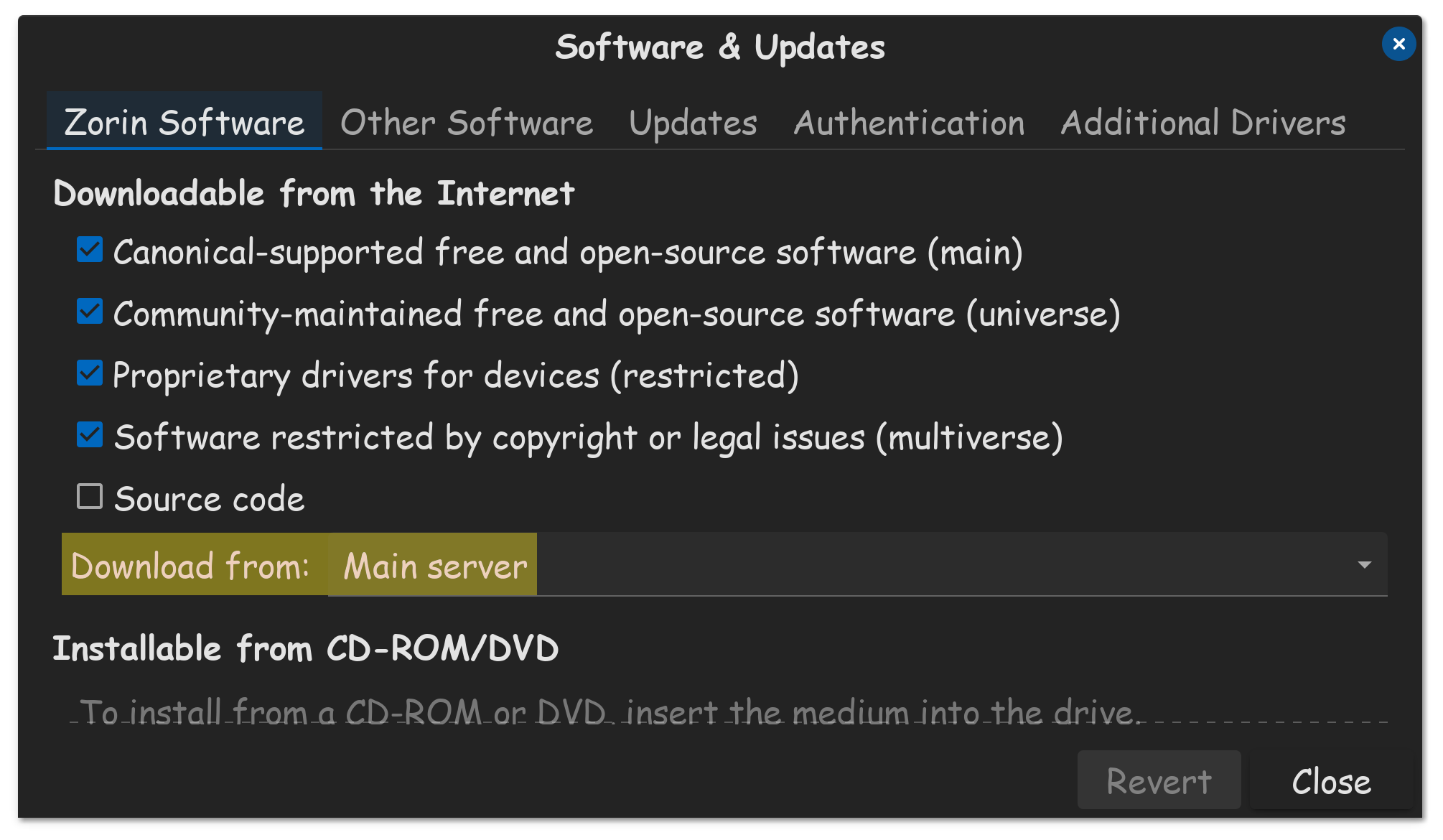

Thanks, @StarTreker . As they say: "A picture is worth a thousand words.", and that is so true. I've been advised many times to always use the main server, but had no idea where to find, or how to change it. I remember also being told to "launch Nautilus", so I searched my laptop, I searched in Google too but I couldn't find out what Nautilus was, let alone how to launch it! In the end, @Ponce-De-Leon saved me by posting screenshots.
I'm eternally grateful to all the thoughtful and patient contributors in this community. Many, long-term, Linux users forget that us noobies just don't have the vocabulary sometimes, and give perfectly accurate instructions, which leave us nonplussed, confused and feeling stupid. It can be a steep learning curve.
2 Likes
We all started at one Point. So, that is no Problem. And to be fair: When Gnome would name their Programs with the actual Program Names, it would avoid Confusion.
2 Likes
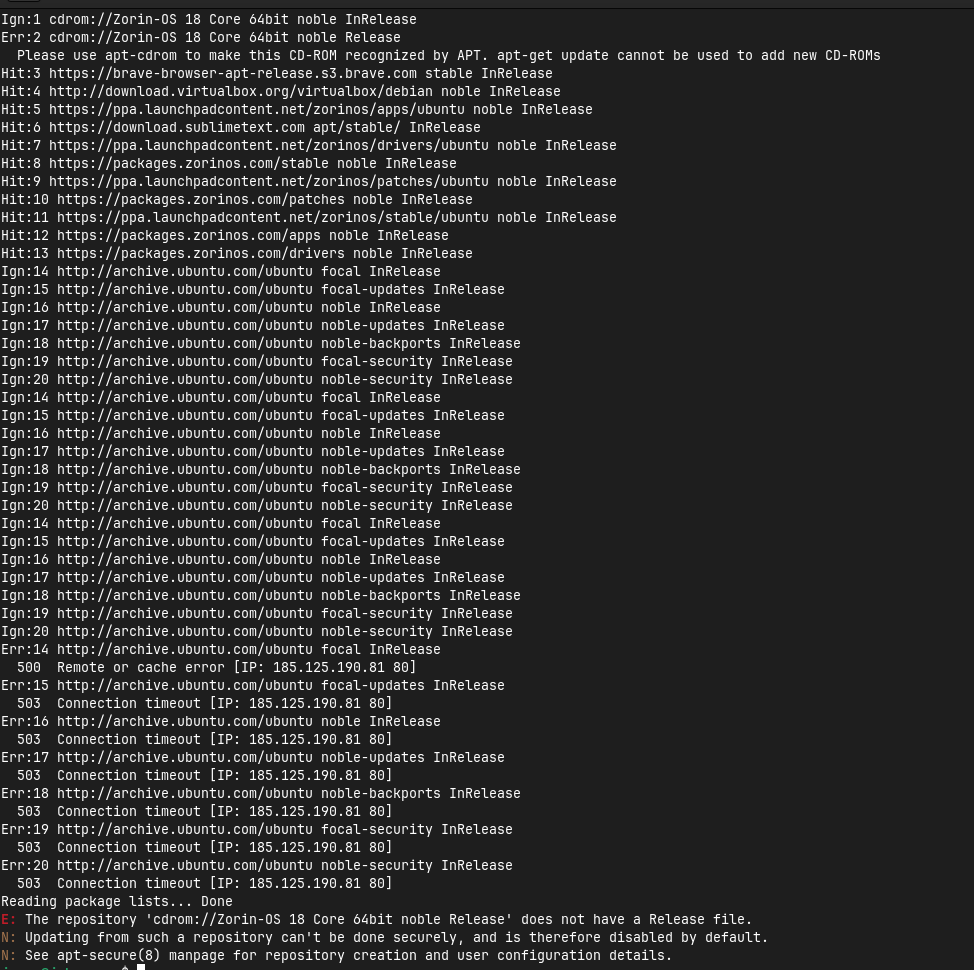
Are you on Zorin 18 now or still on Zorin 16?
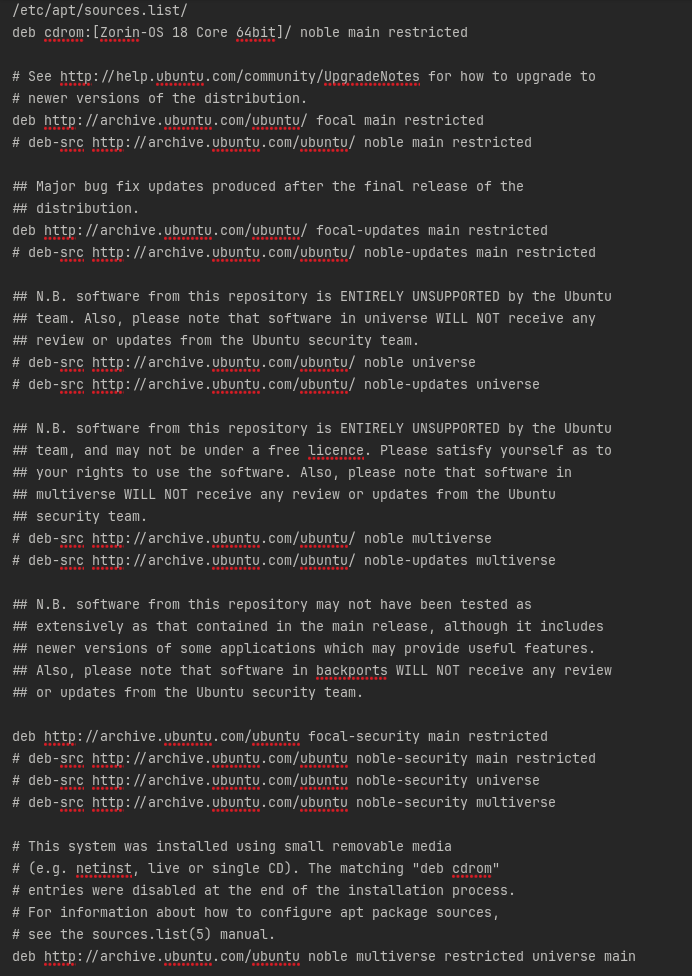
If you are on Zorin 18 please remove all 'ubuntu focal' repositories and the cdrom repository.
Do you have upgraded directly from Zorin 16 to 18? As far as I know you should upgrade first to Zorin 17. Your software sources look very messy. For Zorin 18 you only need 'ubuntu noble' repositories.
Please tell us more about what system you are running and what you have tried to do.
That doesn't look good.
Let's see ... First, go to the ''Other software'' Tab in Software & Updates and unmark there the cdrom Source. This should be disable by default but it seems it is active in Your Case. You have to unmark it.
Anotehr big Point: You have focal Repo's and noble Repo's. When I see it right, You are on Zorin 18. So, the focal sources must go. Did You upgrade to Zorin 18?
Please take a look at /etc/apt/sources.list (this is a File) and post the content here. And take a Look at /etc/apt/sources.list.d (this is a Folder) and look what Files are in this and post it here please.
Did you upgrade to Zorin 18?
Ans: Direct the bootable to install.
/etc/apt/sources.list.d:
brave-browser-release.list zorinos-ubuntu-apps-noble.sources
brave-browser-release.list.save zorinos-ubuntu-apps-noble.sources.save
sublime-text.sources zorinos-ubuntu-drivers-noble.sources
sublime-text.sources.save zorinos-ubuntu-drivers-noble.sources.save
virtualbox.list zorinos-ubuntu-patches-noble.sources
virtualbox.list.save zorinos-ubuntu-patches-noble.sources.save
zorin.list zorinos-ubuntu-stable-noble.sources
zorin.list.save zorinos-ubuntu-stable-noble.sources.save
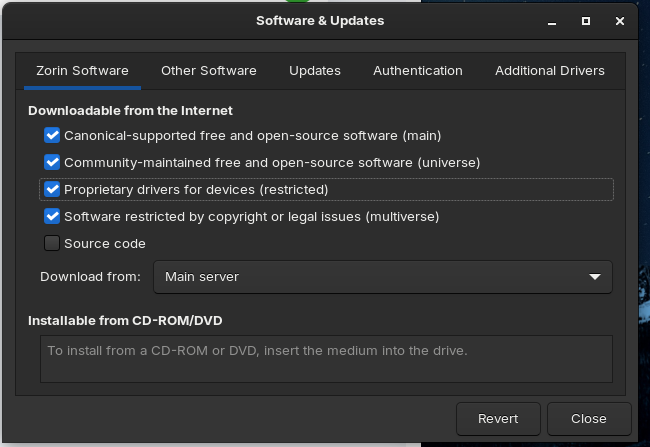
In this screenshot above, it shows you have the restricted and the community Universe repository enabled.
But in this screenshot below, it shows them as disabled.
If installed directly from Zorin OS 18 LiveUSB, .iso burned to bootable, there are no references at all to Focal sources in the .iso. They do not exist.
Can you please clarify if you had Zorin OS 16 installed prior to installing Zorin OS 18?
1 Like
@mosiur100 Please stay in your own thread - you already have asked this question and you'll get answers.
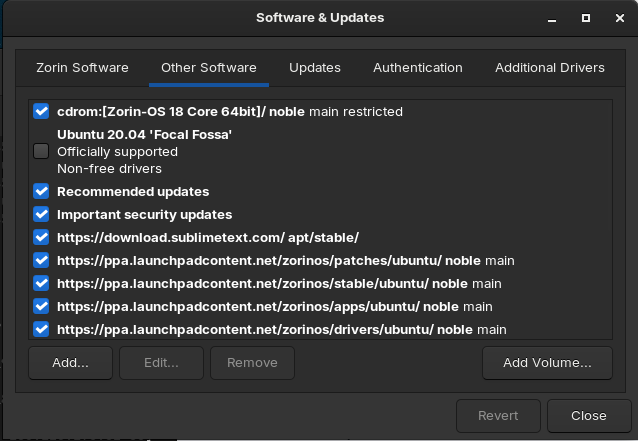
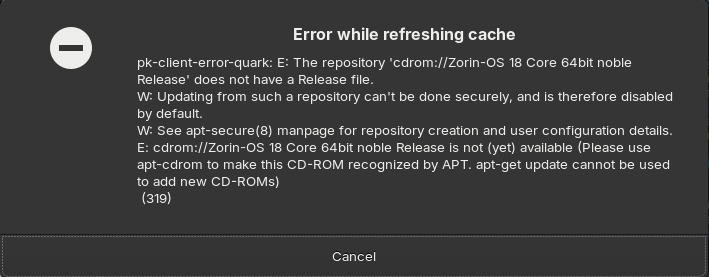
This error only appears when the CDROM is enabled.
So, you installed Zorin 18 from the USB Stick, yes? And You didn't had Zorin 16 installed, yes? When you have it installed directly from the USB Stick, I don't understand why You have focal Sources there to be honest.
That is simply not right. It should look like this:
# deb cdrom:[Zorin-OS 18 Pro 64bit]/ noble main restricted

# See http://help.ubuntu.com/community/UpgradeNotes for how to upgrade to
# newer versions of the distribution.
deb http://archive.ubuntu.com/ubuntu noble main restricted
# deb-src http://archive.ubuntu.com/ubuntu/ noble main restricted

## Major bug fix updates produced after the final release of the
## distribution.
deb http://archive.ubuntu.com/ubuntu/ noble-updates main restricted
# deb-src http://archive.ubuntu.com/ubuntu/ noble-updates main restricted

## N.B. software from this repository is ENTIRELY UNSUPPORTED by the Ubuntu
## team. Also, please note that software in universe WILL NOT receive any
## review or updates from the Ubuntu security team.
deb http://archive.ubuntu.com/ubuntu noble universe
# deb-src http://archive.ubuntu.com/ubuntu/ noble universe
deb http://archive.ubuntu.com/ubuntu/ noble-updates universe
# deb-src http://archive.ubuntu.com/ubuntu/ noble-updates universe

## N.B. software from this repository is ENTIRELY UNSUPPORTED by the Ubuntu
## team, and may not be under a free licence. Please satisfy yourself as to
## your rights to use the software. Also, please note that software in
## multiverse WILL NOT receive any review or updates from the Ubuntu
## security team.
deb http://archive.ubuntu.com/ubuntu noble multiverse
# deb-src http://archive.ubuntu.com/ubuntu/ noble multiverse
deb http://archive.ubuntu.com/ubuntu/ noble-updates multiverse
# deb-src http://archive.ubuntu.com/ubuntu/ noble-updates multiverse

## N.B. software from this repository may not have been tested as
## extensively as that contained in the main release, although it includes
## newer versions of some applications which may provide useful features.
## Also, please note that software in backports WILL NOT receive any review
## or updates from the Ubuntu security team.
deb http://archive.ubuntu.com/ubuntu/ noble-backports main multiverse universe restricted
# deb-src http://archive.ubuntu.com/ubuntu/ noble-backports main restricted universe multiverse

deb http://security.ubuntu.com/ubuntu noble-security main restricted
# deb-src http://security.ubuntu.com/ubuntu noble-security main restricted
deb http://security.ubuntu.com/ubuntu noble-security universe
# deb-src http://security.ubuntu.com/ubuntu noble-security universe
deb http://security.ubuntu.com/ubuntu noble-security multiverse
# deb-src http://security.ubuntu.com/ubuntu noble-security multiverse

# This system was installed using small removable media
# (e.g. netinst, live or single CD). The matching "deb cdrom"
# entries were disabled at the end of the installation process.
# For information about how to configure apt package sources,
# see the sources.list(5) manual.
You could copy mine and use that and then make a sudo apt update && sudo apt upgrade to refresh the Sources and make it affect.
1 Like
Many thanks for helping. The solution you provided worked. After giving the upgrade command, the upgrade was done;
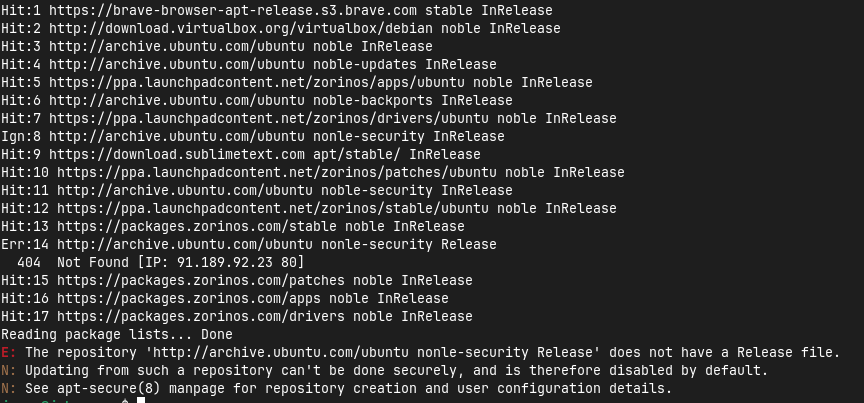
no error came. But when I gave the update command, this 1 error came. How do I fix this?
You have made a typo. Replace 'nonle' with 'noble' in the ubuntu noble-security source
1 Like
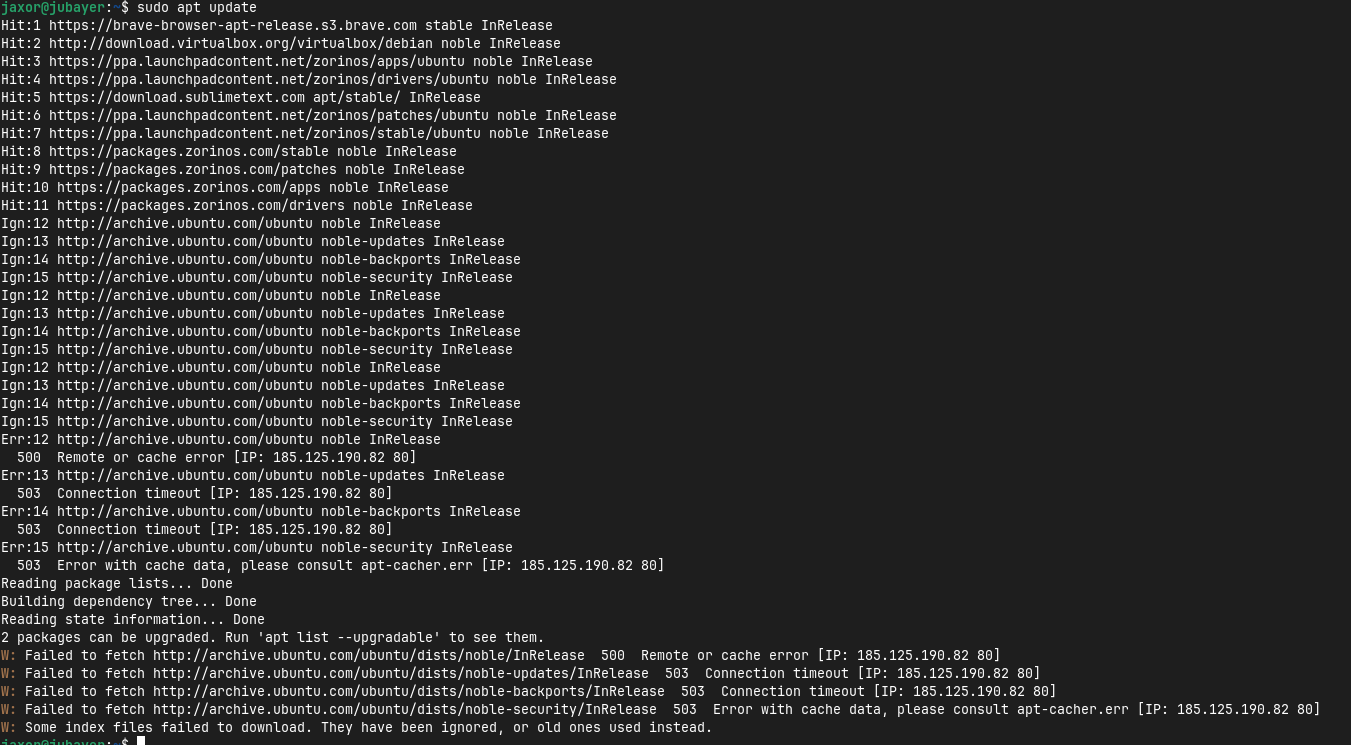
It looks like that it doesn't get a Connection with the Servers.
1 Like