Wacom stylus no longer works after Zorin 18 upgrade

When I ran the 'sudo apt purge linux-headers-6.14.11-061411-generic linux-image-unsigned-6.14.11-061411-generic linux-modules-6.14.11-061411-generic' command, it reminded me that I was still in the kernel that I was asking it to remove, then do I want to continue? So I opted for 'no' so that I could restart in 6.8... but it carried on with the process regardless...

So I restarted into the gimp menu and 6.14.11 was still in the list. I booted up in 6.8.

Ran the command again, and now I get this:

sudo apt purge linux-headers-6.14.11-061411-generic linux-image-unsigned-6.14.11-061411-generic linux-modules-6.14.11-061411-generic
Reading package lists... Done
Building dependency tree... Done
Reading state information... Done
E: Unable to locate package linux-headers-6.14.11-061411-generic
E: Couldn't find any package by glob 'linux-headers-6.14.11-061411-generic'
E: Unable to locate package linux-image-unsigned-6.14.11-061411-generic
E: Couldn't find any package by glob 'linux-image-unsigned-6.14.11-061411-generic'
E: Unable to locate package linux-modules-6.14.11-061411-generic
E: Couldn't find any package by glob 'linux-modules-6.14.11-061411-generic'

:disappointed_face:

Which kernels are shown as installed (the installed ones have a ii at the beginning)?

dpkg --list | grep linux-image

dpkg --list | grep linux-image
ii linux-image-6.14.0-37-generic 6.14.0-37.37~24.04.1 amd64 Signed kernel image generic
rc linux-image-6.17.0-14-generic 6.17.0-14.14~24.04.1 amd64 Signed kernel image generic
rc linux-image-6.8.0-100-generic 6.8.0-100.100 amd64 Signed kernel image generic
ii linux-image-6.8.0-101-generic 6.8.0-101.101 amd64 Signed kernel image generic
rc linux-image-6.8.0-57-generic 6.8.0-57.59~22.04.1 amd64 Signed kernel image generic
rc linux-image-6.8.0-60-generic 6.8.0-60.63~22.04.1 amd64 Signed kernel image generic
rc linux-image-6.8.0-65-generic 6.8.0-65.68~22.04.1 amd64 Signed kernel image generic
rc linux-image-6.8.0-79-generic 6.8.0-79.79~22.04.1 amd64 Signed kernel image generic
rc linux-image-6.8.0-84-generic 6.8.0-84.84~22.04.1 amd64 Signed kernel image generic
rc linux-image-6.8.0-85-generic 6.8.0-85.85~22.04.1 amd64 Signed kernel image generic
rc linux-image-6.8.0-86-generic 6.8.0-86.87~22.04.1 amd64 Signed kernel image generic
rc linux-image-6.8.0-87-generic 6.8.0-87.88~22.04.1 amd64 Signed kernel image generic
rc linux-image-6.8.0-90-generic 6.8.0-90.91~22.04.1 amd64 Signed kernel image generic
rc linux-image-6.8.0-94-generic 6.8.0-94.96~22.04.1 amd64 Signed kernel image generic
ii linux-image-generic-hwe-22.04 6.8.0-101.101~22.04.1 amd64 Generic Linux kernel image

Looks like 6.14.0-37-generic is still installed

Yes, I would remove it

sudo apt purge linux-image-6.14.0-37-generic linux-headers-6.14.0-37-generic linux-modules-6.14.0-37-generic linux-modules-extra-6.14.0-37-generic

dpkg --list | grep linux-image
rc linux-image-6.17.0-14-generic 6.17.0-14.14~24.04.1 amd64 Signed kernel image generic
rc linux-image-6.8.0-100-generic 6.8.0-100.100 amd64 Signed kernel image generic
ii linux-image-6.8.0-101-generic 6.8.0-101.101 amd64 Signed kernel image generic
rc linux-image-6.8.0-57-generic 6.8.0-57.59~22.04.1 amd64 Signed kernel image generic
rc linux-image-6.8.0-60-generic 6.8.0-60.63~22.04.1 amd64 Signed kernel image generic
rc linux-image-6.8.0-65-generic 6.8.0-65.68~22.04.1 amd64 Signed kernel image generic
rc linux-image-6.8.0-79-generic 6.8.0-79.79~22.04.1 amd64 Signed kernel image generic
rc linux-image-6.8.0-84-generic 6.8.0-84.84~22.04.1 amd64 Signed kernel image generic
rc linux-image-6.8.0-85-generic 6.8.0-85.85~22.04.1 amd64 Signed kernel image generic
rc linux-image-6.8.0-86-generic 6.8.0-86.87~22.04.1 amd64 Signed kernel image generic
rc linux-image-6.8.0-87-generic 6.8.0-87.88~22.04.1 amd64 Signed kernel image generic
rc linux-image-6.8.0-90-generic 6.8.0-90.91~22.04.1 amd64 Signed kernel image generic
rc linux-image-6.8.0-94-generic 6.8.0-94.96~22.04.1 amd64 Signed kernel image generic
ii linux-image-generic-hwe-22.04 6.8.0-101.101~22.04.1 amd64 Generic Linux kernel image

That's gone now...

Okay, try again to install the drivers.

1 Like

It appears the driver is still installed from an earlier instruction:

sudo apt install nvidia-driver-470 nvidia-dkms-470
Reading package lists... Done
Building dependency tree... Done
Reading state information... Done
nvidia-driver-470 is already the newest version (470.256.02-0ubuntu0.24.04.1).
nvidia-dkms-470 is already the newest version (470.256.02-0ubuntu0.24.04.1).
The following package was automatically installed and is no longer required:
linux-hwe-6.14-headers-6.14.0-37
Use 'sudo apt autoremove' to remove it.
0 to upgrade, 0 to newly install, 0 to remove and 16 not to upgrade.

Should I just restart the computer?

I would run

sudo apt autoremove

be careful before you confirm with yes and look what will be removed, and then reboot.

It is only going to remove 'linux-hwe-6.14-headers-6.14.0-37'

So this looks promising :crossed_fingers:

1 Like

After the reboot check with

nvidia-smi

if the nvidia-drivers are used.

Or you can run

sudo lshw -C video

This is what I got (after a restart):

nvidia-smi
NVIDIA-SMI has failed because it couldn't communicate with the NVIDIA driver. Make sure that the latest NVIDIA driver is installed and running.

stephen@stephen-System-Product-Name:~/Desktop$ sudo lshw -C video
[sudo] password for stephen:
*-display
description: VGA compatible controller
product: GK110 [GeForce GTX 780]
vendor: NVIDIA Corporation
physical id: 0
bus info: pci@0000:01:00.0
logical name: /dev/fb0
version: a1
width: 64 bits
clock: 33MHz
capabilities: pm msi pciexpress vga_controller bus_master cap_list fb
configuration: depth=32 latency=0 resolution=1920,1080
resources: memory:fa000000-faffffff memory:d0000000-d7ffffff memory:d8000000-d9ffffff ioport:e000(size=128) memory:c0000-dffff
*-display UNCLAIMED
description: VGA compatible controller
product: GK110 [GeForce GTX 780]
vendor: NVIDIA Corporation
physical id: 0
bus info: pci@0000:02:00.0
version: a1
width: 64 bits
clock: 33MHz
capabilities: pm msi pciexpress vga_controller cap_list
configuration: latency=0
resources: memory:f8000000-f8ffffff memory:c0000000-c7ffffff memory:c8000000-c9ffffff ioport:d000(size=128) memory:f9000000-f907ffff

It's worth noting that my 2nd monitor stopped working again the other day when following the previous instructions.

Repeat the steps which Ponce-De-Leon has given to you above to remove the 470 driver and install the driver again.

1 Like

I think it could be fixed... both monitors are working, but I'll need to spend some time going through my software to be sure they work properly again :crossed_fingers:

1 Like

And your stylus?

Yes, everything seems to be back to normal!

I had around 12 software updates after a reboot, which fixed things like Steam (this had also broken).

So I'm making a tentative massive thank you to all who have helped here. Your patience and assistance has been awesome and I'm very happy to have Zorin back again.

At the earliest opportunity, I intend to buy the pro version with a new computer - but first I need to get my business off the ground!

Thank you:
@Ponce-De-Leon @Forpli @Aravisian @zabadabadoo
:clap:

3 Likes

Glad to hear!

1 Like

So I'm back again :face_with_peeking_eye:

Picking up from where I left off, everything seemed to be going really well - no more glitches, Wacom pen worked great, no more software crashes, etc.

Then this morning I switched on my machine and after it taking an age to boot up, I got a blank grey screen with a message telling me it couldn't log in and that I needed to restart, so I did. After which it installed a couple updates, but what I have now is not a fully functional computer.

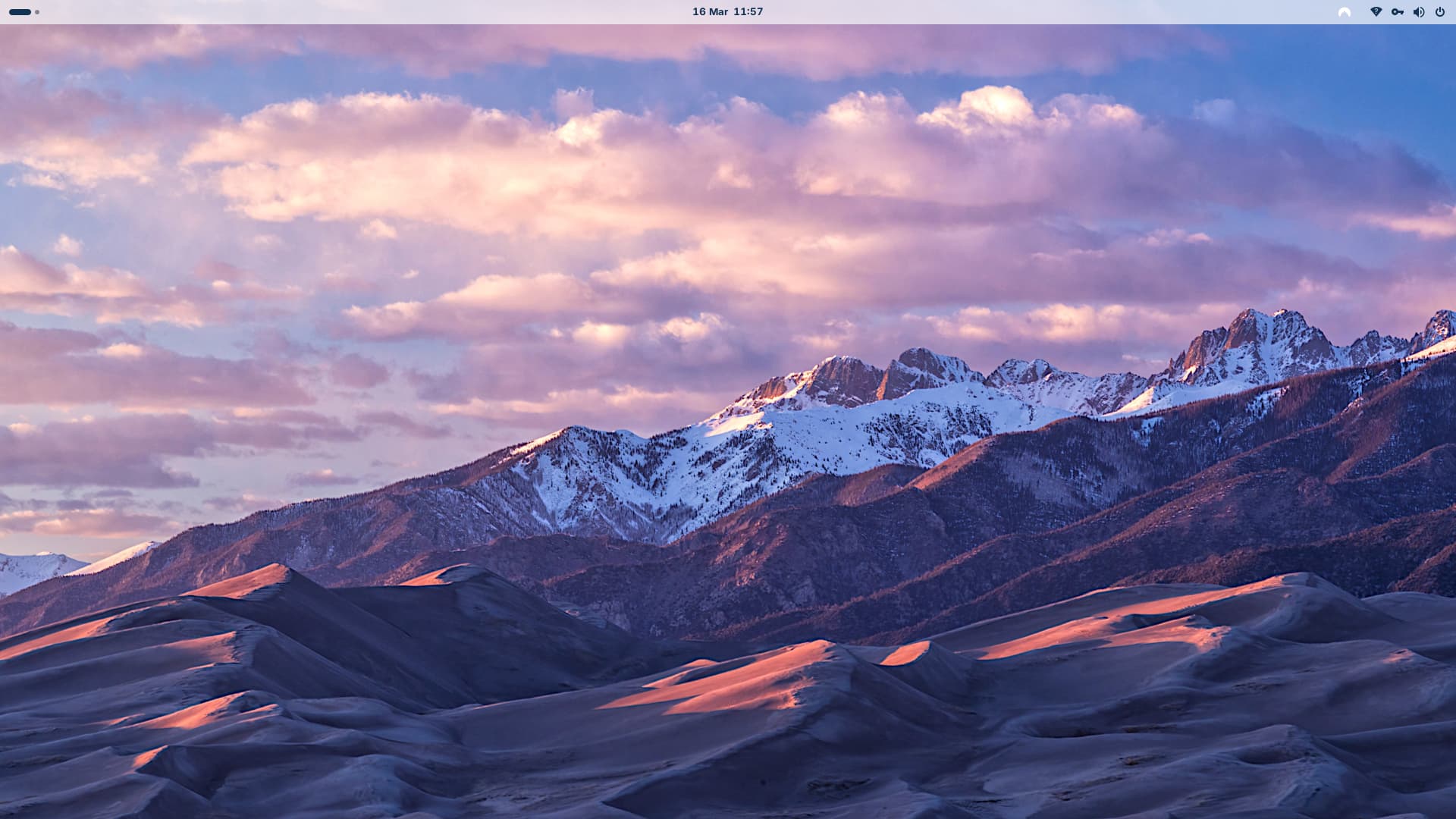
All I get is a bare minimum interface without a toolbar/menu, and my files/folders are hidden:

It's also very slow performance and the right-click options are reduced to a few basics without Terminal.

Any ideas? :face_exhaling:

Press super key to show the Zorin menu or app grid, then go to Zorin Appearance and switch between the layouts. I hope you get the normal desktop layout back then.

1 Like

That did it! Do you have any ideas why this has happened, or if it's a usual thing to expect every once in a while? I wonder if it was to do with the update that came down after the first restart when it wouldn't log in?

No, that shouldn't happen so simply. It seems that the Gnome Extensions were disabled - for whatever Reason. Maybe it was reseted. But at least they were still installed on the System and not deleted.

1 Like