Hello every one. I've got a job interview via Zoom tomorrow morning, so I searched in the app store, found and installed it. I created a profile and took a look around. Then I received a message telling me the interview is at 11 PM, so 11 hours from now I wanted to try out the camera and microphone, so I logged in online and set up a test meeting. When I try to create a test meeting, Zoom won't open on the desktop. I quit Brave and tried to run the app directly, but the wheel spins, then nothing happens. I've right-clicked to open it in a window but that doesn't work either. Any ideas anyone?
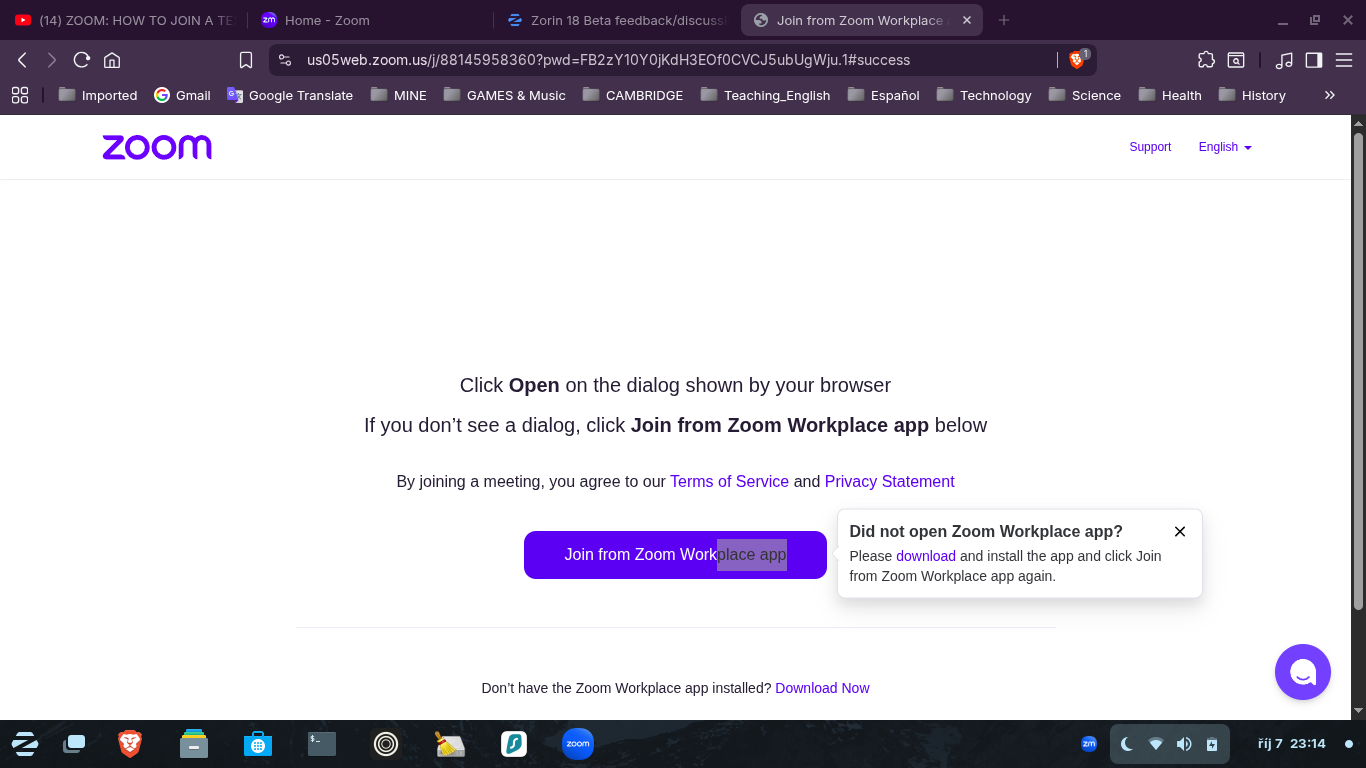
You can see the icon on the tool bar, but all I'm getting is " Did not open Zoom Workplace app?
Please download and install the app and click Join from Zoom Workplace app again."
I'm so disappointed: I just downloaded Zoom on Windows 10, changed my webcam and microphone settings and it just WORKED.
How can I make the switch to Linux if these things just don't work? I'm going to have to stick with Windows for another year, and how can I recommend it, Zorin, to anyone else who just needs things like this to work in order to make a living, to pay the bills? If I had made the switch, if I didn't have my Windows laptop to fall back on, what would I do now?
I also needed Zoom for school and work. I installed the Direct Zoom Installer supplied by Zoom.
The one in software store is a containerized package and Gnome and Ubuntu default to it, instead of the one that can actually communicate with the system and work.
You are 100% right to be frustrated that their political jostling for dominance is a pointless headache.
Lucky for you; you are not a procrastinator.
Now you have an idea as to how to proceed on Zorin OS. Sorry to be so blunt - Like you, I am well past diplomacy with this stuff.
Honestly I know it's frustrating but it's refreshing to hear someone actually test something BEFORE the time comes to actually use it. So many times in IT do we get absolutely no beforehand testing by users, they just expect it to work without testing.
So not really any advice for you, other than thank you for being a slowly growing smaller amount of people that actually think ahead and test things.
Did you manage it? If you have zoom installed as flatpak, also install flatseal from the software store and set the permissions to grant zoom access to your system. I'm not sure what you should set there, if it is enough to grant access to all users/system files at "filesystem" or if there are also settings for camera and microphone are needed.
Or you choose the method Aravisian mentioned. Unfortunately, it has the disadvantage that there are no automatic updates for the program. But .deb packages are not sandboxed, cause less problems and need no special permissions to work correctly.
First remove the installed zoom version.
Install gdebi (you don't need it, but it is better to install .deb packages with gdebi because gdebi recognizes if dependencies are missing and also installs them).
Download the .deb file from the zoom website for Linux>Ubuntu
Go to your download folder and doubleclick on the downloaded .deb file to install it.
One thing that I see as someone who works on Zoom a lot is that there is the little icon in the lower right that I circled. Click that one instead of the main one, as sometimes if Zoom is already pulled up, it will not respond to you clicking the main Zoom button but instead the tiny one on the taskbar. Hope this helps! (Sorry for the weirdly formatted image, I was doing it on the fly).
Hi there, well I did get the job and I've been using Windows 10. I always make sure that I'm as prepared as possible when it comes to work; you're only as strong as the weakest link! I've been busy learning how to get the best out of OpenBoard, Zoom's features and the new course material (also had some work done on the house), so I've not had time to log in here, but as always, I really appreciate your advice and experiences, thank you everyone.
I had a little play around with Zoom again on Zorin, and while it did load eventually, it was so slow to respond and - this is weird - the image was really grainy and I could barely hear my voice when testing the microphone. Why is that weird, well because I had an interview using Google Meet on this laptop, with Zorin_OS 17.3 and everything was perfect! No grainy image and the microphone worked properly, so it's not a problem with my equipment.
I've dragged out my spare laptop and I'm going to install Zorin Core 18, do as @Aravisian and others suggested, and install Zoom directly from their website. If I find that it is still unusable, I might have to distro-hop and try Mint, or another distro that's not too difficult for noobs like me; any suggestions? I can't have excuses as my new boss is a Mac user, and even if I could afford a Mac, I wouldn't buy one because I just do not like Apple as a company, or their ecosystem. Linux has to be the way forward.
Personally I refuse to use Zoom period. When working from home I was expected to use Teams. I refused as it is pants. I refuse to participate in any Zoom meeting because on first launch they said it was E2E when it never was. My preference will always be Jitsi Meet every time. Moderators who set a meeting room up need a GitHub account, but once done, participants only need a Chrome extension based browser to participate, no need for any software to be installed and can sync with Google and Microsoft calendars. You need to apply encryption, there is a switch for it. Why is Jitsi not E2E by default? If the meeting was a training session you would not be able to record it. I successfully used Jitsi Meet to impart my knowledge on Inkscape to someone at the other end of the country, and also used it to help a forum member in Florida reinstall Windows 10 by giving directions in the chat screen. I could here her but she could not here me, suspect my webcam had gone on the blink.
I'm a new employee and no one else is having problems. We work with many different companies here, and also a large bank in Mexico. It's completely ridiculous to expect hundreds of people to switch from what they're already using just because the new employee has an issue with Linux, And a disciple is a follower... .... I'm already following my boss's instructions. He has given me a "professional license" for Zoom. He's invested in it. It's completely unrealistic to expect him to change.
Thanks for your reply, @bollycanuk , your suggestion was actually a fix for another issue I was having, so I'm already using Xorg, but when I do a fresh install of Zorin 18, and Zoom on my spare laptop, I'll be sure to switch to the X11 display manager, and report back.
When the boss went through how everything works, he told me to exit the browser and use the desk top, because I use a PDF in OpenBoard, a white board app. I have recurring meetings with the same people and I'm sharing the screen with them.
 If I had made the switch, if I didn't have my Windows laptop to fall back on, what would I do now?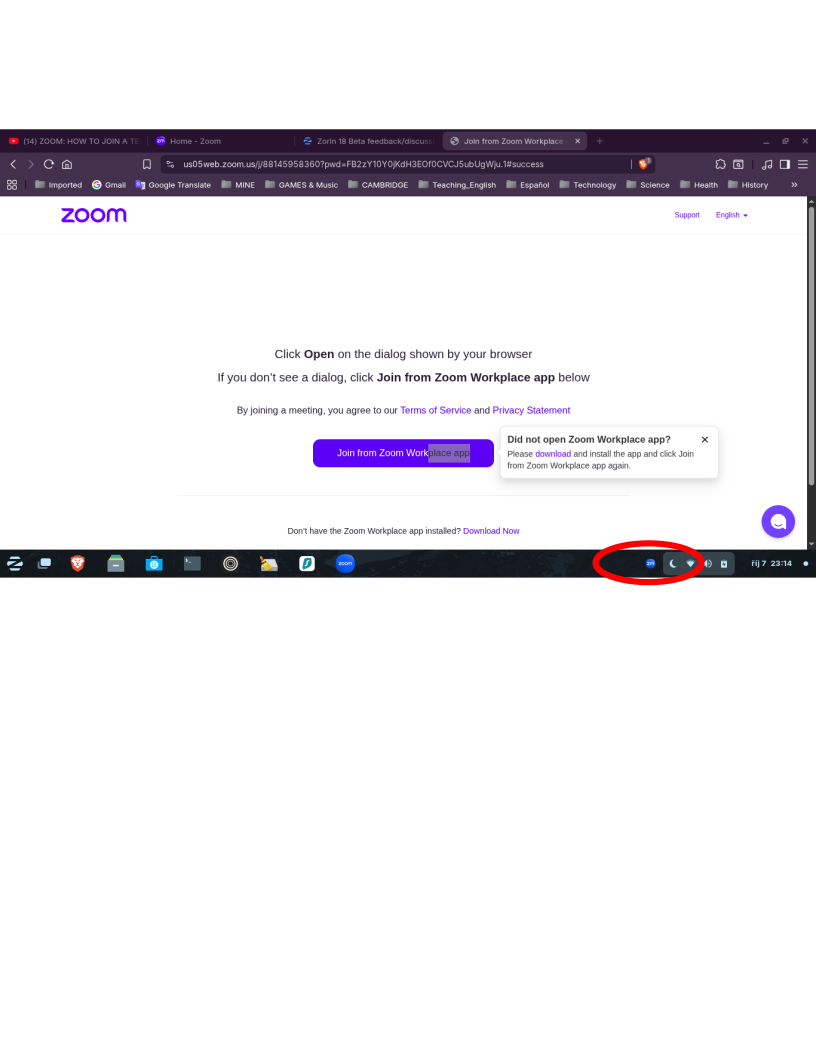
 I've been busy learning how to get the best out of OpenBoard, Zoom's features and the new course material (also had some work done on the house), so I've not had time to log in here, but as always, I really appreciate your advice and experiences, thank you everyone.