Hi all,
we are checking out Zorin as an alternativ to Windows in some computer labs of our school. We use Microsoft Entra authentication so I added support for that following the instructions at GitHub - ubuntu/aad-auth: Azure AD authentication module for Ubuntu
Authentication works fine but for some (not all) users there do not show any apps in the launcher menu or on the taskbar after log-in.
I am using the Education-Version of Zorin 18.
Does anyone have an idea how to fix this?
Welcome to the Forum!
On the Github Page stands:
Azure AD User Authentication is only included in Ubuntu 23.04 and 23.10.
Zorin 18 is based on Ubuntu 24.04.
2 Likes
Thank you for pointing that out. This could be the reason.
As I stated, authentication works fine, even though it is 24.04. Creating the home directory also works fine but for some users there are just no apps in the launcher menu. I wonder if using a different launcher might help? I just don't know, ho to do that. Any hint is most welcome.
Do all Users have the same Machine or they different? Maybe switching to X11/Xorg on zorin could help. To do that, go to the Login Screen, not the Lock Screen. On the Login Screen, click on the Profile so that thee Password Field appears. When it is appeared, you should see in the bottom right Corner a Gear Icon. Click on it and choose the Option ''Zorin Desktop on Xorg'' and then log in.
1 Like
Unfortunately that did not do the trick. The users are all on the same machine. It looks like this to certain users:
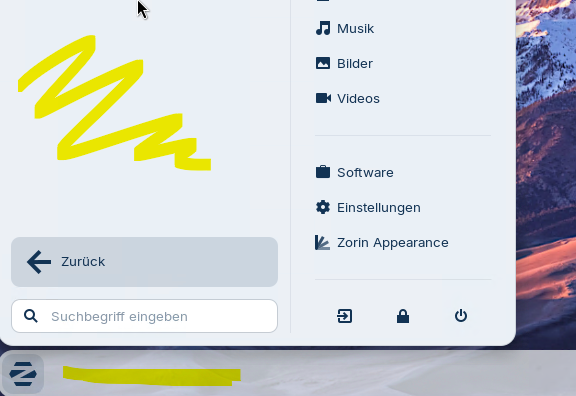
To others it looks just fine. A reboot does not change a thing. Either it works right away or it does not.
Thank you for your help. I know, you guys have more important things to do than helping with problems that only matter for just a few people.
I will mark your first answer as solution and keep waiting for an AAD-solution for 24.04 onwards.
Keep up the great work!!!
When You have a Problem, You have a Problem. And the Forum exists to help if we can. Your Problem doesn't have a lower Worth than any other.
So, when User A logs in it is fine and when User B logs in, it looks like on Your Picture? Do the Users have different Access-Levels?
Are the students divided into different groups that do not have the same access rights/permissions?
Exactly. They are all simple users in the Azure AD. No different groups in AAD. No special group in zorin:
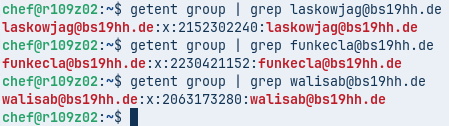
No. Same groups in AAD and no special group in zorin. They all authenticate against AAD and are given access to zorin, if authentication is successful. Then a home directory is created and that's it, as far as I can tell. Not differences really.
To make it more confusing: I setup a VM with the zorin 18 core beta. I logged in with the same 3 users. No problems here.
1 Like
Simplistically, you found a functional difference between Z18Core Beta and Z18 Core.
What if you do a full installation of Z18CoreBeta on a machine (do not update OS) with users and test.
If that is OK then need to trace what changed between versions to isolate and fix the culprit.
1 Like
Beneath @zabadabadoo's Suggestion, I would suggest to try instead of the Education Version the final core Version. And when You need specific Software from Education, You could install it manually later. First test if the normal Core Version works.
I will do that and get back to you.
Already did. Same behaviour 
Just done an A.I. search:
" Ubuntu 24.04 LTS supports Azure AD authentication through the newly released Authd authentication daemon, which enables direct integration with cloud-based identity providers, including Microsoft Entra ID (formerly Azure Active Directory). Authd is available free of charge on Ubuntu 24.04 LTS and is designed to address previous limitations by providing a modular solution based on the OAuth Device Authorization Grant (RFC 8628), allowing for consistent authentication experiences across both Ubuntu Desktop (via GDM) and Server (via CLI). This solution supports stronger authentication mechanisms and is extensible to additional identity providers beyond Azure AD.
While earlier versions like Ubuntu 23.04 introduced Azure AD authentication via the AAD Auth package, this was limited to desktop environments and not compatible with Ubuntu Server. The Authd daemon overcomes these constraints, offering a unified and scalable approach for enterprise environments. For users encountering issues with Global Admin accounts, the SSSD service used for authentication may fail due to elevated permissions; this can be mitigated by configuring the /etc/sssd/sssd.conf file to ignore such group members.
Additionally, Ubuntu 24.04 supports Azure AD authentication for physical devices through the Authd daemon, although device registration for Entra ID is primarily supported via Intune agent for cloud resources, with login to on-prem servers possible using Azure Arc-enabled servers. The Authd feature is available for all Ubuntu 24.04 users, and detailed installation, configuration, and deployment guidance can be found in the project’s official Wiki.
AI-generated answer. Please verify critical facts.
askubuntu.com
Ubuntu Desktop 24.04 LTS Active directory Authentication - Ask Ubuntu
ubuntu.com
Announcing Authd: OIDC authentication for Ubuntu Desktop and Server | Ubuntu
learn.microsoft.com
integration Ubuntu 24.04 with Azure AD - Microsoft Q&A
thurrott.com
Ubuntu Desktop 23.04 Arrives with Azure AD Authentication - Thurrott.com
canonical.com
New Active Directory integration features in Ubuntu 22.04 – FAQ | Canonical
askubuntu.com
Is Azure AD integration is compatible with Ubuntu 23.04 CLI version - Ask Ubuntu
learn.microsoft.com
Azure AD authentication for Ubuntu user login to physical device - Microsoft Q&A
[
Trying to authenticate a us
](Trying to authenticate a user to Azure AD (EntraID) from Ubuntu 22.04 - Microsoft Q&A"
Dear swarfendor437! Thank you for your post and the research. I have already looked into that before myself. It is a great approach allowing multiple openID providers for authentication like Microsoft Entra and Google and even MFA.
Unfortunately it is more a solution for a single-user/single-device situation since the first time you authenticate to a device you get a QR-Code and another code and you have to authenticate using a different device (e.g. mobile phone, different computer) and a local account with a self chosen password us being created. In a school-context with a multi-user/multi-device situation where students use different computers in different rooms this is not a possible solution. That's why I am sticking with the older approach where the authentication for the students is more straight forward.
1 Like
I found the packages causing the problems.
I setup a zorin 18 core beta machine and isolated the 4 updates causing the strange behaviour (sorry, German language pack):

If one of these updates is installed some of the users do not get the icons.
Here are more details about the packages:
-> gir1.2-malcontent-0 (update from nothing to version 0.11.1-1ubuntu1.2)
-> malcontent (update from nothing to version 0.11.1-1ubuntu1.2)
-> malcontent-gui (update from nothing to version 0.11.1-1ubuntu1.2)
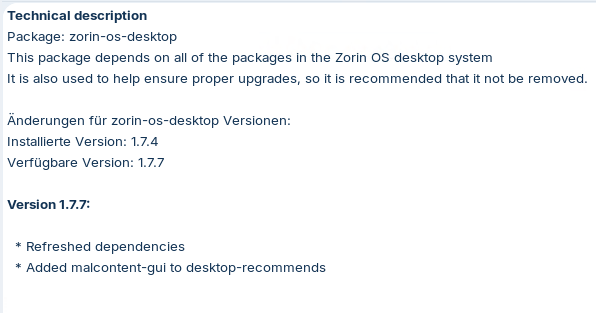
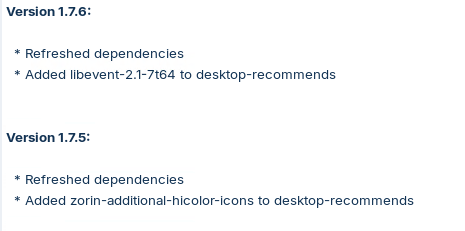
-> zorin-os-desktop (update from 1.7.4 to 1.7.7)
I also did a fresh install of the zorin 18 core and removed those packages. After that everythings works fine for all users. Are there any problems I might run into after having removed these packages?
I don't know if this is just a problem with the AAD-login I am trying to use or if it might be a problem AD- or local accounts as well.
Is there anything I can help you with if you want to further investigate this issue?
I am not really clear as to whether you removed the desktop environment, or just the latest update to it.
But you did narrow down the cause of the issue. MalContent is the Parental Controls software. It looks like MalContent was getting an empty list from accountservice and passing that on to Gnome Shell.
In order to keep the App filtering and parental controls software and prevent future updates from reasserting this issue, you may need to setup to ensure that accountservice can see the aad users.
This is not quite a bug - more of an interoperation action between two different PAM+SSD accounts but I am tagging the ZorinGroup in any case: @AZorin and @zorink due to the integration of the Gnome-SHell, Gnome Parental Controls in Zorin OS.
That seems to be Parental Control which shouldn't be a big Problem to not have it. But the last Package ''The Zorin OS desktop system'' could be a Problem depending wht it includes.
It could be related to the Parental Control Stuff for Implementation in the Desktop; then it shouldn't be a bigger Problem. Could You click on it and show the Details in the bottom Half?