For me, I’m gonna be downloading Zorin 18 Core and evaluate that in-depth before deciding if I should pay for Pro. We will see.
1 Like
My apologise for starting a thread on Zorin 18. I honestly didn't spot this one. Would people like me to close the other one and integrate it here?
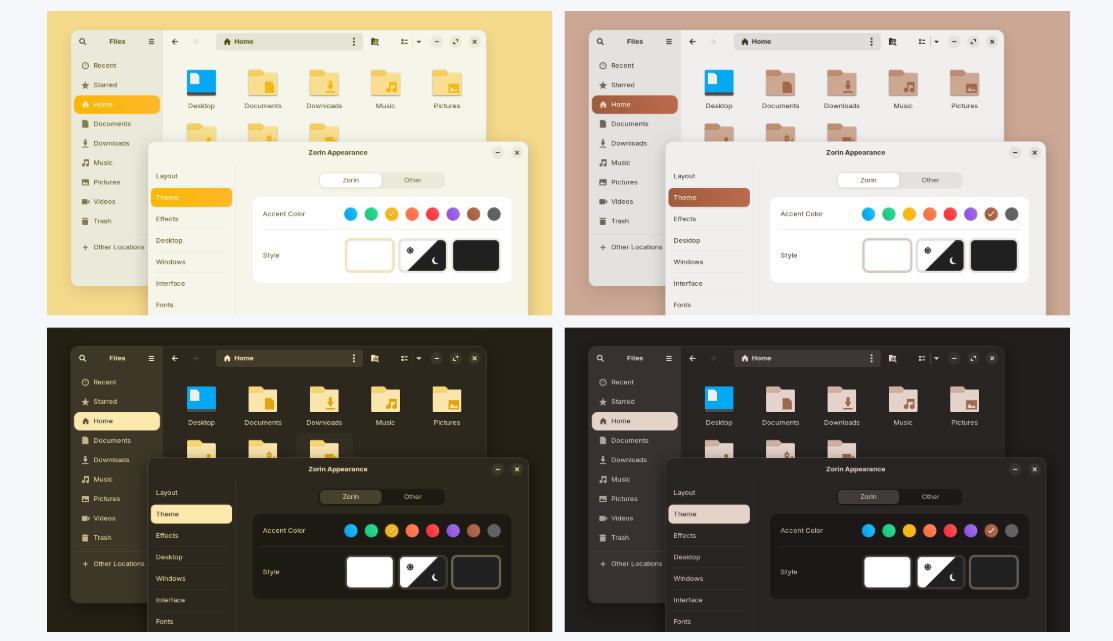
I love Zorin OS very much. It was perfect to come from Windows 7. There is one thing, though, that has always bugged me, and is the reason why I use the blue theme rather than the others, and that is the fact that the icon for Desktop remains blue regardless of which colour theme you use. I had hoped that in Zorin OS 18 that this would have been addressed, but as we can see from the screenshot from the sneak peek, this is not the case. I just don't quite understand why the Desktop icon has to remain blue. I have changed, recently changed to an icon pack (Papirus), and that has the Desktop icon matching any of its colour options. I am probably nitpicking here.

2 Likes
I can totally agree, I don't like the blue desktop-icon at all!
1 Like
The closest colour match in the Papirus icon pack to the blue theme on Zorin is Breeze.

1 Like
I fixed the error using another USB port on my PC.
Been using Zorin 18 beta as a daily driver for a minute now. By daily driver, I mean for work as well as private. Overall, I really like it. Been distrowatching for the past 15 years and have recently been on the KDE bandwagon (Arch).
I know it is a beta, but apart from a few things here and there, my biggest issue is what appears to be a performance degradation throughout the day.
Example;
We're a Microsoft shop. I use M365 through Edge Dev, which includes Teams, Outlook and all of that. It works fine, but a noticeable slowdown starts to creep in througout the day. Obviously, I can blame Edge/M365, but closing down Edge doesn't fix the issue. Rebooting does.
Using Brave actively, with 10+ tabs yields the same result (although, not as noticable).
I didn't have this issue on Arch or Fedora (KDE). I haven't experienced this on the latest Mint versions either.
Seems to me there's a mem-leak somewhere.
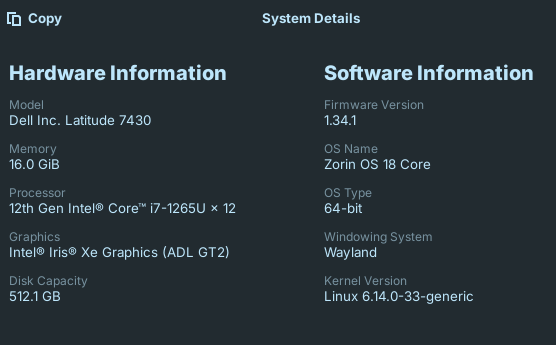
Not complaining, just observing.
1 Like
Did You tried switching to Xorg? I ask because on You Screenshot stands that it runs in Wayland.
I love the look of the floating taskbar! It's a small thing, but I find it refreshing - it just looks somehow more "friendly" than the traditional solid block of taskbar.
That said, this probably works better with auto-hide, and I'm not an auto-hide guy.
In the default non-auto-hide mode that comes with the Windows-like theme, there is a bit of a UX issue, unfortunately:
If the mouse is at the bottom of the screen, it doesn't pick up clicks on the taskbar.
This might not seem like a big deal, but from a UX perspective, there is nothing below the taskbar that I would need to interact with - and (especially on touch devices) a larger interaction area is just good design for a case like this.
The taskbar margins setting needs to similarly grow the hit box of all the taskbar buttons.
For now, I would simply turn off the margins, because I value UX over UI - but this really shouldn't need to be a trade-off.
Zorin 18 is otherwise perfect for me - as soon as I can test the final release, I will almost certainly buy a license to support the project. 

2 Likes
I have started work on the Unofficial Manual for Zorin 18 Core. I have checked this thread and cannot find any reference to it, and perhaps an update has sorted this out. Currently using a VM of the Beta to try and speed up production of the Unofficial Manual. In Zorin 17, selecting the cog in Quick Settings in the System Tray would launch the Display Settings. It doesn't, it launches the Language Settings which actually gets launched correctly from the Language Indicator. I'm currently using the Comic Relief release of the Unofficial Manual for Zorin 17 Core (Mk.IIII), but this of course will become Mk.1 of 18! I am also testing the Beta of SoftMaker Office NX and 2026 by constructing it in the TextMaker Beta. I have recognised a fundamental error in the section of 'Zorin in Live/Try Mode' section of the 17 version in that I have referenced other Software sources - I have marked this to be moved to a 'Post install' section (and on a side note, using Comments inserts to indicate the start and end of a section to be moved has thrown up issues in the Beta of Text Maker! Aaaarrrrrgggghhh!)
3 Likes
I'm sure you already know, there are many differences between Zorin OS 17 & 18. Since you are always so thorough, I'm certain your manual will be written as amazing, as they always are!
BTW, your previous post about LMD scanner tool, you better include a full instruction on how to use it SWARF, people are gonna need it. From what I can tell, the average user will never use something, that goes above their heads. So, you might want to include that, under the security section of the manual.
You always do great with your manuals however, the level of patience you have to write a book length on it, well, lets just say, I have 0 patience to do the amazing work that you do on them. Plus, those illustrations really help with the lamen too.
3 Likes
Here is a sneak preview of the front cover of the Comic Relief version:
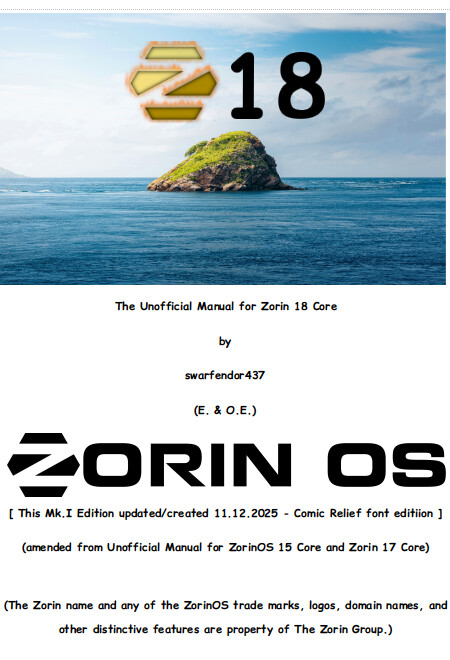
Remember Windows 10 when it was first released and its images of Thailand?
Well here is Zorin 18 equivalent to celebrate the end of 10! (Image from Zorin 18 Core Beta Backgrounds folder). 
6 Likes
Spotted error in Beta of TextMaker 2026 - even though no lines around text frame of the number 18 selected it still showed them so had to use Inkscape Text Tool to copy and paste text = no frame! I also spotted date error, now rectified to 11.10.2025.
I wanted to report again. I think I can't do it so well with btrfs because you have to pay attention to a lot, and because I love the simplicity of ext4, I think that's the best thing to do when it comes to stability, as I said.
3 Likes
Anyone else finding colour profiles not working on x11 ?
Is the driver correctly installed?
Let's have a look:
sudo apt install inxi
inxi -Ga
Just to check quickly when I login I have th options of zorin desktop or zorin desktop Wayland ... It doesn't ever say x11... But it does say x11 in about?
Is that right?
yeah, Zorin desktop is = xorg and Zorin Wayland is well wayland 
1 Like
it shows... nvivida 3060, amd, display x11 server, my montior, and open gl