This does become a developer niche case a bit.
I would perform the fresh install, as you say, even if it seems like more work.
It is less work than untangling and troubleshooting later, especially if it results in a wipe and reload anyway.
1 Like
Felt compelled to add my feedback. After seeing the release of Zorin 18 I was so excited to take it for a spin and hopefully use it as my main distro. It's beautiful, stable, and yet still customizable. My family is looking for a windows 10 replacement so I've been tasked with finding that...
However, the fractional scaling is a dealbreaker. I presume it's due to Zorin 18 being based on GNOME 46, but at the moment it simply does not work as well as Fedora 42 or even Linux Mint 22.2.
Everything else about Zorin has been perfect. But I simply can't use it when the apps are blurry, and the typical workarounds won't cut it when other distros offer working versions of fractional scaling.
Hopefully in the future this issue gets prioritized as it's becoming far more common to have QHD or 4K screen.
But until then I will be looking forward to a future Zorin release because I so badly want to use this as my daily driver.
Welcome to the Forum!
You could compare it with Debian 13 which uses Gnome 48 and see if it performs better. There You could have a better Experience with fractional Scaling.
After the automatic update (with the ad hoc daemon) of a software from the snap store, its shortcut on the desktop is... different.
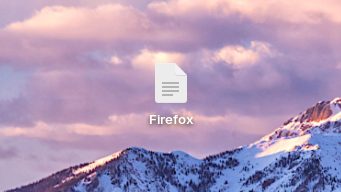
Does the shortcut still work and open firefox? If not, go to start menu, search for firefox, rightclick on it and select "Add to desktop". Maybe you'll also have to enable "Allow launching as program" (right-click on the desktop icon of firefox)
2 Likes
Only the image, everything else seems to be in order to me.
Ctrl + Alt + T to enter Terminal, run the following command bellow.
gtk-update-icon-cache
Once complete, restart PC.

2 Likes
Thank you... but, for me, it's not a problem.
However, for the people I install Zorin OS for instead of Windows 10, it might be strange.
1 Like
As already mentioned in this discussion: forum.zorin.com/t/firefox-snap-software-version-inconsistency/50994
I confirm the inconsistencies between the software of the GNOME app store and the snap package management.

A small clarification regarding my previous post.
The version numbers are the same, but it's the fact that you're offering to update a program that is already up to date that is problematic.
I cannot find another "feedback" thread for Z18 Core other than this Z18 Beta feedback thread.
I have inserted a link to this post, as the user has been forced to fallback from Z18 to Z17 following experience of odd NVIDIA 580 driver behaviour on Z18, but not on Z17.
I think this needs to be considered as feedback to devs.
Snap appears as installed in terminal. Programs are listed in terminal. However, programs won't open. Tried removing and reinstalling snap. Restarting system. No luck. Any suggestions for fixes? Thought snap was supposed to be integrated.
Welcome to the Forum!
Snap Support is installed by default, yes. Do You get any Error Messages when You install a Snap Package?
Hey folks, I got an update:
The updater was bothering me while watching a video. So, I was like, alright what you want now, to update my calculator, so I can do math? Thats when I discovered something new pop up, for which I have not seen in the updater, for years.
The Zorin upgrader got updated, and you know what that means? It means when I have free time this weekend, I'm going to be upgrading this baby to Zorin OS 18. When i get this computer going 88MPH............ 
2 Likes
The Zorin Upgrader tool got an update; does not mean that the direct upgrade path has been released for Zorin OS 18.
4 Likes
yeah maybe, I had two update of the upgrader in 10 days, but please let us get hope 
1 Like
The problem is still there... much less frequent, but not gone.
The really strange thing is that on the same computer, with another account that is very little used, the problem seems to be gone.
And on the computer having a display problem, everything is in order in that regard.
But in retrospect, that's now false (excuse me).
Is there somewhere, in a configuration file, an option to delete in order to completely stop this energy management (Power Mode)?
Or, what is the executable file concerned, so that its permissions can be modified to stop it from starting at boot?
Element that seems possible to realize according to tails.net
