I remember experiencing this on Z16 on my laptop when setting the resolution to normal 720p instead of the slighty-larger-than-720p-but-smaller-than-1080p resolution that my laptop defaults to, so this is probably not a new thing from Z17
I assumed it had something to do with linux itself, but... now that I think about it, it's true that it didn't happen when I set that resolution on Manjaro with the kde desktop
Yeah, I don't really know why it's happening now; other distributions even on virtual machines or bare metal, including ZorinOS 16.x, never had this issue for me.
I believe you are talking about this comment by an Adam Warner:
One thing that has bugged me is the lack of credit they give to the technology it runs on. I get that their focus is on making an OS that is friendly and not intimidating, but it would be nice if their announcement had a link with more technical info for those that want it. Most of the Beta release post details are them talking about feautres which have come about due to the Gnome 40+ , GTK & kernel updates. It comes across as a bit Apple-like, where its the experience rather than the technology that matters. Which is fine and suits their product, but it feels a little off when its built on FOSS projects.
I can't say that I agree with this argument at all. Open source projects operate under a license that is being respected here. Attribution is given where it's required, and it's easy to find more details about this for example in this page that summarizes the technical details of Zorin OS, or in the source code is also available for anyone interested in diving deeper.
Another question that arises from this is argument is how far and beyond must one go when creating something like ZorinOS until it's deemed socially acceptable? Linus Torvalds himself? Alan Turing? Claude Shannon?
They are making an announcement about a product and they are obviously going to talk about what it is, not what is made of. That's information that can be easily found.
I am actually missing it. Not that I used snaps much. But sometimes I needed a snap package, because either it was not available otherwise, or because the snap version was the only one working properly. Having the option is at least is good.
I'm having the exact same problem, I'm running it in a Virtual Machine with Qemu, I couldn't either send a report with the feedback option on taskbar because it is not getting an internet connection either, but in that case I do not dare to rule out a bad configuration of the virtual machine because I have not checked yet
That does work. If it would be intergrated, though, in a way that you can choose the snap version of a program, just as you can choose between .deb and flatpak from the dropdown menu, that would be awesome.
As this is the Beta public testing release, we might assume that in the Final Release of Zorin OS 17 it will be included.
After-all, there are some layouts that need to be added (Noted by the ZorinGroup) and that Direct Upgrade needs to be tied in for the final release (also noted by the ZorinGroup).
For me, personally, I do not use Snap. But I do support its inclusion in order to allow the users free choice of packaging.
I do not worry about software that comes with the Distro. If I want it installed, I can just install it. I do this anyway... After installing Zorin OS, I go through my preferred app installations and all the customizations.
The particularly tricky installations are ones I think might be considered for inclusion. Or those that are most helpful to users migrating from Windows - as achieving the purpose of Zorin OS.
This is something seen directly in Zorin OS Pro. Additional software is professionally meshed with the system, tested and vetted prior to release.
What one person considers a necessary inclusion, another may consider bloat. It is a tough balancing act of figuring out what to include and what not to.
Hi guys,
I installed Zorin OS 17 in Virtualbox and want to report some issues I've got so far, one per post. Some of them are related to beta 17, some of them existed in 16.
During installation, after I chose Time zone and screen with login appears, I can't return to previous screen and correct my time zone.
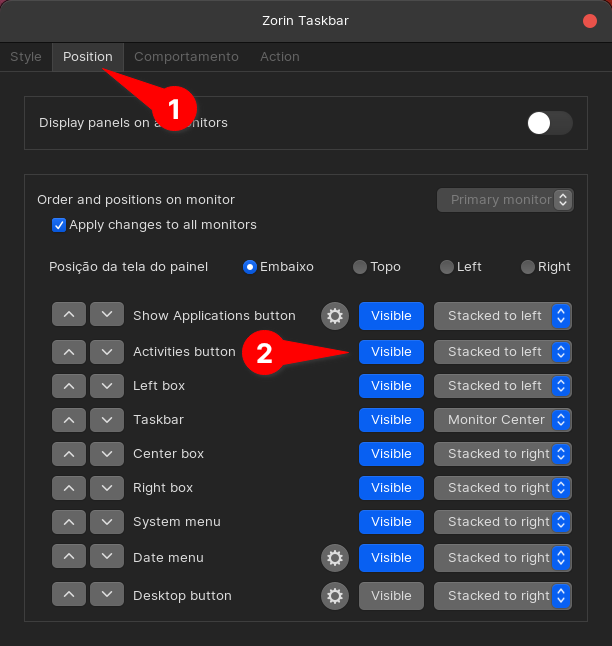
In Microsoft Windows, it is possible to remove task switcher button from taskbar. I would like to do the same in Zorin as I don't use this functionality at all and don't want to accidentally press this button: