Hi, I'm beams. Linux novice. I recently installed Zorin OS, but i'm experiencing constant freezes. I've had this issue before with Linux Mint, but that subsided when i enabled zswap. I did the same on this device, but that hasn't helped. I suspect my Nvidia card/driver might be to blame. Any guidance would be appreciated.
If Windows is still installed: Is Fast Start-Up in Windows disabled?
Are the Freezes happen in Common or when You use specific Software or You do specific Stuff with it? If yes: Explain it further please?
What Nvidia Driver do You use?
Is Your BIOS in UEFI or Legacy Mode?
What Tool did you use to create the Bootstick?
Did You tried to go back to the 6.17 Kernel? You can do that on the GRUB Menu on Startup with choosing ''Advanced Options and there the one with the 6.17 Kernel (without Recovery Mode).
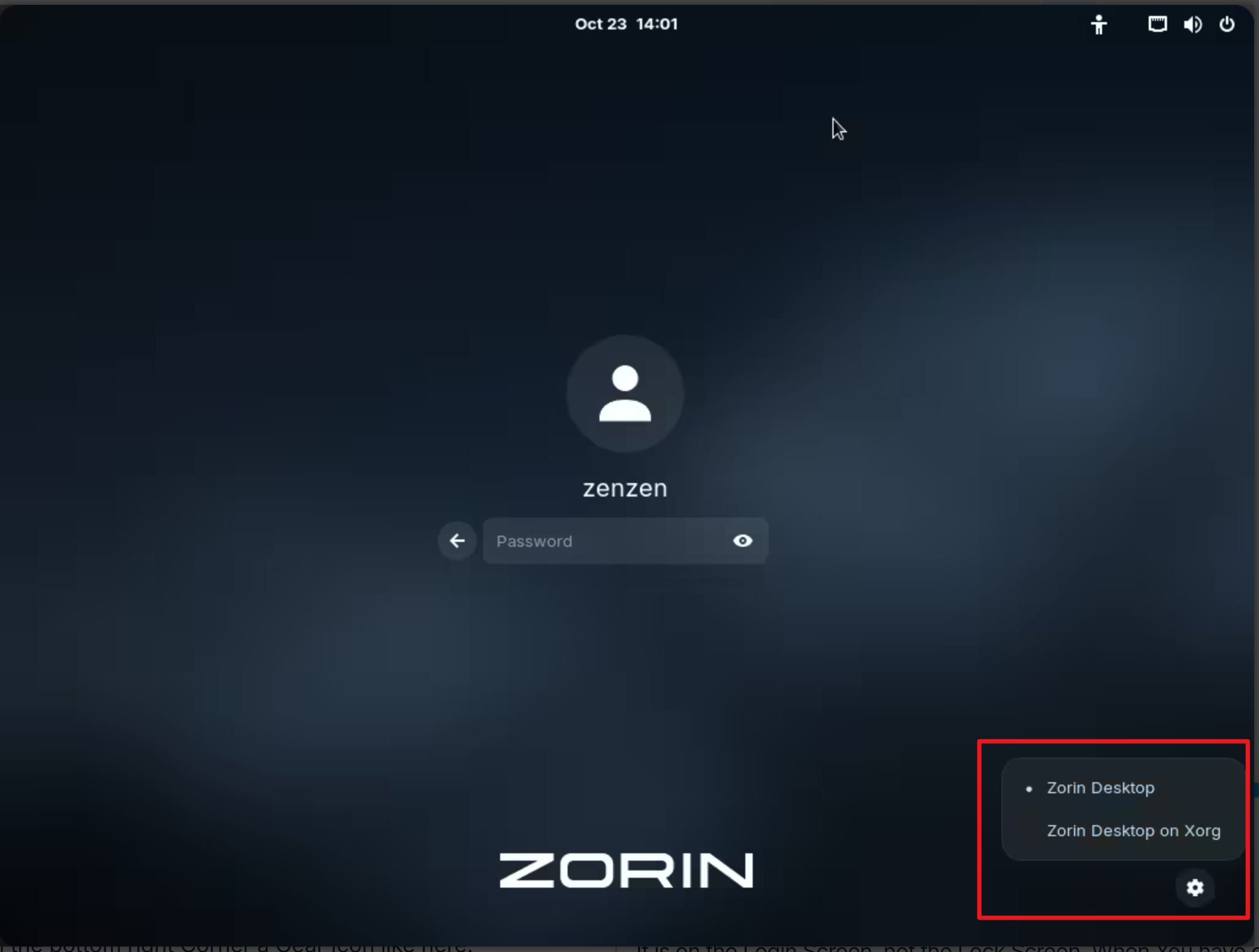
You could try it with switching to Xorg. To do that, go to the Login Screen. Click there on Your Profile so that the Password Field appears. When it is appeared, You should see in the bottom right Corner a Gear Icon. Click on it and choose ''Zorin Desktop on Xorg'' and then log in.
The freezes appear to be happening at random. I played Devil May Cry 5 on it for a good amount of time with out it freezing. I've seen it freeze in Zen Browser and Steam's desktop mode. It also seems to freeze on the desktop or locked, either when i'm using the computer, or when it's idle.
Update: My computer did freeze again, and this time I had the system monitor running on my desk, and noticed there was a big spike of data writing on my ssd shortly after I opened and connected to proton vpn, though these freezes were still occurring even before I installed proton.
One more update: froze again after running “sudo apt update” and then “sudo apt upgrade”, but this time there didn’t seem to be any disk activity at all.
Another update: I tried falling back to the X. org nouveau driver to see if that would help. It hasn’t, and whenever I try to change drivers, I get an error message that reads “pk-client-error-quark: error installing package: Installed Linux-image-7.0.0-28-generic package post-installation script subprocess returned error exit status 127 (313).”
Last update of the night: I did finally figure out how to access the GRUB Menu and fallback to the 6.17 Kernal. Going to use it from now on, and if I don't see any freezes in the next few days, we can consider this thread closed. Again, thanks!
Note that kernel 6.17 is out of support since August. So if the problem with the later kernel persists after the next kernel updates (check after the next kernel updates if your system works with kernel 7.0), then it is better to install kernel 6.8 which is still supported.
It is no problem to use kernel 6.17 for a while now, but better to use it not permanently for many months/years.
It is on the Login Screen, not the Lock Screen. When You have clicked on Your Profile, You should see in the bottom right Corner a Gear Icon like here:
The only options I had are on the Linux 7 Kernal are Zorin OS and Zorin Desktop on Wayland. I did notice when booting from the Linux 6 option, I did have the option to switch to Xorg, but I was met with a black screen with the cursor locked to an (x). I tried a hard reset by switching the power off, but just as it was shutting off, the login screen did appear for a brief second.
Upon trying to turn my pc back on, I was met with a black screen, and for a moment I thought I bricked my desktop. Though I did try changing the hdmi port, and so far it looks good!
I do have a new problem, however.
Zorin running on Kernel 6.17 seems to be locked to using lower resolutions, and even xrandr won’t list anything other than 4:3 resolutions.
After the installation reboot and in grub menu select "Advanced options for Zorin" and select kernel 6.8 (not the recovery one) to boot from.
If you always want to boot with the 6.8 kernel, boot with the 6.8 kernel and then set it as default as described in this guide.
After each kernel update go to advanced options and select the latest version of the 6.8 kernel (or remove the hwe stack entirely from your system if you don't want to use higher kernels in future - then you don't need to care after kernel updates to set the latest 6.8 kernel).
If you want to remove the hwe stack, tell us, then we can give you the commands.
Ah, I understand. then you have Zorin installed with Nvidia Drivers, right? then it switches. Then ''Zorin OS'' is the Xorg Option and Zorin OS on Wayland'' the Wayland Option.
Maybe reinstall the Nvidia Driver could help.
First uninstall the current Nvidia Stuff with:
sudo apt purge nvidia* libnvidia*
and then type
sudo apt autoremove
But check the List of the removing Objects before You remove them. Then boot in the Kernel, You want use and type:
followed your instructions to the letter and i think I'm set! Will let you know if I run into any more freezing issues, but i'm feeling optimistic right now! Thank you so much!
Update: Zorin on Kernal 6.8 froze just now on the desktop.
I believe for now, I’m going to hold off on using Zorin as my main OS, until I can replace my current graphics card. I certainly appreciate you and Forpli’s help with this matter. Wish you all well, and thank you!