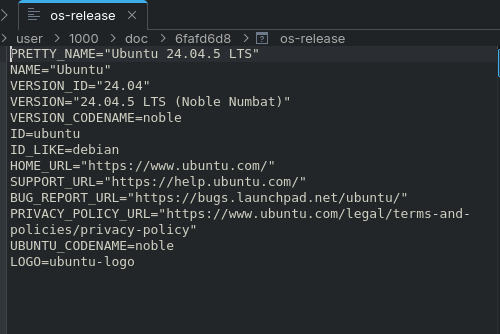
I'm running Zorin OS 18 (based on Ubuntu 24.04 Noble) and for the past few weeks my system has been identifying itself as Ubuntu instead of Zorin. OBS Studio also stopped opening.
Everything started after a resolution problem on Zorin. I switched the NVIDIA graphics driver (first to the wrong one, then back to the correct one), and after that the issues began.
*System info:
Motherboard: Gigabyte Z390 M GAMING
CPU: Intel Core i5-9600K
GPU: NVIDIA GeForce RTX 2070 SUPER
RAM: 16 GB
Kernel: Linux 7.0.0-38-generic
GNOME: 46
Session: X11
Currently shows as: Ubuntu 24.04.5 LTS
*Symptoms:
/etc/os-release, Settings → About, and the Software Store all show "Ubuntu 24.04.5 LTS" instead of Zorin OS
InRelease works, but Packages.xz is missing. Because of this, apt can no longer find any Zorin-specific packages and falls back to the Ubuntu base packages.
This started around late September / early October 2026 and is still happening today (October 20).
*What I already tried:
sudo apt update
Reinstalling zorin-os-desktop, zorin-appearance, etc. (all fail because packages cannot be downloaded)
Reinstalling OBS via apt and Flatpak
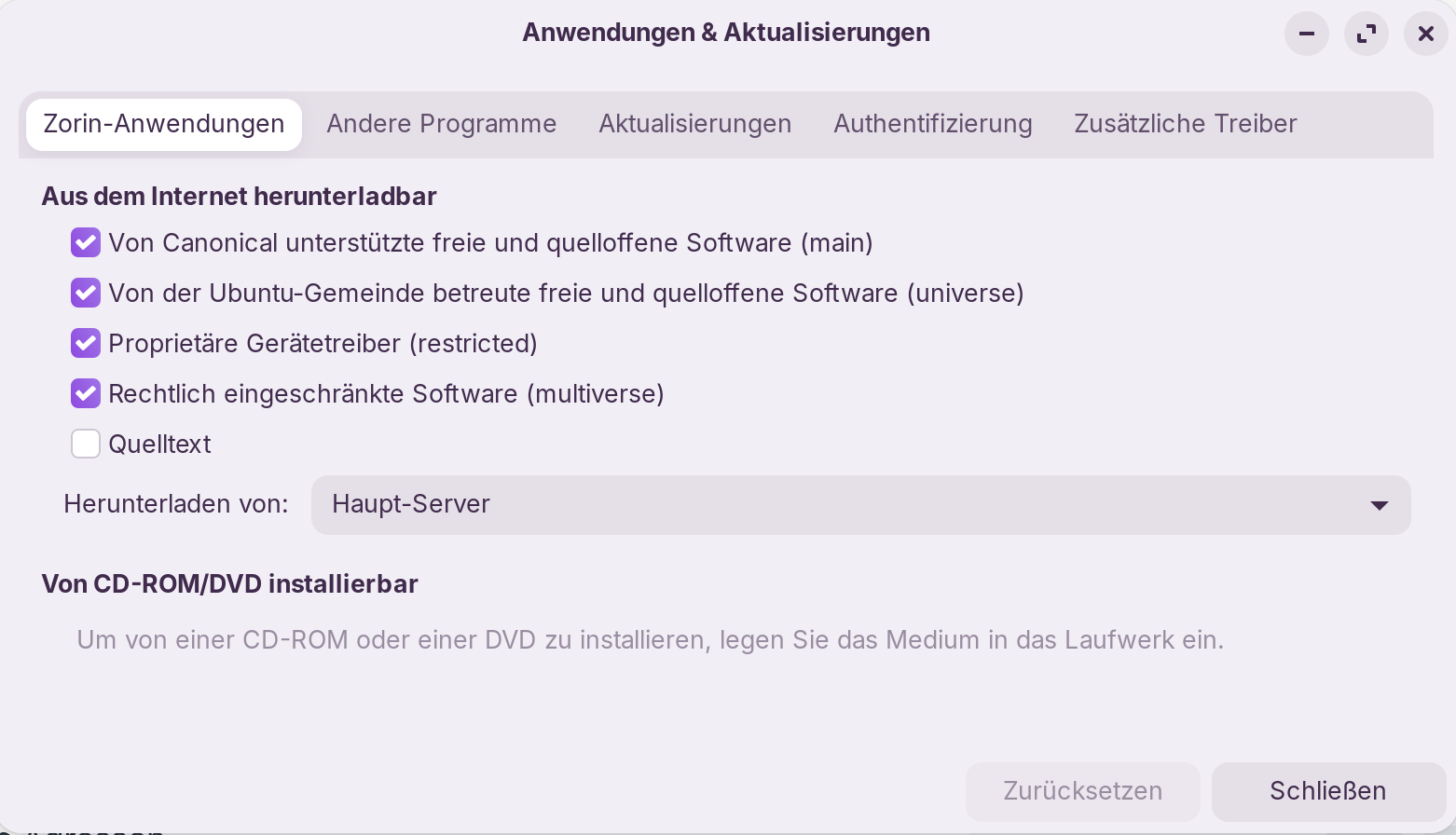
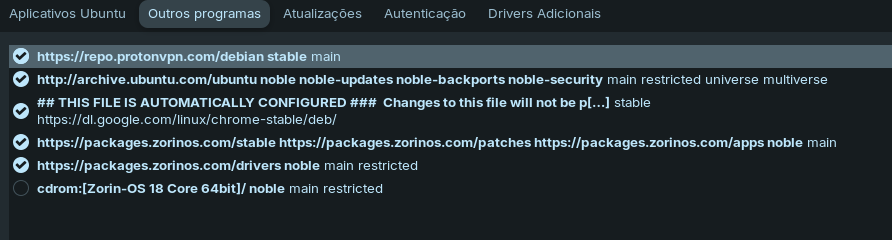
Confirmed the sources list is correct
Is anyone else on Zorin 18 experiencing this?
Is this a known issue on Zorin's side?
PS: I’ve been using Zorin OS for almost a year, but I don’t really know much about Linux. Usually, when I have questions, I just search on forums or ask Grok. Right now, the thing bothering me the most is that OBS isn’t working, and I’m having to use Windows because of it.
Also give us please the content of the following folder:
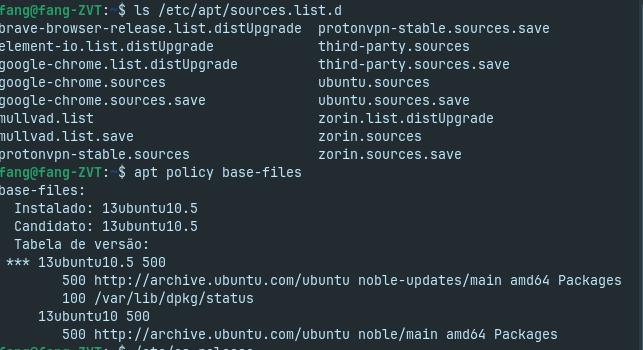
ls /etc/apt/sources.list.d
It should show for Zorin:
zorinos-ubuntu-apps-noble.sources
zorinos-ubuntu-apps-noble.sources.save
zorinos-ubuntu-drivers-noble.sources
zorinos-ubuntu-drivers-noble.sources.save
zorinos-ubuntu-patches-noble.sources
zorinos-ubuntu-patches-noble.sources.save
zorinos-ubuntu-stable-noble.sources
zorinos-ubuntu-stable-noble.sources.save
Please post the whole Output of sudo apt update here. So, we can have an Overview about Your Sources.
Then post the Conent of the File sources.list in /etc/apt and zorin.list in /etc/apt/sources.list.d plus check if the Files availabe that @JustZorin posted here:
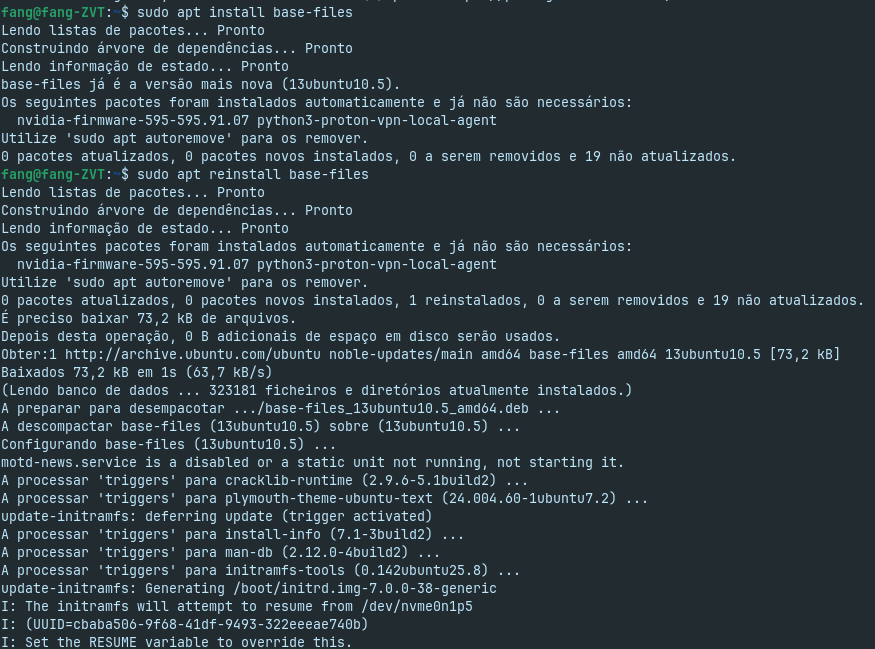
The outputs show that for the install /reinstall commands sudo apt reinstall base-files=13ubuntu10.4+zorin2and sudo apt install base-files=13ubuntu10.4+zorin2
Version '13ubuntu10.4+zorin2' for 'base-files' was not found
Summary
rangofang-ZVT:-$ sudo apt reinstall base-files=13ubuntu10.4+zorin2
[sudo] password for fang:
Reading package lists... Done
Building dependency tree... Done
Reading state information... Done
The package base-files is a virtual package provided by: base-files:1386 13ubuntu10.5 (= 13ubuntu10.5'
**You should explicitly select one to install. ** -- Version '13ubuntu10.4+zorin2' for 'base-files' was not found
Fangofang-ZVT:-$ sudo apt install base-files=13ubuntu10.4+zorin2
Reading package lists... Done
Building dependency tree... Done
Reading state information... Done
The package base-files is a virtual package provided by: base-files:1386 13ubuntu10.5 (= 13ubuntu10.5'
**You should explicitly select one to install. ** Version '13ubuntu10.4+zorin2' for 'base-files' was not found rangefang-ZVT:-$
As @Forpli already said is here the right repository missed.
And as @Ponce-De-Leon said, we still need the whole output of:
Sorry, the missing z from zorin was only a mastake during my copy and paste translation of the spanish errror message I did. I corrected that. Thanks for that you've noticed it.
In the install / reinstall command given by @Naming3599 the install file was named correctly as "13ubuntu10.4+zorin2" and was not found by his system.
What we could do is manually changing the Repo's so it fits again. But it is a bit Work. Also, we have to take a closer Look at the Stuff what You have currently before we change anything.
Do You want do that or do You prefer to save Your Data and make a fresh Install of Zorin?
When You make a fresh Install, Zorin will be deleted at all. So, You have to save everything You need. Documents, Music, Videos, whatever Files.
In this Case, I would suggest the following Way:
You start the Installation of Zorin OS from the Bootstick and choose as Install Option ''Something else''. With this Option, You create the Partitions manually. Might sound intimidating but is not so hard to do.
When You in the Windows, choose the Partition with Your current Zorin Installation and delete it. Then take the free Space and choose for it the Mount Point / and format it to ext4. Under ''Device for boot loader installation'' choose the Windows Boot Manager Option.
Do you have a separate /home partition?
If true, when you re-install using "Something Else" method, you can choose NOT to format the /home partition. So user data in /home should remain intact.
However, best to back-up contents of /home anyhow, just in case of mishap.




 remain intact.