Zorin os keeps freezing on my randomly, showing the last thing that happened before it froze. my cursor changes sometimes when I move my mouse around, and I can still hear stuff, as if stuff is happening in the background I just can't see or do anything. It usually happens when I leave my computer, when I'm doing nothing no my computer, I come back just to see it frozen.
No matter what I do the only temporary fix is to restart my computer.
cpu: Intel Core i5-3470 (4) @ 3.600GHz
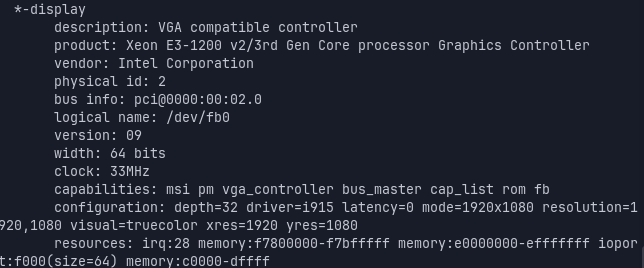
Gpu: "Intel hd graphics" (according to neo fetch, I feel like thats a little bit too simple to be a GPU but what)
Are fast boot and - if you have no Dualboot with Windows - secure boot in your BIOS disabled?
Is fast startup in Windows power options disabled if you have a Dualboot with Windows?
If not, turn them off.
How much RAM do you have?
Have you checked in system monitor the RAM and CPU usage?
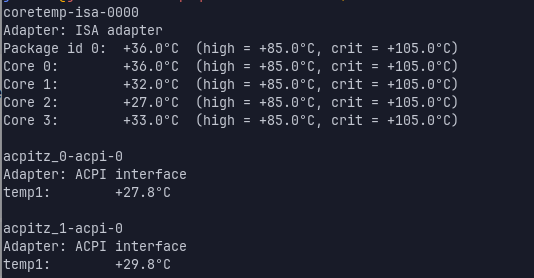
What about the temperatures? Are they in a normal range?
You could test it with a 6.8 kernel or try to add the kernel parameter i915.enable_psr=0 to /etc/default/grub file as shown here:
If it doesn't help repeat all steps, remove the added term and update grub again and reboot.
If you want to test an older kernel because your hardware is pretty old, you can use this command to install the kernel
Then reboot and in grub menu select "Advanced options for Zorin" and select the 6.8 kernel (not recovery) for the next boot.
If the grub menu isn't displayed at boot press continuosly esc key or left shift key (if you have a legacy BIOS) during boot.
This setting for the older kernel is not kept, it is set just for the next boot and you will get no updates for the 6.8 kernel that way. It is only to test if it would solve your problem.
Did You switched to Wayland to see if it behaves the same? To do that, go to the Login Screen. Click there on Your Profile so that the Password Field appears. When it is appeared, You should see in the bottom right Corner a Gear Icon. click on it and choose the Option ''Zorin Desktop'' and then log in.
Please type in Terminal sudo lshw -C video and post the Output here.
You don't say brand or model as far as I can see but there are several strings about failure to wake from suspend properly for different machine types. Dell appears common. Sometimes it seems to be the kernel, sometimes the gpu etc. Have you tried searching for "wake from suspend 'your brand'"?
I'm not really techy so I only understand like half of what you said (I'm sorry)
1: I'm not dualbooting windows
2: 7.6GI total 2.5GI used 1.9GI free 5.1GI available
3:CPU usage seems normal, don't know where do find ram usage tho
4: this is the temperature, I think its normal:
Secure Boot and Fast Boot are Options in the BIOS. So, You have to look there.
I took a quick Look on Your Processor and it seems to be an older one. For this, it could be worth to try an older Kernel like @Forpli already wrote. The 6.8 Kernel in the Zorin Repo's would be a good Point to start.
Your are totally right for the kernel, the 7.0-xx doesn't like older hardware, it makes sense, the best for that is debian with is solid and stable kernel...
yes you can but if you don't follow the tutorial to set an older kernel, you will boot to the most recent, to check after a reboot just go in terminal an run: