Greeting,
Is there any possibility to disable globally windows drop shadow as well as desktop icon text shadow?
I will appreciate any hammer-way suggestions that work.
Thank you in advance
Greeting,
Is there any possibility to disable globally windows drop shadow as well as desktop icon text shadow?
I will appreciate any hammer-way suggestions that work.
Thank you in advance
Take a look at this thread:
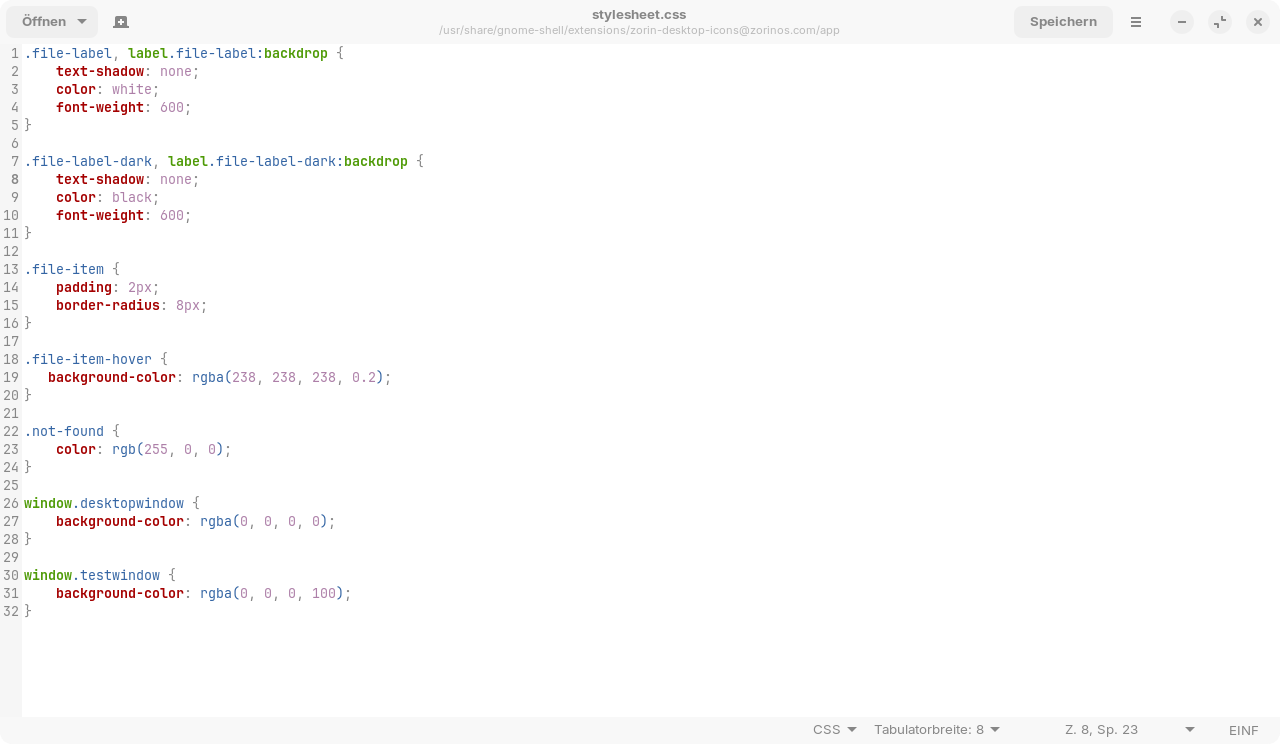
If the other gnome extension doesn't help for all your wishes, you could edit the css file of the gnome extension Zorin desktop icons.
At the moment I'm on Zorin 17, but it should be similar on Zorin 18.
Go to /usr/share/gnome-shell/extensions/zorin-desktop-icons@zorinos.com/app/stylesheet.css
and change line 2 and line 8 into
text-shadow: none;
Before:
After:
That removes the shadow of the text of desktop icons.
However, the file may be overwritten when updating the Gnome extension Zorin Desktop Icons.
Another example of Gnome ignoring print-disabled users.
Thank you very much for your extensive guidance on the text shadow.
Could you please show me how to get rid of the window shadow in a similar way.
Thank you again.
It is a pity that there is no simple function in the settings to make this small but user-satisfying visual adjustment.
PS
Unfortunately, I am unable to find a Gnom Extension that allows the above changes, o is the removal of shadows.
I also found no gnome extension to remove the shadows from the windows. I tried a few things to create a file in
~/.config/gtk-3.0/gtk.css and
~/.config/gtk-4.0/gtk.css
and tried to find the line in the css files of the selected Zorin light grey theme
but it was too difficult for me and what I tried didn't work. I'm not familar with css.
I only found old threads to solve this problem and newer ones about ubuntu 24 without solutions.
Maybe something mentioned here can help?
Thank you for the info and link.
I will give a try.
However, I cannot (there is none?) the given file in this directory:
~/.config/gtk-3.0/gtk.css
No .config one either.
As stated below, we have a maximum of three months to resolve this issue on this platform.
Does anyone have a solution?
I wonder if it is really that difficult to enable these options in Zorin's settings?
Especially since Zorin offers a paid Pro version, which I purchased in the hope of a fairly rich customisation offer.
The Gnome Desktop in general is not conducive to customization. User customization is the one thing Gnome developers do not want users doing.
Windows users should feel right at home on Gnome D.E. as if they never left Windows. It is just someone other than Microsoft that is taking control from you, now.
Gnome wraps its styling (.css) files in gresource bundles. They introduced LibAdwaita with GTK4, which removes styling from the GTK (ToolKit) and locks it in LibAdwaita where the .css is hidden and inaccessible. LibAddwaita will override user styling andd inject its own .css styles, or ignore user styling outright.
This is based on forcing the desktop to adhere to Gnome's invented HIG (Human Interface Guidelines) or... Making anything in Gnome protect the appearance and brand image of Gnome.
Gnome itself is very minimal and bare bones. Distros like Zorin OS add functionality back into the meager Gnome D.E. using Gnome Desktop Extensions which carry their own .css styling. Which makes a global styling even more difficult.
I realize that this is a rather blunt message - but this is where we are at, now. For years, we warned - and no one listened.
On most other Desktop Environments - what you ask for is easily provided. On KDE Plasma, there is a setting for this in the GUI.
But... this will not last.
Gnome Controls GTK - which all desktops rely on except for KDE which uses QT.
And with Gnomes Dominance over GTK, it will now affect other desktop environments - Either driving them under and eliminating them or forcing them to use Gnome's HIG, turning them into little Gnome Clones.
The gtk.css file doesn't exist. You can create an empty textfile and rename it gtk.css. The ~/.config folder exists, you can see it when you press ctrl+h to show the hidden files in your file manager.
In Zorin lite that uses xfce desktop you can remove the shadows of the windows easily, but not in gnome. There you have to edit css files or look for extensions that do this for you.
Why this post has been marked as SOLUTION?
Nothing has been solved.
Still unable to get rid of the shadow.
Could an option be added to a new update, please?
As I see it, the subject hasn't been resolved.
I still can't remove Drop Shadows from windows/programs.
Has anyone found a solution?
Still nothing, no solution found. Hope this option will be available with future updates. Perhaps a word from the authors on the subject?
This topic was automatically closed 90 days after the last reply. New replies are no longer allowed.