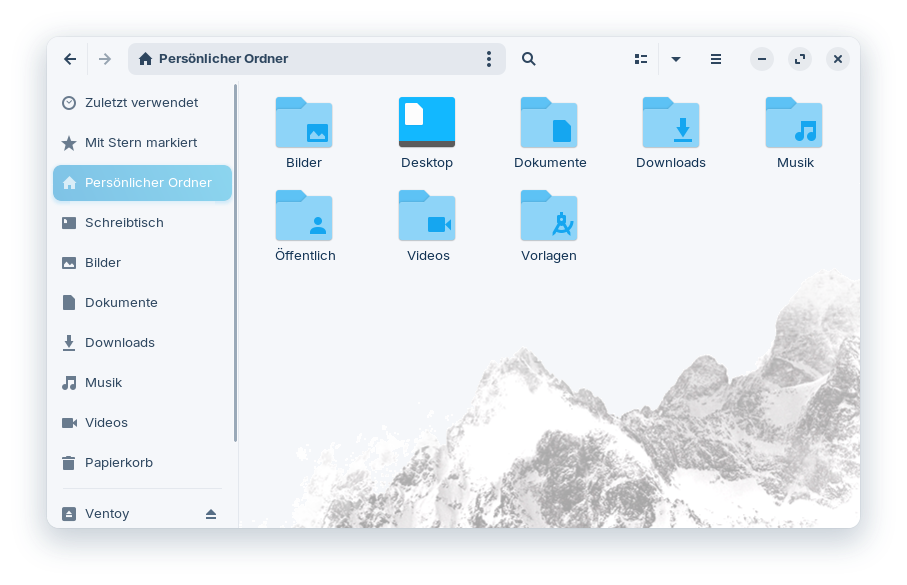
I like that you can get ideas on how to set up a background image in another theme as well (by adding the corresponding .css lines that include the background-image property). Here the lines were
window.thunar notebook scrolledwindow.frame.standard-view, .nemo-window .nemo-window-pane notebook scrolledwindow.view,
.nautilus-window notebook > stack {
  background-image: -gtk-scaled(url("assets/backimage.png"), url("assets/backimage@2.png"));
  background-repeat: no-repeat;
  background-position: bottom right;
}
However, I haven't tested it in other themes yet. When I tried out Qogir myself some time ago, I completely missed that part about the background image because I focused on other things, and I haven't ever seen background images in file explorers, yet.
Setting the background-position to centered instead of bottom right makes it better so that the head of the cat isn´t cut off, but it is more difficult to read the text of the files/folder then.
Edit: Now I adapted the Zorin Theme so that the file manager Nautilus has the same mountain background image as Qogir theme (I don´t know, why the background image isn't shown in Thunar). I replaced the white background color of the mountain image with the same color as the background color of the Zorin theme (the left side of the image looks a bit strange now)