Hi there. I saw quite a number of requests for a theme similar to the Windows 7 Aero theme, but generally unsatisfied with what is available.
I am reluctant to try this on my patience and Acer Aspire1 (iykyk), but would someone with a more powerful system be interested in giving Aura Glass a run and report on it?
The Terminal commands (no installer file available, afaik) are at the Github page, linked at the end of, and here also after, the included article:
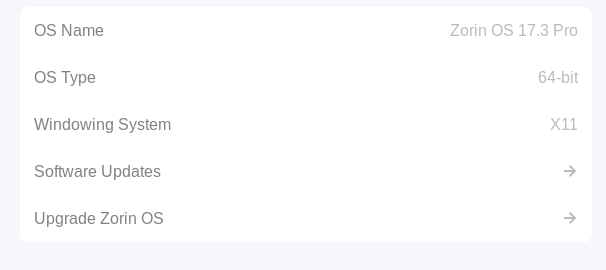
Edit: For the bright sparks who point out "NO ZORIN!!!!", Zorin is derived from Ubuntu, which is derived from Debian. Debian packages generally install on Zorin, because Zorin is Debian based. But as pointed out down the thread, Zorin is currently at GNOME 46, which makes this an exercise in futility. However, according to the article I linked, X11 is also supported, which I cannot say for sure, but might be workable? (I'm running ZOS 17.3 Pro on XFCE with X11 system)
Ummmmmm, maybe Zorin is not good for this. Maybe do ummmm.... the latest Ubuntu with like I don't know becuase it has GNOME 50. So, maybe that's your best option. @Forpli that's correct 18 uses 46
The script did not work, it showed an error:
"gnome 46 is older than this projects supports (48+)"
I'll try to change the script.
Edit: Hm..it is a bit complicated, I didn't find out the file/line yet which checks which version of GNOME is being used. I'm not a programmer.
I edited the ~/aura-glass/tools/preview-driver/metadata.json file now and added gnome-shell 46 there, but the error is still shown, so it was not the right file.
Zorin is 46, Ubuntu is 50. So, what that means is basically
ChatGPT says this: Understanding Zorin OS and "GNOME"
To understand your software versions, it helps to understand how your computer is built: [1, 2]
The Engine (Ubuntu): Underneath the hood, Zorin OS is built directly on top of Ubuntu Linux. Zorin borrows Ubuntu's stable code so that your apps, security patches, and hardware drivers work reliably. [1, 2, 3]
The Body / Dashboard (GNOME): GNOME is the base software that provides the desktop, the settings menus, and windows. Zorin takes GNOME and heavily customizes it with a tool called "Zorin Appearance". This tool reshapes GNOME so that it acts like Windows or macOS, meaning you usually don’t even notice you are using GNOME! [1, 2, 3]
The Version Comparison
Zorin deliberately stays a bit behind the newest Ubuntu releases to focus on absolute stability, testing, and keeping your desktop lag-free. Here is where things stand right now: [1]
Feature / Software
Zorin OS 18.1 (Current)
Ubuntu 26.04 LTS (Latest)
Ubuntu Engine Base
Built on Ubuntu 24.04
Built on Ubuntu 26.04
GNOME Version
GNOME 46
GNOME 50
Display Technology
Supports both X11 and Wayland
Strictly Wayland-only
What This Actually Means For You
Because you are a Zorin user, you do not need to worry about what these version numbers mean for your day-to-day computing, but here are the three key takeaways: [1, 2]
Your interface is stable and custom: Ubuntu 26.04 uses the brand-new GNOME 50, which completely removed older display technologies (X11). Zorin uses a highly-polished GNOME 46 base, which means Zorin still safely supports older apps and layouts without forcing you into newer, potentially buggy software changes. [1, 2, 3, 4, 5, 6]
Software support is wide open: Even though Zorin's GNOME desktop environment is technically a few versions behind Ubuntu's, it supports almost everything. Thanks to Zorin’s built-in support for Flatpaks, Snaps, and its Windows App Support database, your software shop has access to thousands of modern apps that run perfectly. [1, 2, 3, 4, 5]
The future Zorin OS 19: When the Zorin developers are completely satisfied that the new code from Ubuntu 26.04 and GNOME 50 is stable and heavily customized to look like Windows or Mac, they will release it as a major upgrade (likely called Zorin OS 19). [1, 2]
Apparently X11 is also supported, according to the article. But yes, if Zorin is currently at GNOME 46 we're out. Though with this calculator I'm typing on, it probably doesn't matter.
If you realize that you are installing it on X11, or maybe some older gnome, then press Ctrl + C immeditally to stop it, and then upgrade to a newer OS.
I hope that was an offer, because my finances are currently at a no-go for upgrades. From what I've learned XFCE is less resource intensive than Wayland? And currently, ZOS17.3 meets my needs for what I do. But thank you for the offer to pay for a ZOS upgrade!
So, you're running XFCE/Zorin Pro Lite, or Zorin Pro with gnome desktop? I'm not quite sure if you really mean XFCE or Xorg/X11.
The aura glass project is for gnome.
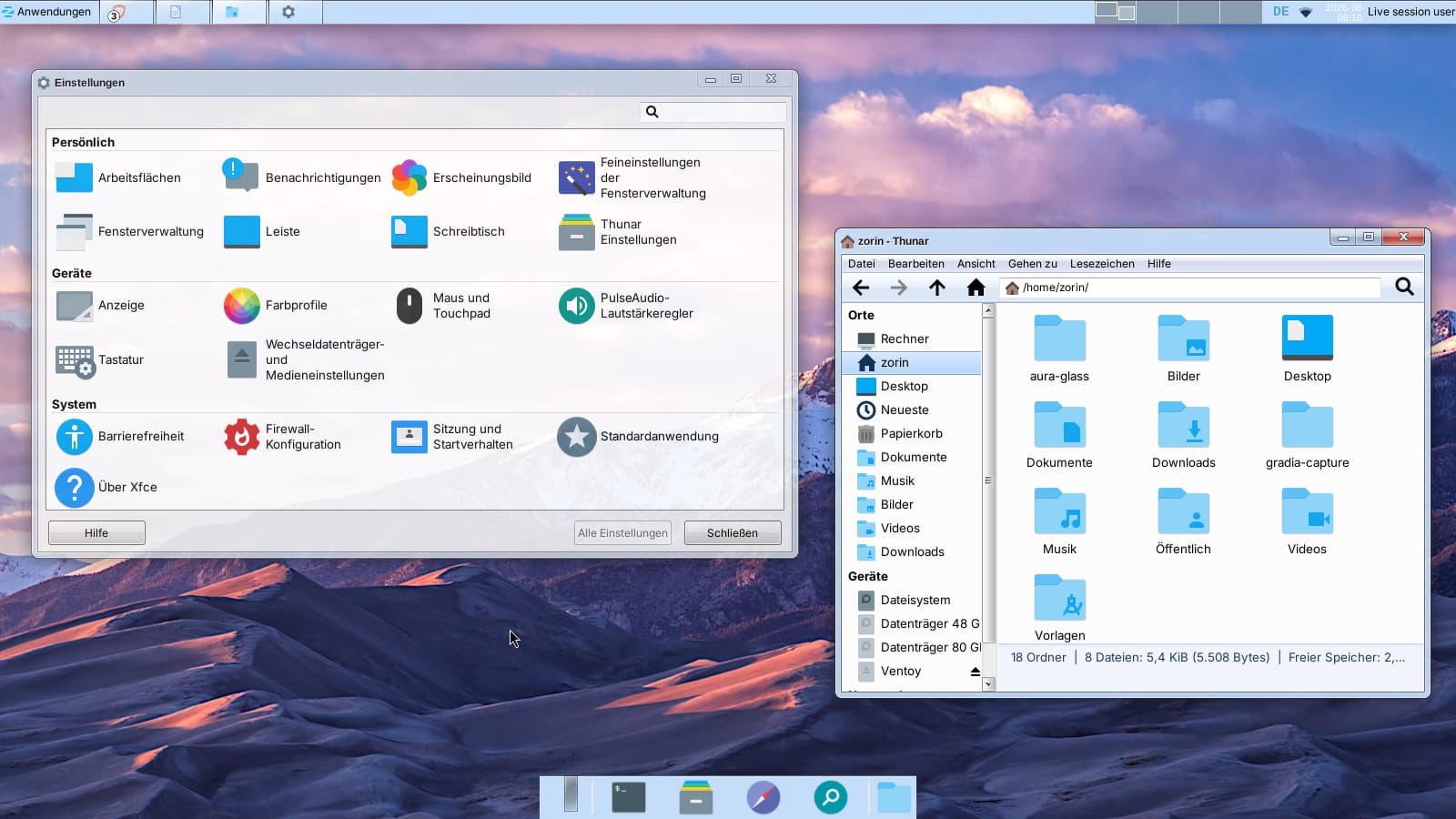
I took a look at this project for xfce4 in a Zorin 18.1 live session with xfce4 desktop. There are picom config files, so perhaps you need picom. I didn´t install it, I just set transparency in the normal xfce settings of the compositor there.
The project has stopped in the beta phase. With picom, you can add blur, but you need to add picom to autostart and disable the compositor xfwm4. In Zorin 17 Lite/Xfce, you may also need to enable the experimental backends for picom.
When you describe what you're looking for, perhaps I can help you. The two panels are because of the default settings of the xfce4 desktop. I did not change it.
Do you want a window-like look or just a glass-like look?

 Understanding Zorin OS and "GNOME"
 The Version Comparison
 What This Actually Means For You
 Though with this calculator I'm typing on, it probably doesn't matter.