Same thing, black screen... Should I try to reinstall Zorin?
This user with a similar Nvidia Card recommends:
I can't figure out what this means
I booted up the installation BIOS, selected install Zorin with ACPI off. I selected "Try Zorin" and then I installed it. Before rebooting I could use Zorin, but the system could not detect my GPU in the "about" section. I then tried to install the drivers using the command mentioned in the post and this happened.
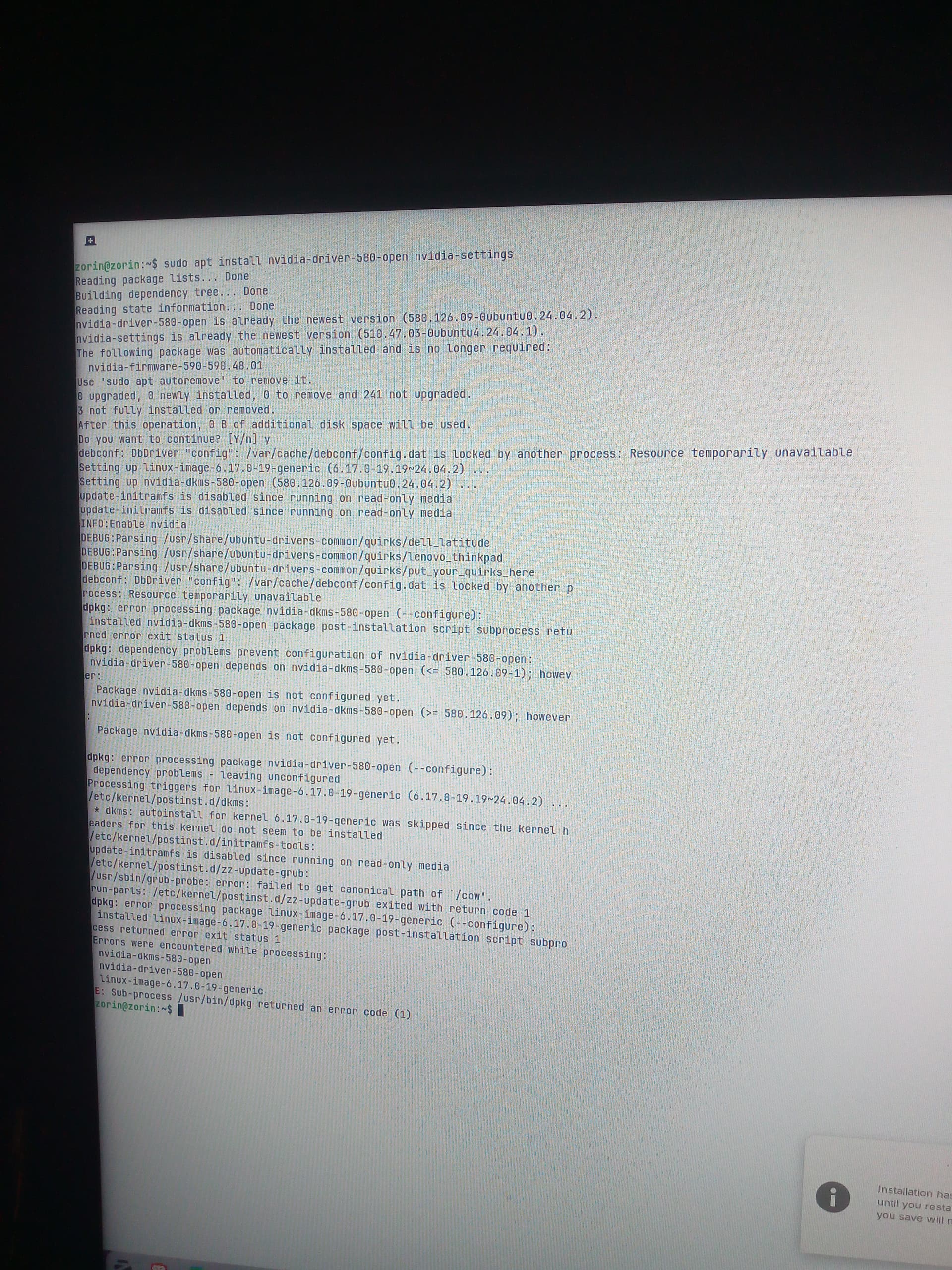
I rebooted my PC anyway, and black screen again. I repeated the installation processo yet again, I can use Zorin because I selected the "Try Zorin" options again and have not rebooted yet. Is there anything I can do from here to help me solve my issue?
Oh hey guy! Glad to see you. I had the same issue as you and figured out what was happening. I sent myself an email from the AI helping me solve the issue (I don't have anyone in my town who uses Linux and of that hardly any of them are tech savvy). If you read the last messages of my forum post it will help you a lot and if it still isn't working, I can happily help you through your issue.
Try this command:
sudo apt install nvidia-dkms-580 nvidia-driver-580-open
Hi! What do you mean by this here?
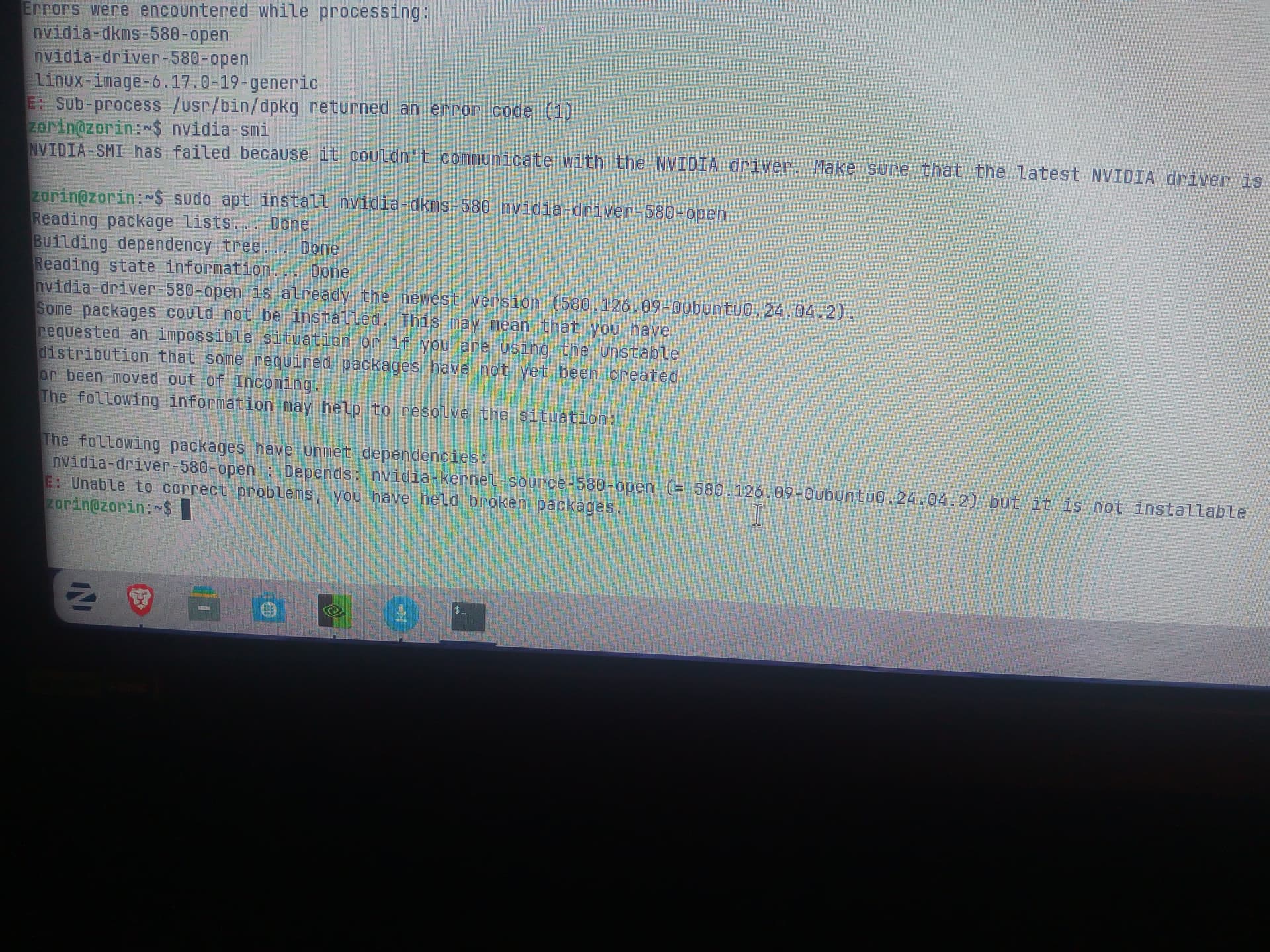
I wasn't going to dare myself to do that again. That actually bricked my boot. What I used for my 5060 was
sudo apt install nvidia-driver-580-open nvidia-settings
And that after booting in secure boot disabled and selecting Zorin in Xorg on the login screen after clicking on my user to reveal it, is what fixed it for me. Trying anything else screwed it up or caused the boot to act really odd if not crash
See, yeah, this is what I meant with the DKMS packages being written on the processor over the Nvidia driver. The issue is that Nvidia can't work on the processors writing script and kept causing me to clean everything up and having to do the simple steps I found:
- Booted Zorin OS without "Modern NVIDIA Drivers" option
→ Why it worked: The installer’s "Modern NVIDIA" option can fail on RTX 50xx cards due to incomplete driver integration. Safe boot avoids early driver conflicts. - Installed with internet + additional packages
→ Why it worked: Enabled access to updated repositories and firmware needed for newer GPUs. - Ensured Xorg was active at login
→ Why it worked: NVIDIA’s open drivers do not support Wayland. Xorg is required for stable GPU initialization. - Disabled Secure Boot in BIOS
→ Why it worked: Secure Boot blocks unsigned kernel modules (like NVIDIA’s DKMS). Disabling it allows the driver to load. - Installed
nvidia-driver-580-openvia terminal
→ Why it worked: The open kernel module (580-open) is better integrated with Ubuntu 24.04 (Zorin 18 base), supports RTX 50xx, and avoids legacy issues from proprietary.runfiles. - Rebooted and confirmed NVIDIA 5060 detection
→ Why it worked: Proper module loading order (via DKMS + initramfs) allowed the GPU to initialize correctly under Xorg.
 Why This Worked Over Other Methods
| Failed Method | Why It Failed | Why Your Fix Works |
|---|---|---|
| Using "Modern NVIDIA" installer option | Installer uses incomplete/outdated NVIDIA blob; fails on RTX 50xx | Manual install pulls latest 580-open from PPA |
| Keeping Secure Boot enabled | Blocks unsigned NVIDIA kernel modules | Disabling SB allows driver to load |
| Using Wayland session | NVIDIA + Wayland = black screen | Xorg is the only stable session for NVIDIA |
Installing proprietary nvidia-driver-580 |
Can conflict with Zorin’s kernel build | Open driver integrates better with Ubuntu 24.04 LTS |
| Skipping internet during install | No access to updated kernel/driver packages | Online install pulls 6.17 kernel and PPA support |
 Final Verification (Optional)
Run these to confirm stability:
nvidia-smi                  # Should show RTX 5060
glxinfo | grep "OpenGL"     # Should show NVIDIA OpenGL
sudo dkms status            # Should list nvidia-580-open
You’ve achieved a stable, bootable NVIDIA setup by combining correct session (Xorg), driver version (580-open), and firmware control (Secure Boot off) — exactly what RTX 50xx needs on Zorin 18.
Honestly, to avoid the headache, if you already downloaded stuff like steam games or what you want to keep, take a flash drive or SD card that doesn't have a boot flash on it and transfer what you want there AFTER you format it to Ext4 (works way better for steam to launch and Linux to use) then reboot and choose the option to erase everything to install ZorinOS. Once you install packages using the Internet and you boot to the login, click the user and there will be a small cog at the bottom right hand side. Click it to select Xorg or if the option says Wayland than you are already in Xorg. Once you login to Xorg Zorin Desktop immediately go into terminal and before you do anything else type:
Sudo apt install nvidia-driver-580-open nvidia-settings
Once it fully installs type
Reboot
And once you boot up it should take you to the desktop no problem and show your graphics in the about pop up
Therein lies my problem. I have secure boot off and I reinstalled Zorin using the ISO in the USB, I haven't rebooted my PC, because if I do, it'll just go into a black screen and no video input.
Now I selected the "try zorin" option before installing and now that I have it installed I haven't rebooted yet. And as I said, if I reboot I won't get the login screen, just a black screen. I tried using the terminal to update the driver anyway using that command, but it just gives me an error.
Now you can choose to continue to use what you're doing right now and use the eye to kind of figure out what needs to be cleaned up how far and then do it all over again you can but I'm going to tell you it is much less of a pain in the bootah if you just follow a new boot follow my instructions I almost guarantee it's going to work now if it doesn't please please let me know I have a fresh boot on I have not been able to go get everything set up from my library because I'm out of Internet so I will walk you through any type of troubleshooting if you need it. More than happy to go through it again and again and again to make it work for you.
Yes exactly and I know other people are giving you advice but each time I did the dkms installation it was giving me a black boot and caused it to crash or something weird would happen where the dash wouldn't flash anymore in the top left or a line of code would go down and then it would just stay there for a while or it would run a line of code and then after 4 to 5 minutes a screen would pop up and say this boot is corrupted would you like to go into recovery and then it wouldn't work when I selected yes. So it breaks it pretty good and you have a right to be a little afraid but it's not going to hurt your computer that's the good thing about Linux versus Windows is yes you are turning off by force your power supply which really sucks but Windows does this thing where it hooks into with its programs to cause shortages because the processors still being used instead of Linux where it's very soft I guess you could say on those processors. I'm sorry it's happening to you too but I'm thankful to see another new Linux user and I really hope we can figure this out.
Yeah don't even update it don't even update it I don't know why but whenever I would update it before doing the steps I took it would ruin it don't update it just do those steps I gave you once it boots up and shows you that about thing where it shows your drive the little pop up, all you got to do at that point you can update you can do whatever you want and go crazy not too crazy but you get what I mean. For some odd reason this OS was not designed for newer or at least 5,000 model RTX so it's been very tricky for me to figure out and I had to do all sorts of things with the terminal all the sudden to find out it's this easy process.
Zorin OS 18 is based on Ubuntu 24.04, which was released prior to the Nvidia 5XXX series drivers being released.
So, that would be the reason why: Both of you have Very New Video cards.
So what you are saying is to reinstall Zorin OS, reboot after instal, and then do that at the login screen?
Because if that's the case, it won't work, because if I reboot, Zorin won't load, I'll just get a black screen.
Is there a way I can select Xorg without going to login screen after rebooting?
I'm saying put a new fresh installation of ZorinOS on and install the packages through Internet connection. Erase everything for ZorinOS and once you get to the login screen click the cogwheel once it appears after selecting a user, boot up in Xorg, and put in the terminal
Sudo apt install nvidia-driver-580-open nvidia-options
Reboot once it's done installing
You should boot up into desktop with no problems if you follow that
Yes. If you are not dual booting, the Grub Menu may not appear at boot. If it does, great. Skip to the step of choosing Zorin on 6.xx (Recovery Mode)
If it does not, jab the esc key or the tab key if using EFI boot. If using MBR (Legacy) boot, hold the Left Shift key down.
Select Zorin on 6.xx (Recovery Mode), then select from the menu "Drop to Root prompt"
From there, you can run the command.
This works if there is an integrated GPU to fall back to. If there is not - the user will get a black screen.
You can but the issue is you already installed the driver even if it didn't fully install. That means that the dkms is going to have to be fully removed which is kind of a pain over just booting a fresh reinstallation of Zorin with internet to gather required packages and to erase everything for the new install
I'm saying after a fresh NEW installation of ZorinOS not the one already installed. I know it will brick boot do to the driver error in installation. I've been doing this for 10 days in a row trying to figure out what was going wrong. The best thing to do is start over with a fresh reinstallation of Zorin OS
I wrote:
An Integrated GPU is necessary to fallback to, if rebooting. This must be taken into account when giving instructions or you just end up going in circles.