I played it a few weeks ago and the performance was great! Today I tried to play it and immediately realized something was wrong! On the Steam screen, when I click play, that box appears saying "processing Vulkan superchargers" and the progress in percentage. It's much slower than normal and the CPU is reaching 75 degrees! Did Zorin make some update that I'm not aware of? Other games are working normally, like Resident Evil 4 Remake... I don't know what it could be! I've already tested different versions of Proton! When the game starts, the CPU is almost at 80 degrees and horribly slow!
Are you using Nvidia GPU?
AMD Rx 6600.
Did You receided a Kernel Update to Version 7.0 before this? If yes, try it with switching back to the older 6.17 Kernel and check if it behaves normal again.
To switch, choose on the GRUB Menu on Startup ''Advanced Options'' and there the one with the 6.17 Kernel (without Recovery Mode). If You don't have a Grub Menu press on Startup Esc or the left Shift Key.
Also with that vid card do you have LACT installed and configured to help keep the card cool? Its possible its throttling due to high heat
as you can see i have a 6600 xt and this helps with heat issues on the 5500-9900 amd vid cards hottest mine has ever gotten playing games is 55C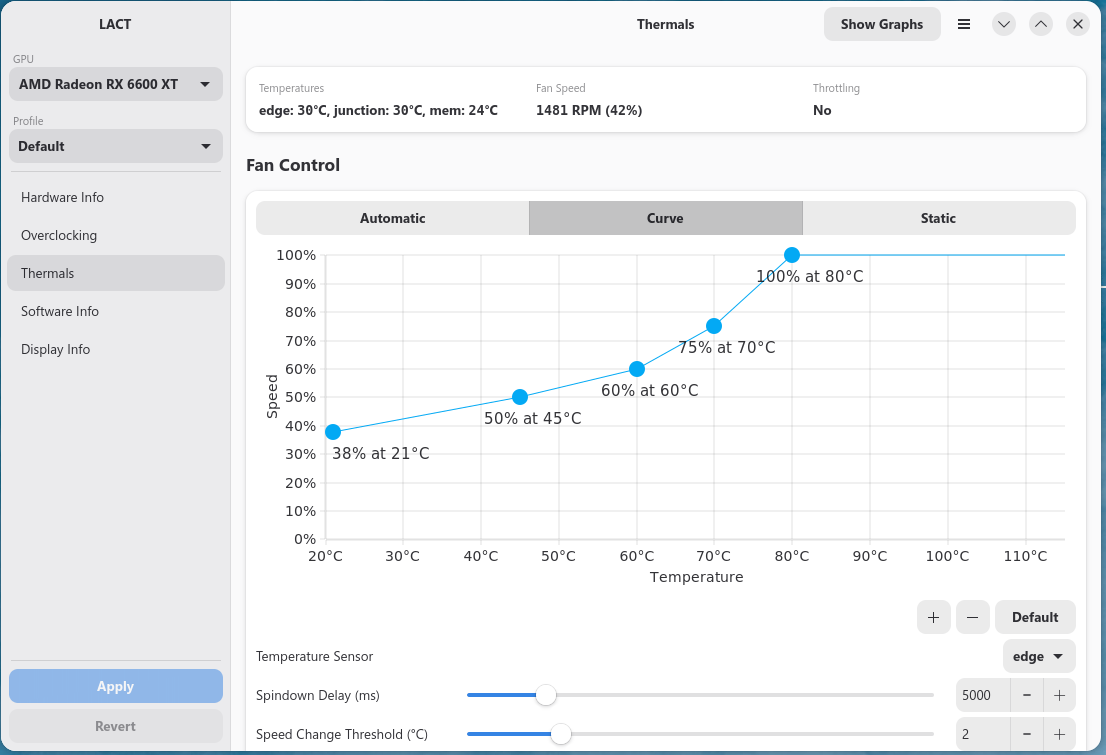
I tried several versions of Proton, GE, Proton 10, 9, Cachyos, all had the same symptom: very high CPU usage. What I researched using AI was to change the login to xorg. I tried to run God of War and had the same symptom. I reset the PC and installed the experimental Proton. It ran normally... I don't know exactly what I did to fix it, but it worried me. The game started running again after changing some things like xorg, but today I turned on the PC and the game takes too long to load the Vulkan shaders, overheating the CPU...
I didn't even know the kernel was 7.0, which had already been installed...it seems this update was recent and I missed it.
I returned to 6.17 kernel and the game loads with any version of proton without problems....i think this new kernel can be very dangerous...
1 Like
Earlier, I had asked if you used Nvidia.
You responded that you use AMD.
The reason I asked about Nvidia is because it is more common on Nvidia: The GPU drivers offload computing onto the CPU in Some Versions.
This can lead to not only High CPU usage, but excessive heat.
AMD drivers are not a module as they are with Nvidia. They are included in the kernel.
While Nvidia is known for offloading, this does not mean AMD won't do it, too.
I switched to kernel 6.17 and haven't had any more problems with any games. God of War 2018 was a game that behaved very strangely! Other games like Warframe ran normally on 7.0. I'll stick with 6.17.
1 Like
When You want make it the Default, You can find here Instructions:
I followed these steps and it reverted to kernel 7.0.
It ended up like this:
GRUB_DEFAULT=saved
GRUB_SAVEDEFAULT=true
GRUB_TIMEOUT_STYLE=hidden
GRUB_TIMEOUT=10
GRUB_DISTRIBUTOR=`( . /etc/os-release; echo ${NAME:-Ubuntu} ) 2>/dev/null || ec>
GRUB_CMDLINE_LINUX_DEFAULT="quiet splash"
GRUB_CMDLINE_LINUX=""
Reverted to kernel 7.0.
Please write exactly the text I should paste....
It is right. Did You changed it in Terminal with nano? If Yes, did You pressed ctrl+o to save, Enter to confirm and ctrl+x to exit? When done, did You typed sudo update-grub in Terminal to make the Changes affect?
What I forgot to do was run sudo update-grub. Do I then need to restart the PC, select kernel 6.17, and make those changes again?
Boot into the 6.17, then open a terminal and run
sudo update-grub
When you reboot, it should boot into 6.17.
You do not need to redo the saved Grub File.
I redid everything and ran sudo update-grub and it continued to load version 7.0...
When the Changes are already in the GRUB File then not. Then boot in the 6.17 Kernel and do a sudo update-grub like @Aravisian has mentioned.
You do not need to redo if the saved grub file is correct. Redoing should be done if it is incorrect.
So, I would first suggest verifying that the grub file in /etc/default is fully correct. No typo's, etc.
You can post a screenshot of it here.
And - in terminal run:
uname -r
This should print the 6.17 kernel and not the 7.0 kernel.
If it prints the 6.17 kernel, then run
sudo update-grub
If it prints the 7.0 kernel, you must reboot, enter Advanced Options for Zorin, highlight 6.17 to select to boot...
Once booted, check again:
uname -r
before running sudo update-grub to make certain you are on 6.17
I restarted and the uname -r command is indeed showing version 6.17.
I ran sudo update-grub again and took a screenshot of the screen below.
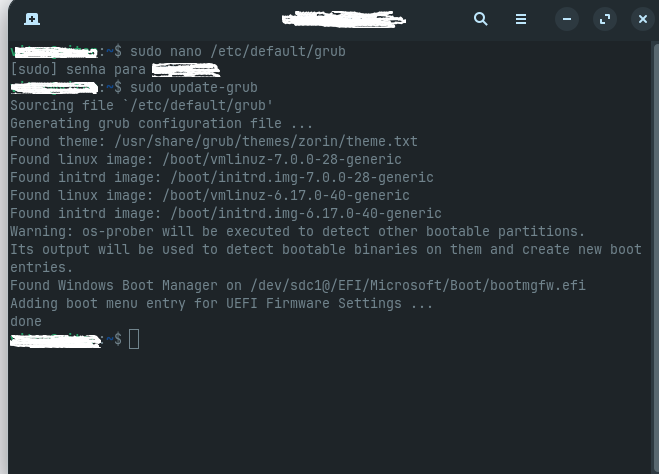
i will restart again to see if everything is okay.
I'll restart again to see if everything is alright.
It's loading version 7.0 again... the curious thing is that on the boot screen, the first option for selecting Zorin OS was unchecked, and the second, advanced option was already selected...
Very curious.
The changes made to grub file will store the selected kernel. Not the selection on the Menu.
You posted your grub file - and it is correct.
You posted your uname -r output and showed that you updated Grub inside of that booted kernel.
So... Next- Are you Dual Booting with another Distro?
And using that installed grub to boot, instead of this one?