Don’t know if the link is the right place to put here since this was giving to me after saying yes with pastbin but I got an error saying the Nvram is locked, the link is down below for what exactly is going on
Before you ask
Yes I turned off Secure Boot
Yes I turned off TPM
And yes I turned off both fast boot with bios and Windows.
This is right after I turned off those 4 things I listed above me
Edit
I have removed the link due to it being hard to access
I think this motherboard contains a setting for Microsoft WHQL Support which, if enabled, can cause this error.
Did you install one OS (Wondows OS or Zorin OS) as Legacy MBR and the other as EFI?
Mixing them can cause this error, as well. It should be both as MBR or both as EFI.
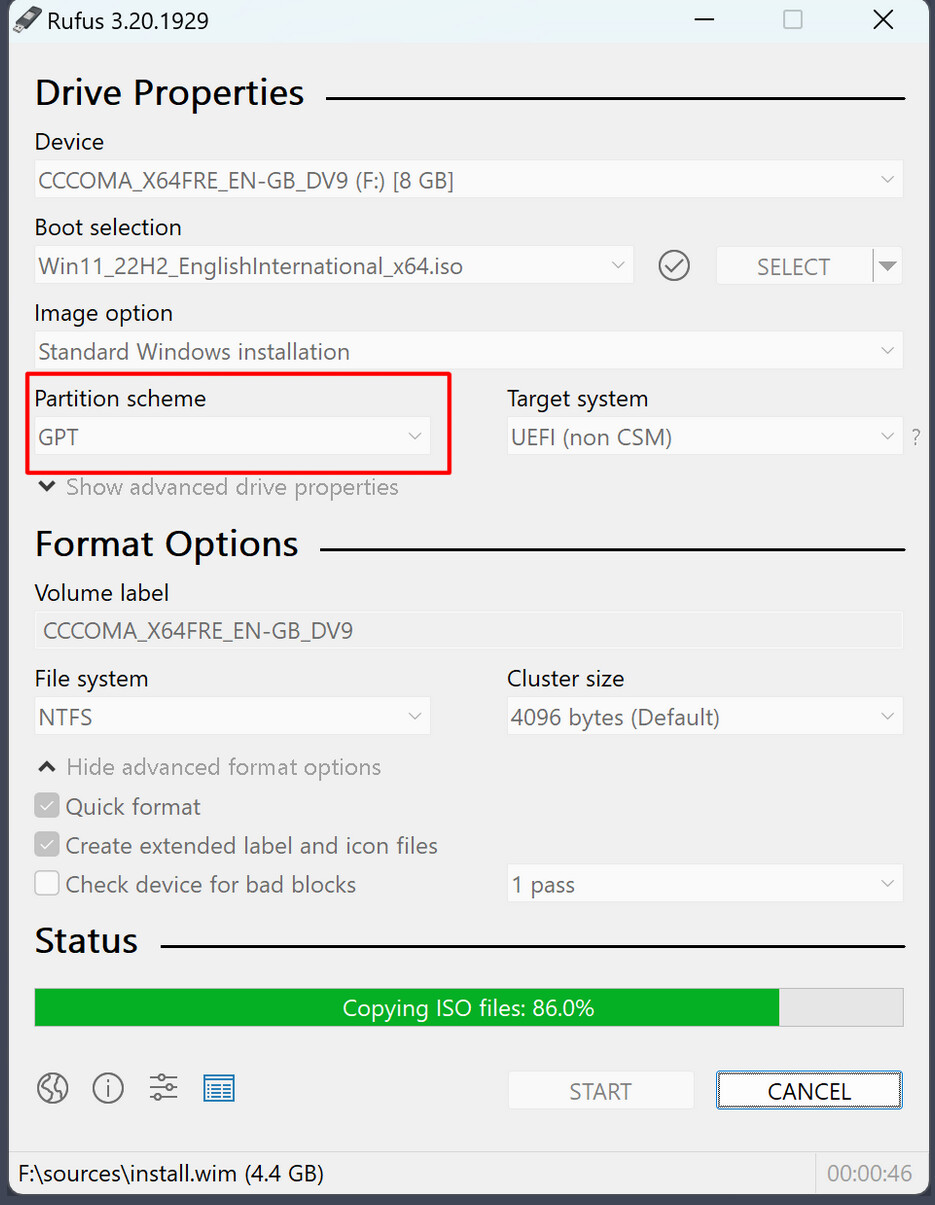
The choice between MBR or UEFI is before partitioning when you create the Zorin bootstick. There you should set the partition scheme MBR or GPT depending on your BIOS settings (MBR for legacy, GPT for UEFI).
Did you checked the downloaded .iso checksum?
Is ubuntu at first boot position in your BIOS?
Which tool did you use to create the Zorin bootstick?
I looked over the log you sent me and the logs confirm that you were installing Zorin OS as EFI,
Microsoft Windows is installed as EFI,
The EFI partition is present and of sufficient size...
But the LiveUSB stick itself was booted as MBR (Legacy).
Probably due to Rufus autoselecting that...
I am not on Windows OS to verify how Rufus operates. But there may be a setting that you can adjust to ensure the LiveUSb stick is written to boot in EFI, not MBR.
This should be found during Formatting of the USB stick, prior to burning the .iso as a bootable medium.
But the short of it is; burning the LiveUSb with the bootable medium set to EFI, not MBR, should solve your issue the most easily and painlessly.
Ya I really kept everything untouched I really thought it was nothing to be honest…. My bad anyway how do I uninstall the Linux partition? To start all over again from the ground up?
Do You have Zorin only installed now? If yes, You simply start the Installation Process again and choose the Option ''Erase disk'' for the Installation. this will delete everything from the Disk. So, if there are any Data You need, save them!
Ok thanks, also to get into specifics, since I am probably all over the place and forgot to say this stuff last night. What happened basically is I was setting up install (I was making a new partition with the “something else” button after I did all that. I rebooted, I then removed the “installation medium” and then press Enter (as told so with the instructions In front of me) then what happened was I got some kind of error. So afterwards as this happened I guess you could say I have to press f11 every time to get into the “Ubuntu” part of the boot which I am gonna assume is not supposed to happen. Which probably means something along the lines of “NVRAM Locked”
As I say here that yes Zorlin OS is probably installed here and fine but one problem could be causing this that is not supposed to happen is pressing “f11” every time if I am not mistaken??? So after I encounter this error I did the research. I Reinserted my USB Stick, Went into Boot Repair And then got the error message on the boot repair telling me the “NVRAM is locked”. That is when I posted this Error problem on the forums last night.
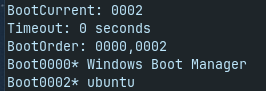
Ubuntu is not at first position in your boot order. To change it to first position enter in terminal
sudo efibootmgr -o 0002, 0000
and then reboot.
Important is that secure boot and other security tools in BIOS are disabled otherwise this change can not be done. Did you take a look if Microsoft WHQL support is disabled?
Maybe your BIOS resets these settings but let's try if it will help.