Yes, you must run boot repair when booted in the LiveUSB of Zorin OS since the files for boot must be unmounted in order to write to them. They cannot be unmounted if you are booted into your bare-metal installation.
I wrote this command and it worked:sudo add-apt-repository ppa:yannubuntu/boot-repair
Yes... that is the command shown here
And here:
And here:
I m confused what will i do
Well i got an idea i will reinstall zorin because it will get more frustrating if we continue to fix the boot
1 Like
And can you tell me what will i do when i finish installing zorin os
And take your time because i will sleep so i will continue tomorrow
1 Like
Maybe we will fix it this time 
And i did reinstall zorin os like 7 times
When I first migrated from Windows to Zorin OS (Linux), I reinstalled a lot.
Reinstalling is a lot like Moving house.
It's easy to do at first, but the more clutter you accumulate, the harder it becomes.
Can u tell me how to fix my gpu
My gpu is 820m
And i think we will install 340m to fix it
sudo apt remove --purge nvidia*
sudo apt install sudo apt install linux-headers-5.4.0-81-generic linux-modules-5.4.0-81-generic linux-modules-extra-5.4.0-81-generic linux-image-5.4.0-81-generic nvidia-340
Reboot and tap esc tab and choose Advanced Options for Zorin
Select the 5.4 kernel to boot from.
Once logged in, test graphics performance through use.
it says unable to locate package with this command:sudo apt install sudo apt install linux-headers-5.4.0-81-generic linux-modules-5.4.0-81-generic linux-modules-extra-5.4.0-81-generic linux-image-5.4.0-81-generic nvidia-340
Does sudo apt install sudo apt install linux-headers-5.4.0-81-generic linux-modules-5.4.0-81-generic linux-modules-extra-5.4.0-81-generic linux-image-5.4.0-81-generic also say that?
yes it does
I have double checked the repositories and those packages are assured present.
Are you connected to the internet?
Have you run
sudo apt update && sudo apt upgrade
no but i did it now
and which command do i use
sudo apt install sudo apt install linux-headers-5.4.0-81-generic linux-modules-5.4.0-81-generic linux-modules-extra-5.4.0-81-generic linux-image-5.4.0-81-generic nvidia-340
or
sudo apt install sudo apt install linux-headers-5.4.0-81-generic
linux-modules-5.4.0-81-generic linux-modules-extra-5.4.0-81-generic
linux-image-5.4.0-81-generic
i tried sudo apt install sudo apt install linux-headers-5.4.0-81-generic linux-modules-5.4.0-81-generic linux-modules-extra-5.4.0-81-generic linux-image-5.4.0-81-generic nvidia-340
and
sudo apt install sudo apt install linux-headers-5.4.0-81-generic
linux-modules-5.4.0-81-generic linux-modules-extra-5.4.0-81-generic
linux-image-5.4.0-81-generic
but i have the same problem
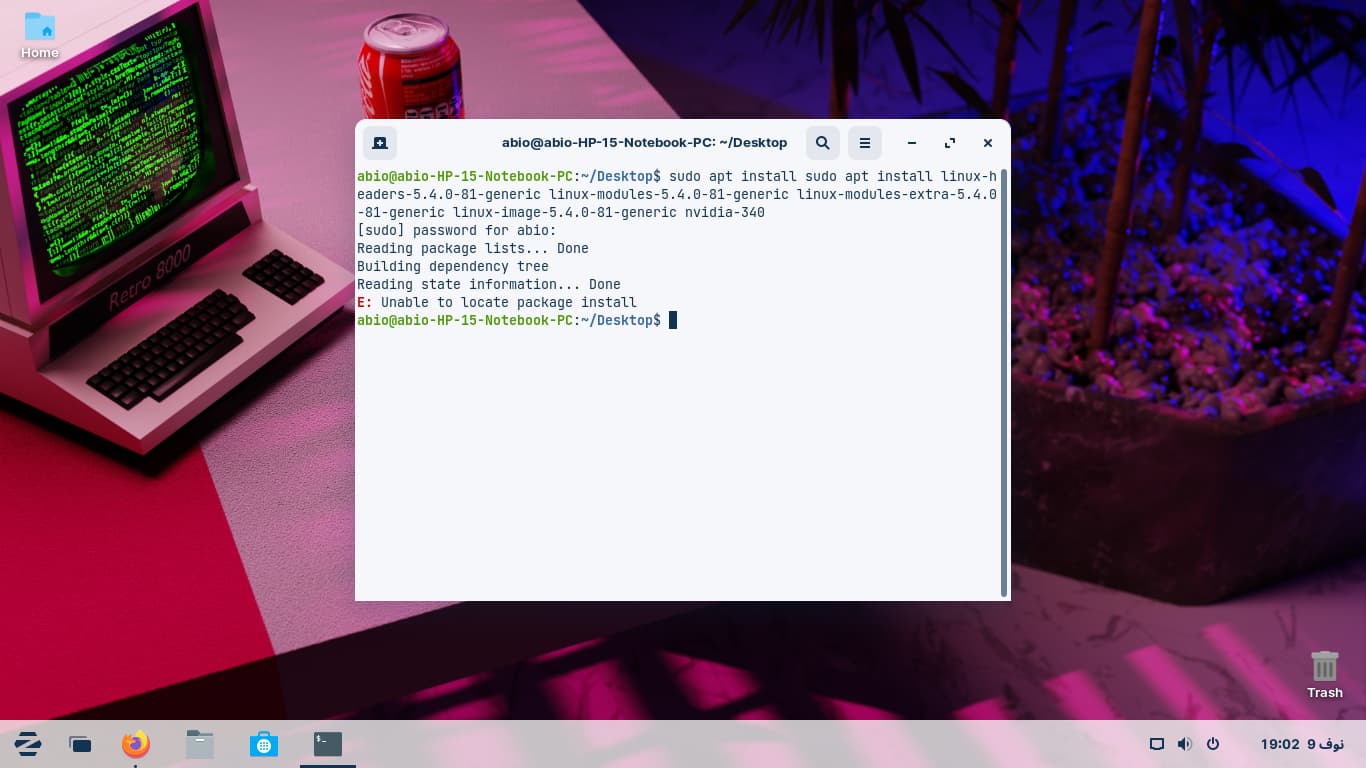
Oh... I see it now. I made a typo. I was thinking while typing instead of trusting my brain to think for itself - and have sudo apt install twice in the command line.
sudo apt install linux-headers-5.4.0-81-generic linux-modules-5.4.0-81-generic linux-modules-extra-5.4.0-81-generic linux-image-5.4.0-81-generic nvidia-340
I knew it was a typo but its ok
its downloading now when i finish i will reboot and choose kernal 5.4.0 and then check if my laptop works fine
is there an error? DKMS: install completed.
...done.
/etc/kernel/postinst.d/initramfs-tools:
update-initramfs: Generating /boot/initrd.img-5.4.0-81-generic
/etc/kernel/postinst.d/zz-update-grub:
Sourcing file /etc/default/grub' Sourcing file /etc/default/grub.d/init-select.cfg'
Generating grub configuration file ...
Found theme: /usr/share/grub/themes/zorin/theme.txt
Found linux image: /boot/vmlinuz-5.15.0-52-generic
Found initrd image: /boot/initrd.img-5.15.0-52-generic
Found linux image: /boot/vmlinuz-5.13.0-30-generic
Found initrd image: /boot/initrd.img-5.13.0-30-generic
Found linux image: /boot/vmlinuz-5.4.0-81-generic
Found initrd image: /boot/initrd.img-5.4.0-81-generic
Adding boot menu entry for UEFI Firmware Settings
done
Processing triggers for initramfs-tools (0.136ubuntu6.7) ...
update-initramfs: Generating /boot/initrd.img-5.15.0-52-generic
Errors were encountered while processing:
nvidia-340
E: Sub-process /usr/bin/dpkg returned an error code (1)
Hmmm... we installed Nvidia-340 before, right?
sudo apt --fix-broken install
sudo apt purge nvidia-*
sudo apt clean && sudo apt autoremove
sudo apt install nvidia-340
but i reinstalled zorin os so how i installed 340m before?