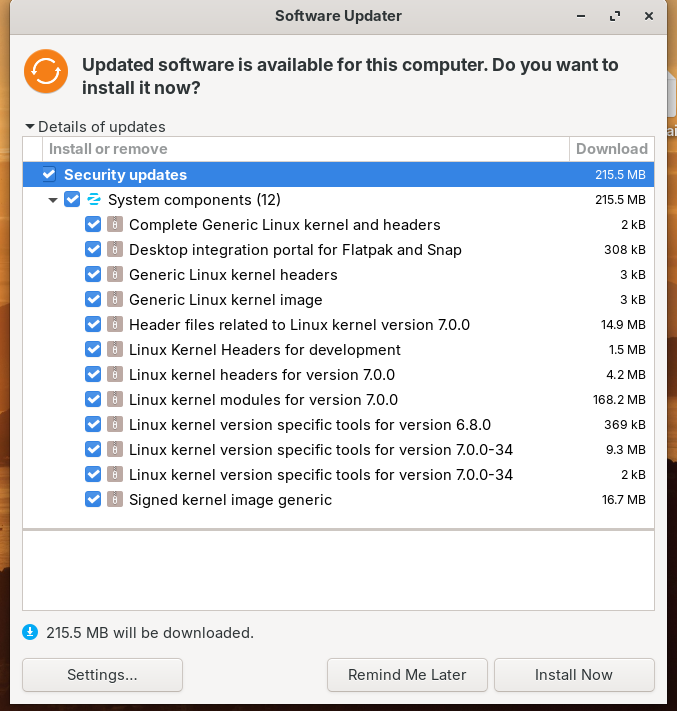
I just want to be sure if there's any definite knowledge either for or against if the below screenshot update will recreate the issues I had before reading the USB storage between OS (win11/Zorin18)?
I can't honestly comment as I only run Zorin as a VM for creating the Unofficial Manual. My advice is if you have not already installed it is to use Timeshift first to make a backup of your system (not /home which is excluded by default anyway) so that you can restore to the time before current update.
Timeshift first is the right call. keep the 6.17 entry in grub so you can pick it if USB dies again.
after the update, before you yank any sticks:
uname -r
ls /boot/vmlinuz-*
if USB flakes, reboot, pick the older kernel at grub, then hold 7.0 until it settles:
sudo apt-mark hold linux-image-7.0.0-34-generic linux-headers-7.0.0-34-generic
(adjust the package names to whatever Software Updater actually queued.)
Actually, I have found the System had already been updated to use Kernel 7.0.0.31 anyways so it seems my previous issue was specific to 7.0.0.28 and fixed past that.
Your answer is still the best solution but my question is moribund. I should have checked the current kernel already!