Can someone please tell me how to find out which kernels are installed on the system, e.g. using the terminal?
I have set up automatic maintenance on my Linux Mint XFCE computer so that always two kernels are retained. However, the Grub menu shows a lot of kernels to choose from in the "Advanced Options".
I would therefore like to check which kernels are actually still installed.
I tried with Synaptic package manager, but it didn't display any installed kernels at category kernels.
Is it required to update grub regulary to show the right kernel versions at "Advanced options" or is it done automatically?
Thank you, wesoliv429! I tested it on my Zorin Virtual Machine and it works. There is a long list but the two kernels with ii at the beginning should be the ones which are still on my system.
I'll try later on my LM computer.
I searched for the kernels again with synaptic package manager and at status installed all packages of the system were listed and there was shown the linux image 6.8 kernel (and also the kernel modules/modules extra and linux-tools) as well as the hwe kernel. So when I want to remove the kernels, I go to Synaptic, or is there an easy method for the terminal to delete old kernels?
Thank you for your replies. On my Mint computer around ten kernels are shown with the dpkg --list command.
"sudo apt autoremove" showed 0 packages to remove,
"sudo apt clean" showed no output.
I already had removed some kernels a time ago, and today I removed again some with Updatemanagement>View>Linux kernels
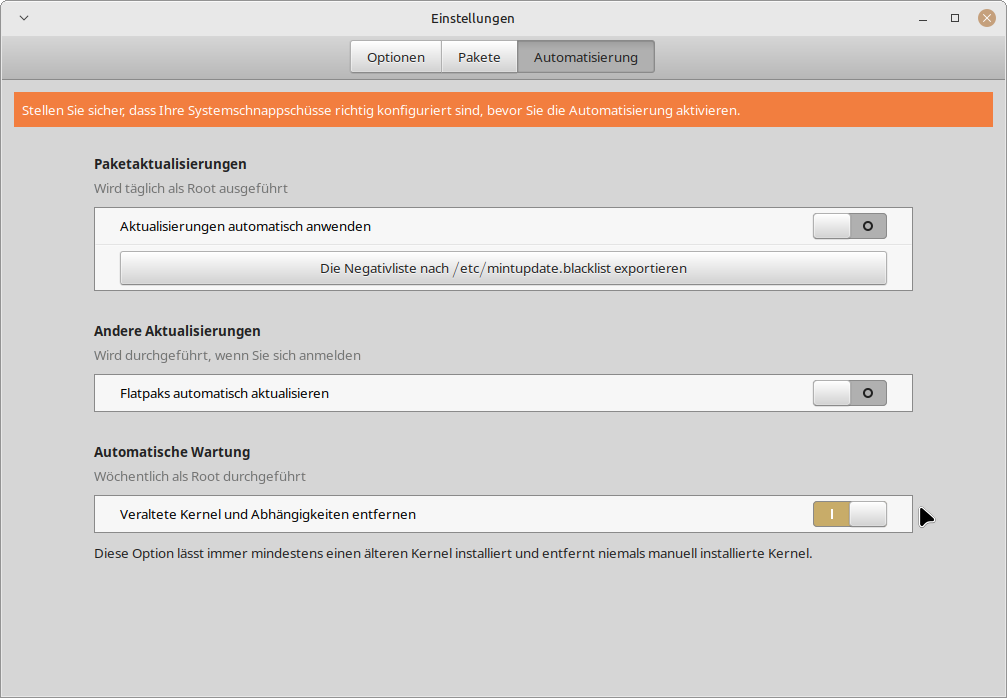
Does anyone know what I'm doing wrong, because my kernels are not being automatically cleaned up?
These are my settings. I don´t have enabled timeshift because it needs too much storage space. I'm not sure if it is required for the automatic maintenance.
I believe it never happens. Can I check somehow if they are marked as manually installed? Maybe they are marked as manually installed because I initialize the update myself when I want to update something.
But just now I took a look at synaptic package manager and there are all my kernels listed as manually installed at category status.
So this is the cause why they are not maintained automatically and aren't removed with 'sudo apt autoremove'.
Probably I would have to change the settings for the updates if I want the kernels to be removed automatically.
Usually in my panel is a icon that shows when updates are available and I make the updates once or twice a week
How can I change the flag of my kernels (or other packages because many packages are shown as manually installed because of my updating method) from manually installed into automatically installed?
In synaptic package manager there seems to be no option to do this.
Do you know an app with a GUI where this can be done by clicking on the packages?
For the kernels a command that would show all installed kernel packages completely would be helpful. The
dpkg --list | grep linux-image
command only lists the one linux-image package of a kernel version, not the other kernel packages like modules and so on.