Thank you very much, littlekun. I'll try it later. Maybe it works with grep -i kernel, grep linux-image doesn't show the headers when I remember right.
Or is it sufficient to select the linux image package, and the other kernel packages will then be included automatically, or are they separate ones?
When looking at Ubuntu Cleaner a while back, noticed that it listed all the kernels and made them easy to remove, if remember correctly. In fact, it was the only cleaner that showed the kernels. Running the commands 'sudo apt update' and 'sudo apt autoremove' should remove the old kernels, but maybe one or two are kept in reserve?
Synaptic does, yes.
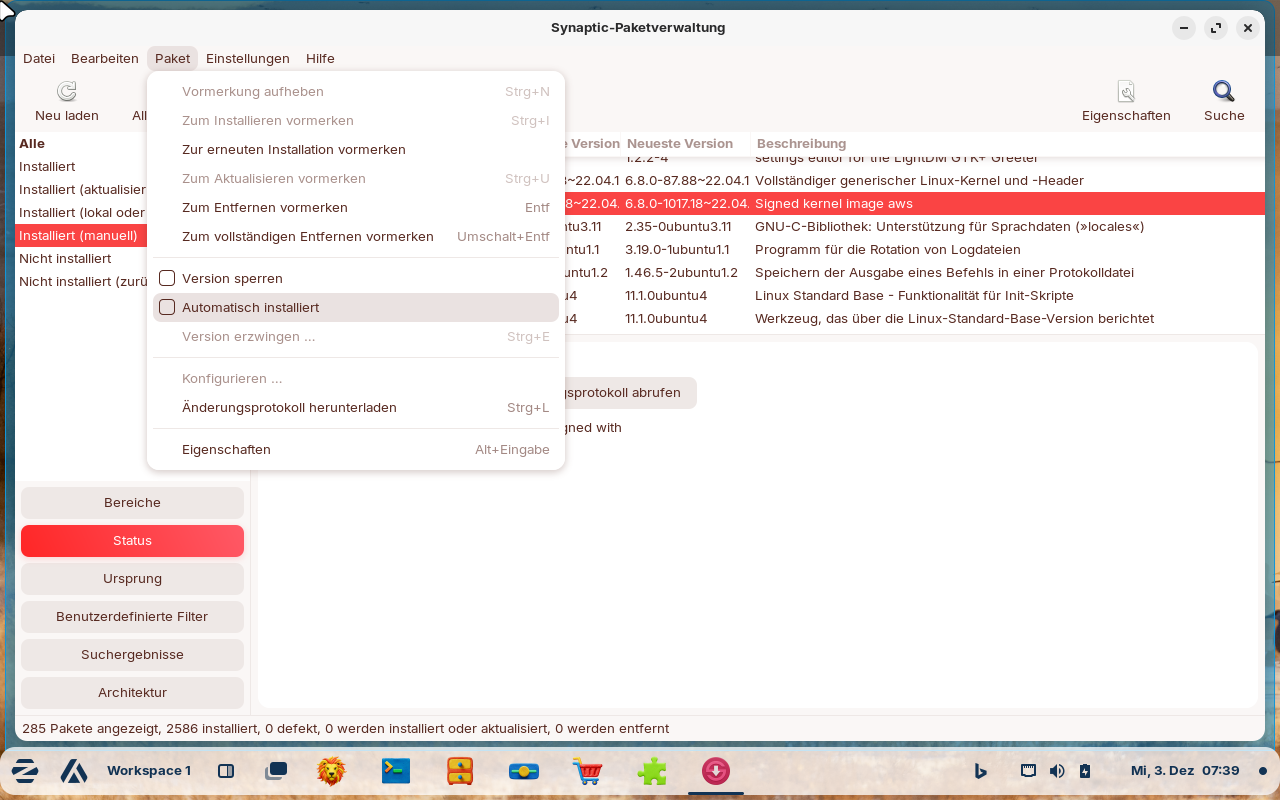
Select the package from the list.
In the Menubar > Package
Select Lock Version to mark hold.
Uncheck if to later revert - there is also the option below to include AutoInstalled.
Unfortunately, this command does not work because all my kernels are set to manually installed for some reason.
Therefore, I am trying to find out if I can change them to automatic installation so that the autoremove command will remove old kernels in the future.
Okay, I'll have to take a closer look there. I already checked the options in synaptics but haven't found it. With your guide I'll try again after breakfast.
Now I found out how to change the packages from manually installed into automatic installed with Synaptic. I tested it on my VM.
Click on the package(s) you want to change, then in the topbar click on "packages" and then enable the field at automatically installed. Now they are no longer shown as manually installed.
Even more people have the problem that all kernels accumulate. I've definitely had to remove more than 15 kernels manually.
Since it works for some people and not for others, I suspect that it doesn't work when you don't let the updates run automatically but click on update yourself. Then all packages and also the kernels are marked as manually installed and the automatic maintenance or 'sudo apt autoremove' don't work then.
I'll test next time how it looks when I use the terminal to update the system and not the update tool. I would like to continue to decide when to update myself, as I have a slow computer and a poor internet connection.
On Z17.3Core. Even when updating kernels as part of a Software Update session (not automatic), Update session completion is usually followed by a new "Update" appearing that lists oldest kernel for removal. However, I have found this is not a clean removal.
I have been using
sudo apt clean
sudo apt-get autoremove
to clear out the dross.
Taking care to read the output of autoremove before hitting "Y".
Also have used Ubuntu Cleaner for same purpose. I find that is a less invasive cleaner app than bleachbit.
Normally, these commands work, and they also work for me on Zorin. However, any packages that are set to manually installed cannot be deleted with these commands. Since the Mint updater has marked all my kernels as manually installed, I have to laboriously remove all kernels one by one by hand.
I just hover or click on where multiple same size wedges appear and see what is there.
I have not done it for a while, but was first thing I tried when my disk occupancy was growing unexpectedly.
Now I regularly cull old kernels and logs, to preserve the little disk space I have.
My hard drive with 128 GiB is really small for dual booting. That's why I'd like to find out how I can avoid all packages installed via the Mint updater being permanently treated as manually installed and thus not being affected by cleaning commands.