Thanks everyone for letting us know about this issue!
The issue
After a period of investigating, debugging, and testing, we have found the source of the issue and fixed it. It appears that there was an error with the interplay between LightDM (the display manager & login screen in Zorin OS Lite) and the latest update to systemd on 32-bit systems. More specifically, it happened after an update patch changed the memory limits, which explains why this error only occurred on 32-bit systems.
This error appears to have only affected computers running Zorin OS 15 Lite 32-bit.
We have recently fixed this error in the latest software updates, specifically in the LightDM greeter. If you are currently running Zorin OS 15 Lite on a 32-bit system, it's now possible to update your system safely.
How to fix it
If you're only seeing a blank screen after booting Zorin OS, you can install the latest update that fixes this issue by following these steps:
- At the operating system boot menu (GRUB) enter "Advanced options" under Zorin OS and select the newest "(recovery mode)" option in the list to boot it.
Tip
If you only have Zorin OS installed on your computer as a single boot (with no other operating systems installed alongside it), you can make the boot menu appear by holding down either the Shift or Esc key immediately after pressing the power button (to turn on your computer).
- When you see the "Recovery Menu", use the down arrow key to highlight the "root" option and press Enter to select it.
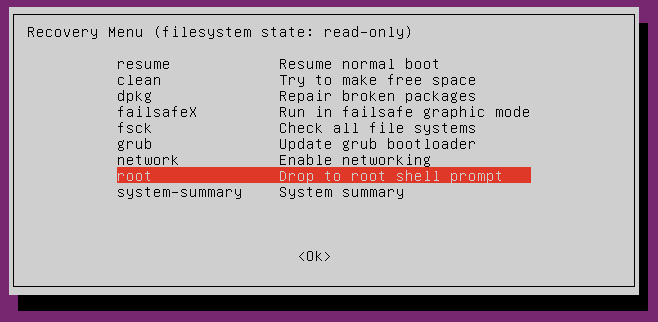
- Press the Enter key again when you see the "Press Enter for maintenance" prompt
- Enter the following 3 commands to install the latest updates:
sudo service network-manager restart
sudo apt update
sudo apt upgrade - After the updates finish installing, enter this command to reboot your computer:
reboot
You should now be able to start Zorin OS normally.