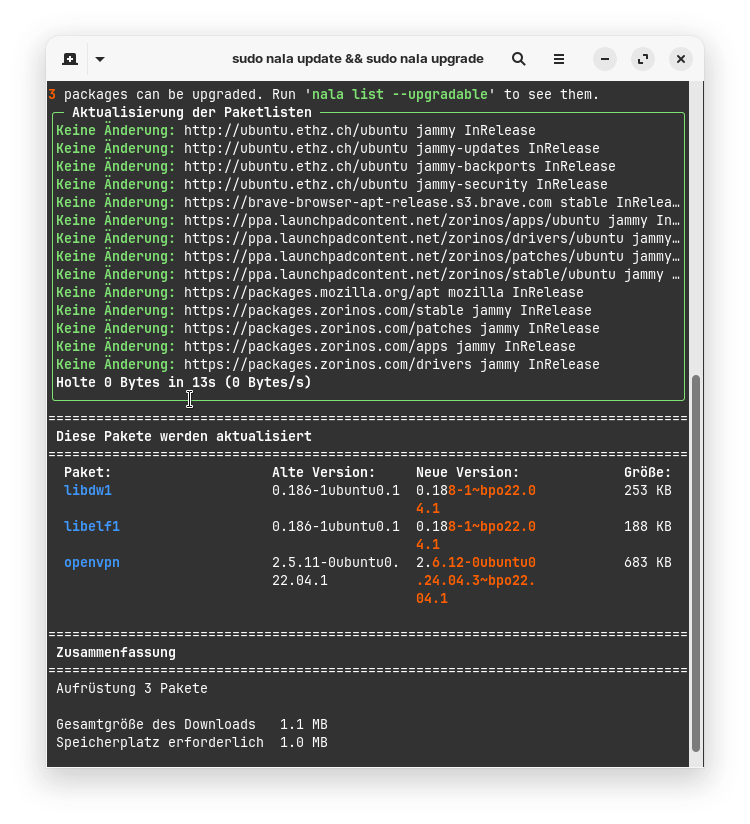
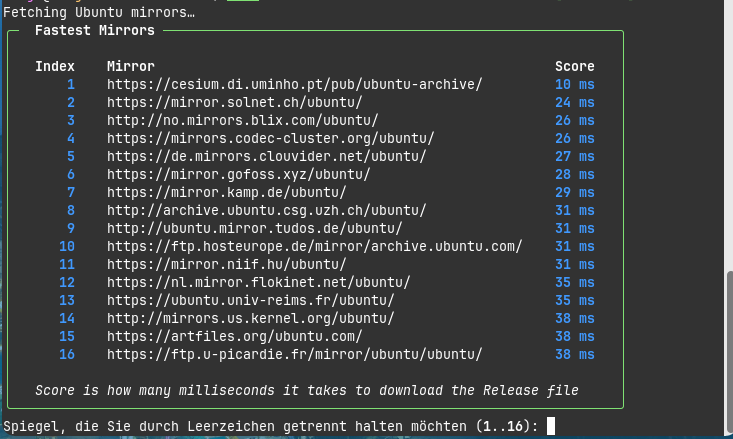
I like the colorful and clear presentation of the terminal output of nala, e.g. when updating the system.
Can someone please tell me how I can set main server for nala when it isn´t shown at command "sudo nala fetch"? Or is the mainserver automatically used when there is set main server in Software&Updates and no ones are set specially for nala? I want to avoid that nala fetches the packages from different servers without my knowledge.
Nala is only a Front End for APT. It is not an own Package Manager. It only makes APT more pretty if You want so. So, when You set Main Server, it is still set up.
The nala fetch Command only searches for Faster Servers to connect with. If You don't have Issues with Download Speed, You don't need to do that. It is the same as when You go in Software & Updates and choose instead of Main Server a specific Server.
Yesterday I installed liquorix kernel for testing on my Zorin VM. The installation worked, but afterwards I ran 'sudo nala update && sudo nala upgrade' and nala showed that one of the latest linux 6.8 generic kernels would be removed (I had booted with liquorix kernel). I entered no for continuing because under no circumstances I wanted to remove my current kernel. I always thought kernel versions are kept until I delete them.
I want to set it up so that nala does not automatically remove packages, but only when I use the command 'sudo nala autoremove' or 'sudo nala clean'. Is that possible? It seems there is an autoremove command included by default.
I found this information:
"A special feature of Nala is that it always integrates 'sudo apt autoremove' with the command 'sudo nala upgrade' and removes packages that are no longer needed. However, this may result in packages that are still needed being removed. This behavior can be prevented with the parameter --no-autoremove:
'sudo nala upgrade --no-autoremove'
"
Is there a .config file where I can set this permanently or do I need to enter the flag with each upgrade command?
Hm, I thought this is only the case when "sudo apt autoremove" is used. At advanced options at grub menu on my Mint Computer I can choose between many older kernel versions. I'll take a look tomorrow how things look in Zorin.
I don't know how Mint handles that but on Zorin I had that in the Past this Way. When A Kernel Update come, it will be installed and the oldes Version will be deleted and the pre-update Version will be saved.
I wasn't aware of that, but yes, Zorin seems to handle it differently than Linux Mint. In Zorin, I can only select a single 6.8 kernel, not countless ones like on my Linux Mint computer. I'm glad I noticed that nala wanted to remove this last and only one 6.8 kernel. I suspect this was because I still had the liquorix and tuxinvader kernels installed and hadn't booted with the 6.8 kernel.
Now I've disabled nala's automatic autoremove function so that I don't have to be careful every time I run 'sudo nala upgrade'.
I was going to post for help regarding Nala and things I don't understand when I run apt update and upgrade. I'm seeing that some things are configured multiple times (I then used the autoremove command), and was wondering if I should remove Nala completely? Rather than create a new topic, I thought I'd ask here as it could be related.
Hit:1 Index of /ubuntu/ jammy-updates InRelease
Hit:2 Index of /ubuntu jammy InRelease
Hit:3 https://brave-browser-apt-release.s3.brave.com stable InRelease
Hit:4 Index of /ubuntu jammy-security InRelease
Hit:5 Index of /ubuntu/ jammy-backports InRelease
Hit:6 Index of /ubuntu jammy InRelease
Hit:7 Index of /ubuntu jammy InRelease
Hit:8 https://packages.mozilla.org/apt mozilla InRelease
Hit:9 Index of /zorinos/apps/ubuntu jammy InRelease
Hit:10 Index of /zorinos/drivers/ubuntu jammy InRelease
Hit:11 Index of /zorinos/patches/ubuntu jammy InRelease
Hit:12 Index of /zorinos/stable/ubuntu jammy InRelease
Hit:13 Index of /stable/ jammy InRelease
Hit:14 Index of /patches/ jammy InRelease
Hit:15 Index of /apps/ jammy InRelease
Hit:16 Index of /drivers/ jammy InRelease
Reading package lists... Done
Building dependency tree... Done
Reading state information... Done
10 packages can be upgraded. Run 'apt list --upgradable' to see them.
W: Target Packages (restricted/binary-amd64/Packages) is configured multiple times in /etc/apt/sources.list:5 and /etc/apt/sources.list.d/nala-sources.list:3
W: Target Packages (restricted/binary-i386/Packages) is configured multiple times in /etc/apt/sources.list:5 and /etc/apt/sources.list.d/nala-sources.list:3
W: Target Packages (restricted/binary-all/Packages) is configured multiple times in /etc/apt/sources.list:5 and /etc/apt/sources.list.d/nala-sources.list:3
W: Target Translations (restricted/i18n/Translation-en_US) is configured multiple times in /etc/apt/sources.list:5 and /etc/apt/sources.list.d/nala-sources.list:3
W: Target Translations (restricted/i18n/Translation-en) is configured multiple times in /etc/apt/sources.list:5 and /etc/apt/sources.list.d/nala-sources.list:3
W: Target DEP-11 (restricted/dep11/Components-amd64.yml) is configured multiple times in /etc/apt/sources.list:5 and /etc/apt/sources.list.d/nala-sources.list:3
W: Target DEP-11 (restricted/dep11/Components-all.yml) is configured multiple times in /etc/apt/sources.list:5 and /etc/apt/sources.list.d/nala-sources.list:3
W: Target DEP-11-icons-small (restricted/dep11/icons-48x48.tar) is configured multiple times in /etc/apt/sources.list:5 and /etc/apt/sources.list.d/nala-sources.list:3
W: Target DEP-11-icons (restricted/dep11/icons-64x64.tar) is configured multiple times in /etc/apt/sources.list:5 and /etc/apt/sources.list.d/nala-sources.list:3
W: Target DEP-11-icons-hidpi (restricted/dep11/icons-64x64@2.tar) is configured multiple times in /etc/apt/sources.list:5 and /etc/apt/sources.list.d/nala-sources.list:3
W: Target CNF (restricted/cnf/Commands-amd64) is configured multiple times in /etc/apt/sources.list:5 and /etc/apt/sources.list.d/nala-sources.list:3
W: Target CNF (restricted/cnf/Commands-all) is configured multiple times in /etc/apt/sources.list:5 and /etc/apt/sources.list.d/nala-sources.list:3
W: Target Packages (multiverse/binary-amd64/Packages) is configured multiple times in /etc/apt/sources.list:26 and /etc/apt/sources.list.d/nala-sources.list:3
W: Target Packages (multiverse/binary-i386/Packages) is configured multiple times in /etc/apt/sources.list:26 and /etc/apt/sources.list.d/nala-sources.list:3
W: Target Packages (multiverse/binary-all/Packages) is configured multiple times in /etc/apt/sources.list:26 and /etc/apt/sources.list.d/nala-sources.list:3
W: Target Translations (multiverse/i18n/Translation-en_US) is configured multiple times in /etc/apt/sources.list:26 and /etc/apt/sources.list.d/nala-sources.list:3
W: Target Translations (multiverse/i18n/Translation-en) is configured multiple times in /etc/apt/sources.list:26 and /etc/apt/sources.list.d/nala-sources.list:3
W: Target DEP-11 (multiverse/dep11/Components-amd64.yml) is configured multiple times in /etc/apt/sources.list:26 and /etc/apt/sources.list.d/nala-sources.list:3
W: Target DEP-11 (multiverse/dep11/Components-all.yml) is configured multiple times in /etc/apt/sources.list:26 and /etc/apt/sources.list.d/nala-sources.list:3
W: Target DEP-11-icons-small (multiverse/dep11/icons-48x48.tar) is configured multiple times in /etc/apt/sources.list:26 and /etc/apt/sources.list.d/nala-sources.list:3
W: Target DEP-11-icons (multiverse/dep11/icons-64x64.tar) is configured multiple times in /etc/apt/sources.list:26 and /etc/apt/sources.list.d/nala-sources.list:3
W: Target DEP-11-icons-hidpi (multiverse/dep11/icons-64x64@2.tar) is configured multiple times in /etc/apt/sources.list:26 and /etc/apt/sources.list.d/nala-sources.list:3
W: Target CNF (multiverse/cnf/Commands-amd64) is configured multiple times in /etc/apt/sources.list:26 and /etc/apt/sources.list.d/nala-sources.list:3
W: Target CNF (multiverse/cnf/Commands-all) is configured multiple times in /etc/apt/sources.list:26 and /etc/apt/sources.list.d/nala-sources.list:3
W: Target Packages (restricted/binary-amd64/Packages) is configured multiple times in /etc/apt/sources.list:5 and /etc/apt/sources.list.d/nala-sources.list:3
W: Target Packages (restricted/binary-i386/Packages) is configured multiple times in /etc/apt/sources.list:5 and /etc/apt/sources.list.d/nala-sources.list:3
W: Target Packages (restricted/binary-all/Packages) is configured multiple times in /etc/apt/sources.list:5 and /etc/apt/sources.list.d/nala-sources.list:3
W: Target Translations (restricted/i18n/Translation-en_US) is configured multiple times in /etc/apt/sources.list:5 and /etc/apt/sources.list.d/nala-sources.list:3
W: Target Translations (restricted/i18n/Translation-en) is configured multiple times in /etc/apt/sources.list:5 and /etc/apt/sources.list.d/nala-sources.list:3
W: Target DEP-11 (restricted/dep11/Components-amd64.yml) is configured multiple times in /etc/apt/sources.list:5 and /etc/apt/sources.list.d/nala-sources.list:3
W: Target DEP-11 (restricted/dep11/Components-all.yml) is configured multiple times in /etc/apt/sources.list:5 and /etc/apt/sources.list.d/nala-sources.list:3
W: Target DEP-11-icons-small (restricted/dep11/icons-48x48.tar) is configured multiple times in /etc/apt/sources.list:5 and /etc/apt/sources.list.d/nala-sources.list:3
W: Target DEP-11-icons (restricted/dep11/icons-64x64.tar) is configured multiple times in /etc/apt/sources.list:5 and /etc/apt/sources.list.d/nala-sources.list:3
W: Target DEP-11-icons-hidpi (restricted/dep11/icons-64x64@2.tar) is configured multiple times in /etc/apt/sources.list:5 and /etc/apt/sources.list.d/nala-sources.list:3
W: Target CNF (restricted/cnf/Commands-amd64) is configured multiple times in /etc/apt/sources.list:5 and /etc/apt/sources.list.d/nala-sources.list:3
W: Target CNF (restricted/cnf/Commands-all) is configured multiple times in /etc/apt/sources.list:5 and /etc/apt/sources.list.d/nala-sources.list:3
W: Target Packages (multiverse/binary-amd64/Packages) is configured multiple times in /etc/apt/sources.list:26 and /etc/apt/sources.list.d/nala-sources.list:3
W: Target Packages (multiverse/binary-i386/Packages) is configured multiple times in /etc/apt/sources.list:26 and /etc/apt/sources.list.d/nala-sources.list:3
W: Target Packages (multiverse/binary-all/Packages) is configured multiple times in /etc/apt/sources.list:26 and /etc/apt/sources.list.d/nala-sources.list:3
W: Target Translations (multiverse/i18n/Translation-en_US) is configured multiple times in /etc/apt/sources.list:26 and /etc/apt/sources.list.d/nala-sources.list:3
W: Target Translations (multiverse/i18n/Translation-en) is configured multiple times in /etc/apt/sources.list:26 and /etc/apt/sources.list.d/nala-sources.list:3
W: Target DEP-11 (multiverse/dep11/Components-amd64.yml) is configured multiple times in /etc/apt/sources.list:26 and /etc/apt/sources.list.d/nala-sources.list:3
W: Target DEP-11 (multiverse/dep11/Components-all.yml) is configured multiple times in /etc/apt/sources.list:26 and /etc/apt/sources.list.d/nala-sources.list:3
W: Target DEP-11-icons-small (multiverse/dep11/icons-48x48.tar) is configured multiple times in /etc/apt/sources.list:26 and /etc/apt/sources.list.d/nala-sources.list:3
W: Target DEP-11-icons (multiverse/dep11/icons-64x64.tar) is configured multiple times in /etc/apt/sources.list:26 and /etc/apt/sources.list.d/nala-sources.list:3
W: Target DEP-11-icons-hidpi (multiverse/dep11/icons-64x64@2.tar) is configured multiple times in /etc/apt/sources.list:26 and /etc/apt/sources.list.d/nala-sources.list:3
W: Target CNF (multiverse/cnf/Commands-amd64) is configured multiple times in /etc/apt/sources.list:26 and /etc/apt/sources.list.d/nala-sources.list:3
W: Target CNF (multiverse/cnf/Commands-all) is configured multiple times in /etc/apt/sources.list:26 and /etc/apt/sources.list.d/nala-sources.list:3
Reading package lists... Done
Building dependency tree... Done
Reading state information... Done
Calculating upgrade... Done
The following packages have been kept back:
libnss-systemd libpam-systemd libsystemd0 libsystemd0:i386 libudev1 systemd
systemd-oomd systemd-sysv systemd-timesyncd udev
0 upgraded, 0 newly installed, 0 to remove and 10 not upgraded.
You can check your sources for duplicates and comment them out with # or possibly remove that line.
Open your /etc/apt/sources.list in text editor and enable showing Line Numbers, then looking at your terminal output, you can look right to the specified line number to check if a line is duplicated.
I have only been using nala for a short time and am not yet entirely sure whether it is really beneficial to use it.
The warning message may be be related to different (additional) servers for nala than for apt, but I'm not sure.
You could open
/etc/apt/sources.list.d/nala-sources.list
and take a look what is in there and also what is in
/etc/apt/sources.list
It could help to use the same server as for apt and not to set other servers at the command 'sudo nala fetch'
Perhaps it would help to delete the entire file
/etc/apt/sources.list.d/nala-sources.list
But I'm not sure, I'm not at the computer at the moment and can't look what is in my nala-sources.list file.
To test if it would help you could rename the file by adding .bak or move the original file to another place.
Interesting that You have a nala-sources.list File. I tried nala in the Past but can't remeber that I had one. And You didn't seem to have added a Repo for nala if I see that right.
Now, you have 2 Options to solve that. Like @Aravisian already wrote, you have to comment out a Source to avoid the multiple Configuartions Isse. You can go in the default sources.list File and comment out the Lines 5 and 26 or You go in the nala-sources.list File and comment out Line 3.
What You choose, is up to You. I personally would choose the nala-sources.list File to avoid Issues with the default sources.list File from the System. When You would uninstall nala for Example, You would have to remember to go back to the sources.list file to make the changes back. And because I know myself, I would probably forget it, hahaha! So, I would take the nala one.
I'm not sure if nala really works exactly the same as apt. With apt, I can only set one server to download from, but with nala, there are several. I'm not entirely convinced that this won't cause problems on the system. Until now, it made me more headaches than apt The program doesn't seem to be widely used.
I installed Nala - as mentioned earlier, and it did not change any of my sources at all.
Summary
ls /etc/apt/sources.list.d
brave-browser-release.list                               zorin.list
brave-browser-release.list.save                          zorin.list.save
ernstp-ubuntu-mesarc-noble.sources                       zorinos-ubuntu-apps-noble.sources
google-chrome.list                                       zorinos-ubuntu-apps-noble.sources.save
google-chrome.list.save                                  zorinos-ubuntu-drivers-noble.sources
luigifab-ubuntu-packages-noble.sources                   zorinos-ubuntu-drivers-noble.sources.save
luigifab-ubuntu-packages-noble.sources.save              zorinos-ubuntu-patches-noble.sources
ubuntuhandbook1-ubuntu-conkymanager2-noble.sources       zorinos-ubuntu-patches-noble.sources.save
ubuntuhandbook1-ubuntu-conkymanager2-noble.sources.save  zorinos-ubuntu-stable-noble.sources
xubuntu-dev-ubuntu-staging-noble.sources                 zorinos-ubuntu-stable-noble.sources.save
xubuntu-dev-ubuntu-staging-noble.sources.save

cat /etc/apt/sources.list
# deb cdrom:[Zorin-OS 18 Core 64bit]/ noble main restricted

# See http://help.ubuntu.com/community/UpgradeNotes for how to upgrade to
# newer versions of the distribution.
deb http://archive.ubuntu.com/ubuntu noble main restricted
# deb-src http://us.archive.ubuntu.com/ubuntu/ noble main restricted

## Major bug fix updates produced after the final release of the
## distribution.
deb http://archive.ubuntu.com/ubuntu noble-updates main restricted
# deb-src http://us.archive.ubuntu.com/ubuntu/ noble-updates main restricted

## N.B. software from this repository is ENTIRELY UNSUPPORTED by the Ubuntu
## team. Also, please note that software in universe WILL NOT receive any
## review or updates from the Ubuntu security team.
deb http://archive.ubuntu.com/ubuntu noble universe
# deb-src http://us.archive.ubuntu.com/ubuntu/ noble universe
deb http://archive.ubuntu.com/ubuntu noble-updates universe
# deb-src http://us.archive.ubuntu.com/ubuntu/ noble-updates universe

## N.B. software from this repository is ENTIRELY UNSUPPORTED by the Ubuntu
## team, and may not be under a free licence. Please satisfy yourself as to
## your rights to use the software. Also, please note that software in
## multiverse WILL NOT receive any review or updates from the Ubuntu
## security team.
deb http://archive.ubuntu.com/ubuntu noble multiverse
# deb-src http://us.archive.ubuntu.com/ubuntu/ noble multiverse
deb http://archive.ubuntu.com/ubuntu noble-updates multiverse
# deb-src http://us.archive.ubuntu.com/ubuntu/ noble-updates multiverse

## N.B. software from this repository may not have been tested as
## extensively as that contained in the main release, although it includes
## newer versions of some applications which may provide useful features.
## Also, please note that software in backports WILL NOT receive any review
## or updates from the Ubuntu security team.
deb http://archive.ubuntu.com/ubuntu noble-backports main restricted universe multiverse
# deb-src http://us.archive.ubuntu.com/ubuntu/ noble-backports main restricted universe multiverse

deb http://archive.ubuntu.com/ubuntu noble-security main restricted
# deb-src http://security.ubuntu.com/ubuntu noble-security main restricted
deb http://archive.ubuntu.com/ubuntu noble-security universe
# deb-src http://security.ubuntu.com/ubuntu noble-security universe
deb http://archive.ubuntu.com/ubuntu noble-security multiverse
# deb-src http://security.ubuntu.com/ubuntu noble-security multiverse

# This system was installed using small removable media
# (e.g. netinst, live or single CD). The matching "deb cdrom"
# entries were disabled at the end of the installation process.
# For information about how to configure apt package sources,
# see the sources.list(5) manual.
I also had no problems with the sources until now, but I didn't set up other servers with the 'nala fetch' command. I'm not entirely sure what would happen when I enter multiple servers there. Perhaps only then a separate nala-sources.list is created.
I'll take a closer look later.
Wish if we could use apt 3.0 under Zorin 18 but sadly it's available for Ubuntu 24.10 onwards. For Zorin it will take even longer until we get Zorin 19 (which I guess will happen in 2027).
APT 3.0 the improvements are really good, the new UI gives much better clarity than the current one.