Problems involving the file explorer

Just uninstalled a game i had on steam and now i just cant open the file explorer.

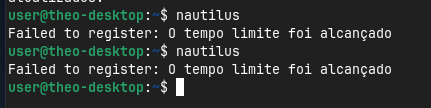
As you can see, nautilus failed to register and reached the time limit. I have no idea how i keep runing into these kinds of problems.

Update: Just reopened nautilus after killing its processes but i get this output in the terminal
Captura de tela de 2026-06-16 20-19-43

How i fix it?

Maybe some ideas of that thread can help you:

Do you have setup a network share? If not, you can try to remove nautilus-share.

Perhaps it helps to reinstall nautilus

sudo apt reinstall nautilus
2 Likes

Nautilus for GNOME 46 is known for its bugs and Nautilus_v50 is only available on gnome 50.

I recommend you to use Dolphin File Manager:

Your problem is nautilus share, you made a share with named "net usershare info"
Give us the output of

testparm
2 Likes

No, it is known for extensions bugs, because many extensions have bugs, install the same extension in nautilus 50 and you will have a bug, since I removed forlder-color from fresh new zorin 18 I never encounter any nautilus bug....

testparm not found, should i install this samba-commun-bin?

No, i am reading the post you linked before reinstalling nautilus.

Sure because as you installed nautilus-share, it's not a standalone extension
Take a look here I made a guide

1 Like

I didn't have folder-color but I had open with vscode python extension from some years ago. And nautilus was randomly freezing both in ubuntu and zorin. Anyway i removed the extension and even the nautilus extensions app but still sometimes it was getting stuck. I was mounting One/Google Drive on boot up using rclone and my solution was to use bisync command. I never had these issues with other file managers that's why I'm not a fan of nautilus. but I like your extensions to add more features to nautilus to make it like dolphin.. and I believe you work harder than the nautilus devs themselves. Thanks

2 Likes