give me the output of
pactl list sinks | grep -A 10 "Name: alsa_output.pci-0000_00_1f.3.analog-stereo.2"
give me the output of
pactl list sinks | grep -A 10 "Name: alsa_output.pci-0000_00_1f.3.analog-stereo.2"
	Name: alsa_output.pci-0000_00_1f.3.analog-stereo.2
	Description: Built-in Audio Analog Stereo
	Driver: PipeWire
	Sample Specification: s32le 2ch 48000Hz
	Channel Map: front-left,front-right
	Owner Module: 4294967295
	Mute: no
	Volume: front-left: 65536 / 100% / 0,00 dB,   front-right: 65536 / 100% / 0,00 dB
	        balance 0,00
	Base Volume: 65536 / 100% / 0,00 dB
	Monitor Source: alsa_output.pci-0000_00_1f.3.analog-stereo.2.monitor
this now
pactl list sinks | grep "State:"
Aha: Its SUSPENDED
Run these commands right now to fix it:
mkdir -p ~/.config/pipewire/pipewire.conf.d
Then:
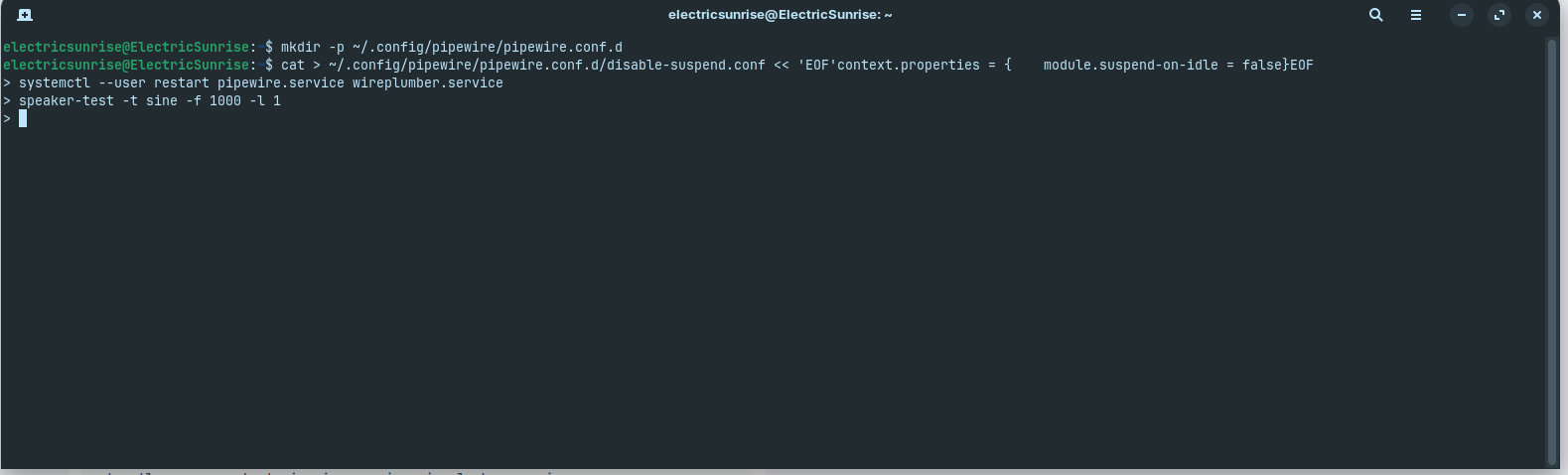
cat > ~/.config/pipewire/pipewire.conf.d/disable-suspend.conf << 'EOF'
context.properties = {
    module.suspend-on-idle = false
}
EOF
Then restart PipeWire:
systemctl --user restart pipewire.service wireplumber.service
Wait about 5 seconds for it to restart, then test:
speaker-test -t sine -f 1000 -l 1
Press Ctrl+C after you hear the beep.
Unfortunately..... nothing. The commands went through, I waited about 8 seconds and tried it twice. I checked the specs page, this computer has 2x5w speakers.
verify the config was actually created:
cat ~/.config/pipewire/pipewire.conf.d/disable-suspend.conf
Does that file exist and show the content?
Also, check the PipeWire logs to see if there are errors:
journalctl --user -u pipewire.service -n 30 --no-pager
First one: No such file or directory.
Second one: There seem to be some errors:
Mai 29 12:29:44 ElectricSunrise systemd[2009]: Started pipewire.service - PipeWire Multimedia Service.
Mai 29 12:29:44 ElectricSunrise pipewire[2027]: mod.jackdbus-detect: Failed to receive jackdbus reply: org.freedesktop.DBus.Error.ServiceUnknown: The name org.jackaudio.service was not provided by any .service files
This Jackdbus error occurs multiple times.
Also there is this:
Mai 29 13:03:26 ElectricSunrise pipewire[22901]: ALSA lib seq_hw.c:528:(snd_seq_hw_open) open /dev/snd/seq failed: Permission denied
Mai 29 13:03:26 ElectricSunrise pipewire[22901]: spa.alsa: open failed: Permission denied
Should I restart the PC maybe?
it didn't create the file, of course, be sure you copy correctly all commands
Run these commands right now to fix it:
mkdir -p ~/.config/pipewire/pipewire.conf.d
Then:
cat > ~/.config/pipewire/pipewire.conf.d/disable-suspend.conf << 'EOF'
context.properties = {
    module.suspend-on-idle = false
}
EOF
Then restart PipeWire:
systemctl --user restart pipewire.service wireplumber.service
Wait about 5 seconds for it to restart, then test:
speaker-test -t sine -f 1000 -l 1
Press Ctrl+C after you hear the beep.
No sound unfortunately.I clicked the copy button on this forum and then ctrl+shift+v in the console. Thats correct, yes? 
I have to shut down the PC for today. Thanks a bunch for helping so far. Ill be around again tomorrow (European times that is).
<3
show me the output of
cat ~/.config/pipewire/pipewire.conf.d/disable-suspend.conf
When you send something from IA you need to tell the user
The rules are not made by what you want or what you think
So for now I will not answer you anymore
And your post will never help because we did all what AI suggest, the context is important, not the topic title....
Moderator Note:
When You post AI Content, it should be declared as such like You can read in the Forum Guidelines:
If you're quoting another source – such as a guide on an external website or output from a generative AI tool – it's recommended to label this clearly in your post. That way, the original author would be fairly credited for their work and other members would have more context about the origin of this knowledge.
To say that clear: You can ask AI, but when You post it here, write that it is AI Content. Simply write at the Beginning something like ''I searched with XY AI for this Issue and get [Output]'' or similar. Something that shows that it is AI and from what AI Model/Software.
Hey,
are you talking about me? I have not used AI at all in this? As i wrote I got some commands from this forum here (Post 1) after that the only commands I put in where the ones you suggested? Not sure what is happening right now?
the result from your last command is this:
cat ~/.config/pipewire/pipewire.conf.d/disable-suspend.conf
cat: /home/electricsunrise/.config/pipewire/pipewire.conf.d/disable-suspend.conf: No such file or directory
Im grateful for your help!
I was not talking to you, it was another user and the post was removed.
So do this in terminal,copy entire the block
cat > ~/.config/pipewire/pipewire.conf.d/disable-suspend.conf << 'EOF'
context.properties = {
    module.suspend-on-idle = false
}
EOF
after that give me the output of
cat ~/.config/pipewire/pipewire.conf.d/disable-suspend.conf
OKay.
context.properties = {
module.suspend-on-idle = false
}
cool, do that now
systemctl --user restart pipewire.service wireplumber.service
and test sound
speaker-test -t sine -f 1000 -l 1
The Bluetooth speaker now works again, amazing thank you. However the inbuilt speakers dont.
Maybe hardware?
give me the output of
journalctl --user -u pipewire.service -n 30 --no-pager