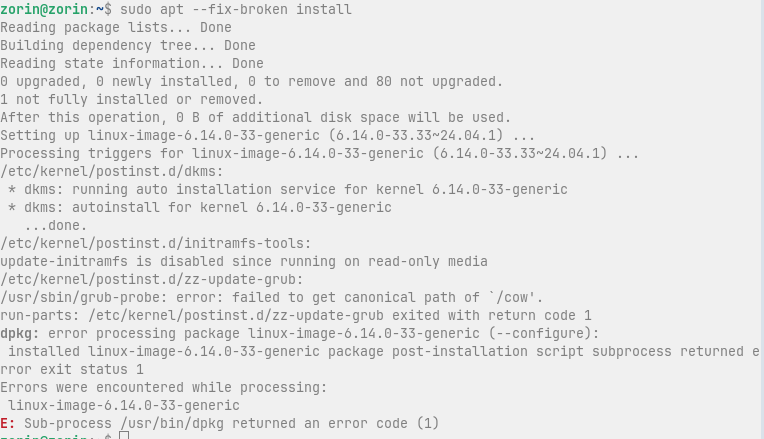
Hi I'm getting the following error when I try to install Zorin 18 Pro onto my machine, I've been running 17 Pro on it pretty much since it was released
"Sub-process /usr/bin/dpkg returned an error code (1)"
Some packages are in a broken state…
I tried both Pro and Core, using both Ventoy to run the iso and Rufus to burn the ISO to USB.
First: I repaired the Subprocess error Link, You posted because it doesn't work.
To the Topic: Did You checked the Checksums of the ISO's? Did You tried downloading the ISO's again from a different Server? Did You tried a complete Offline Installation?
After my first attempt, I saw the same error and could not boot to disk. I needed to repair the boot sector, which worked, but the Zorin install on disk did not have any drivers except Nvidia.
So I have been attempting fresh installs since then with no luck
The USB runs a checksum automatically before install
The BIOS secure boot, fast boot and TPM are disabled
Had same issues when installing Zorin 18. Same error and was unable to find my ssd as bootable. But downloaded iso of Zorin 17.3 from another pc and everything just worked.
Hello, I ran into the same problem while trying to install Zorin 18 Pro, but eventually succeeded. If it is still relevant, here's what I've done.
My configuration:
Ryzen 7 3700X
nidia 2070S.
I tried to install several times, after turning fast and secure boot off, checking the ISO, switching USB drive, etc...
I finally succeded by doing the following:
I selected the "Try or install Zorin OS without nvidia modern drivers"
Then "Try Zorin OS"
Then, I selected the icon "Install Zorin OS" on the desktop
Finally, I unchecked all the updates and drivers downloads
I don't know why, but this particular configuration did the trick, and the install went fine. I could install all the relevant drivers afterwards (except for my Wi-Fi card) without any problem. Hope it can help someone.