I did an update, which included several things. I have to revert back to: 6.17.0-40-generic.
Version 7.#### gave me a kernel error on boot.
1 Like
1 Like
@Bob3214 as you can see in the list of topics today, the latest "kernel update" broke several things. It seems that for now, if the older kernel works, you should keep using that, although someone here might be able to give you a more personalised solution.
For that, it seems that the problems might be linked to specific drivers so if you could send a screenshot of your
Software & Updates > Additional drivers List
(unless it's empty) - then that might help fix it!
PS - I'm having the same problem, here
1 Like
No addtional drivers (It's empty).
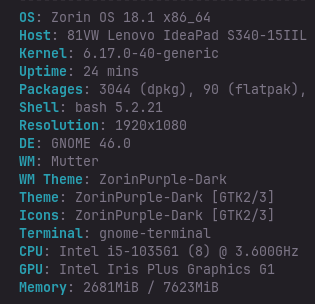
Here's a screenshot using nefetch, but idk if this will help because I'm rolled back to 6.17.0-40-
1 Like
If you get back to 6.17.0-40 kernel you should stay like this with this tutorial
2 Likes
I tried the commands and it still defaulted to the 7.## kernel. I'll just not shur down my laptop for a while and hopefully an update is released soon.
Had you booted with a kernel 6.17? It doesn't work when you boot with kernel 7.0. Also don't forget to run sudo update-grub after editing and saving the file.
2 Likes
I had a similar issue to this (i think?) I was trying to install a usb-blutooth dongle
I figured i would do a pkg update while i was at it.
Sudo apt update
Sudo apt upgrade
Sudo apt install (blutooth?)
Anyway it gave me an error about manually updating some dpkg and when i tried to get more info boom
System reboot
Now wont boot from main drive or from my zorin live dongle.
Im in the process of reformatting my LE and trying again.
Some major failure though on my boot. Im dead in the water
Adendum i dont remeber all the exact commands this happened 9-10am and been fighting it all day(now 9pm)
What is make and model of your Notebook? What software did you use to make your live installation media?
Not sure exactly what you are asking. I case swapped a optiplex 7010 and originally used rufus on an old ms10 laptop. I have since shifted over to ventoy on linux for my boot stick.
When i do a #sudo apt update i get a couple warnings and errors about manual updates and to do something like ls --upgradable to find out whoch ones.
1 Like
OK. Do you see a menu at all at boot? If not try pressing Esc, Tab or Left Shift to get GRUB Menu and choose advanced options, then recovery mode.
This should produce a menu list of options. First ensure you have a network connection to the internet, then select "Drop to root terminal".
Once there enter:
sudo dpkg --configure -a
This should repair any incomplete installation of packages that crashed the system.
I reloaded zorin and currently restoring a time shift from a couple days ago. Im hesitant though about if it will restore 18.1 though and rerunnin a current update.
May also need to switch to another thread but will
#sudo apt install bluetooth
Get me where i can run a blutooth dongle and connect wireless divices?
1 Like
It says " unable to access the dpkg database directory /var/lib/dpkg: read-only file system
1 Like
Try it without sudo because it is already a root shell
dpkg --configure -a
But I'm not sure if it helps with this error message.
1 Like
Hi, I would take a look here:
https://www.baeldung.com/linux/unlock-var-lib-dpkg-directory
and here, but be sure to read all of it as somethings like forced remounting could break the system:
2 Likes
Ill give the instructions in the first link a try. I went to reboot my computer this morning as it said it was needed. When i super+L instead of going to the log in screen the monitor just loaded up with terminal fail logs.( they looked like the terminal and listed page after page of failed system files). May have to re load zorin from my live drive and start over.
In the "drop to root shell" it can maybe help to mount the drive with
mount -o remount,rw /
to be able to run the
dpkg --configure -a
command.
1 Like
I had this happen on one of my computers. What was suggested was going to the "Advanced Line" on boot, choose that, and it will show two for 7 and one for 6, I choose 6 and it boots.