Thank you for this explanation 
1 Like
I've finally managed to get 6.14 working and on x11...
...and my software still crashes.
Looking further into this, I'm starting to feel that my problems revolve around my Nvidia graphics cards being a bit too old for Zorin 18. I'm starting to think this issue can not be solved and am wondering if I need to move over to a different distro - which would be very disappointing, since I really love using Zorin. 
Which nvidia card do you have and which driver do you use?
Did you test to go back to kernel 6.8 as your computer worked in Zorin 17?
You can also stay at Zorin 17, it will still be supported for one year.
2 Likes
Yes, You can use the Mainline Tool or when You are on Zorin 18, you should be able to install the Kernel over the Terminal because it is in the Repos:
Can You name the Model and what Driver You are use for it?
1 Like
@Forpli, @Ponce-De-Leon - I have two GeForce GTX 780 cards installed
I ran this code in terminal to get information about it: lspci -k | grep -EA3 'VGA|3D'
01:00.0 VGA compatible controller: NVIDIA Corporation GK110 [GeForce GTX 780] (rev a1)
Subsystem: eVga.com. Corp. GK110B [GeForce GTX 780 SC w/ ACX Cooler]
Kernel driver in use: nouveau
Kernel modules: nvidiafb, nouveau02:00.0 VGA compatible controller: NVIDIA Corporation GK110 [GeForce GTX 780] (rev a1)
Subsystem: eVga.com. Corp. GK110B [GeForce GTX 780 SC w/ ACX Cooler]
Kernel driver in use: nouveau
Kernel modules: nvidiafb, nouveau
I took a Look and it seems that You can use the 470 Driver for it. Is this Driver installed? When You look at the ''Additional Drivers'' Tab in Software & Updates is the Driver shown as installed?
Another Point about this Driver: I'm not entirely sure if this Driver is compatible with Kernel 6.17 or even the 6.14 Kernel. So, it is good that You still have the 6.8 Kernel installed.
1 Like
For the 470 driver you need kernel 6.8. The installation will probably fail when you try it with higher kernels as 6.14 or 6.17.
1 Like
Yes, I have 470 as an option:
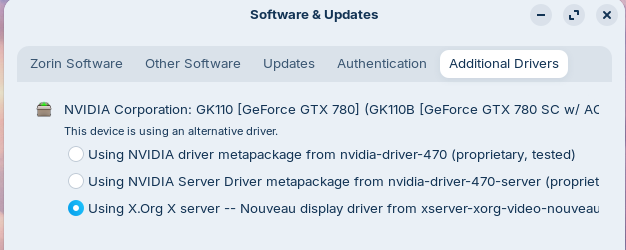
So I'll run one of the two options here and switch back to kernel 6.8 and give that a shot
Please start first in the 6.8 Kernel and then use the Driver. Otherwise it could get Trouble.
1 Like
Although I changed to kernel 6.8 before changing to the 470 driver, I still got this error message after the installation:
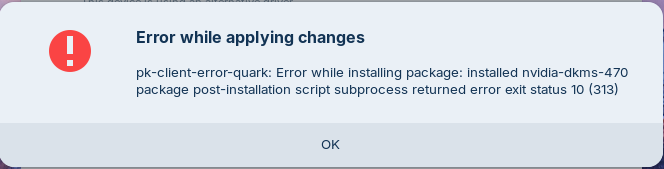
After restarting the machine, I checked and it was using the 470 driver. So I tried testing Krita and Unity and both appear to be stable now. Krita doesn't crash and the colours in Unity have returned to normal!
But of course it wasn't going to be a complete solution - one of my monitors have now stopped working! 

I've changed between the two 470 alternate drivers that was listed, and they're both producing the same error message above and both perform the very same on restart - with only one monitor working.
Did You switched to Xorg?
Maybe a Reinstall of the Driver could help. Do that in the Terminal when running the 6.8 Kernel. First uninstall all current Nvidia Stuff with
sudo apt purge nvidia* libnvidia*
and then type
sudo apt autoremove
to remove file Rests. But please take a Look at the List of removing Files before You delete them. Then to install the Driver type
sudo apt install nvidia-driver-470 nvidia-dkms-470
1 Like
Thanks for persevering with this @Ponce-De-Leon I really appreciate your support.
Yes, it's now very clear that the alternative Wayland breaks my Wacom stylus so I'm keeping it in Xorg.
I'll follow your instructions here to remove and reinstall the driver and let you know how it goes 
I've followed your instructions @Ponce-De-Leon and it resulted in [what I assume is] the same error as when I installed 470 last time 
Errors were encountered while processing:
nvidia-dkms-470
nvidia-driver-470
E: Sub-process /usr/bin/dpkg returned an error code (1)
Could You post the whole Output of the Installation Process please?
I closed terminal and restarted the machine before seeing your latest reply - is there a way to recall the output? 
Simply repeat the Steps.
1 Like
Here is the entire installation output:
sudo apt install nvidia-driver-470 nvidia-dkms-470
Reading package lists... Done
Building dependency tree... Done
Reading state information... Done
The following additional packages will be installed:
dkms libgl1:i386 libgl1-mesa-dri:i386 libglx-mesa0:i386 libglx0:i386
libnvidia-cfg1-470 libnvidia-common-470 libnvidia-compute-470
libnvidia-decode-470 libnvidia-decode-470:i386 libnvidia-egl-wayland1
libnvidia-encode-470 libnvidia-encode-470:i386 libnvidia-extra-470
libnvidia-fbc1-470 libnvidia-fbc1-470:i386 libnvidia-gl-470
libnvidia-gl-470:i386 libnvidia-ifr1-470 libnvidia-ifr1-470:i386
libxcb-glx0:i386 libxxf86vm1:i386 nvidia-compute-utils-470
nvidia-kernel-common-470 nvidia-kernel-source-470 nvidia-prime
nvidia-settings nvidia-utils-470 screen-resolution-extra
xserver-xorg-video-nvidia-470
Suggested packages:
menu
The following NEW packages will be installed
dkms libgl1:i386 libgl1-mesa-dri:i386 libglx-mesa0:i386 libglx0:i386
libnvidia-cfg1-470 libnvidia-common-470 libnvidia-compute-470
libnvidia-decode-470 libnvidia-decode-470:i386 libnvidia-egl-wayland1
libnvidia-encode-470 libnvidia-encode-470:i386 libnvidia-extra-470
libnvidia-fbc1-470 libnvidia-fbc1-470:i386 libnvidia-gl-470
libnvidia-gl-470:i386 libnvidia-ifr1-470 libnvidia-ifr1-470:i386
libxcb-glx0:i386 libxxf86vm1:i386 nvidia-compute-utils-470 nvidia-dkms-470
nvidia-driver-470 nvidia-kernel-common-470 nvidia-kernel-source-470
nvidia-prime nvidia-settings nvidia-utils-470 screen-resolution-extra
xserver-xorg-video-nvidia-470
0 to upgrade, 32 to newly install, 0 to remove and 13 not to upgrade.
Need to get 0 B/260 MB of archives.
After this operation, 680 MB of additional disk space will be used.
Do you want to continue? [Y/n] y
Extract templates from packages: 100%
Selecting previously unselected package dkms.
(Reading database ... 372254 files and directories currently installed.)
Preparing to unpack .../00-dkms_3.0.11-1ubuntu13_all.deb ...
Unpacking dkms (3.0.11-1ubuntu13) ...
Selecting previously unselected package libgl1-mesa-dri:i386.
Preparing to unpack .../01-libgl1-mesa-dri_25.2.8-0ubuntu0.24.04.1_i386.deb ...
Unpacking libgl1-mesa-dri:i386 (25.2.8-0ubuntu0.24.04.1) ...
Selecting previously unselected package libxcb-glx0:i386.
Preparing to unpack .../02-libxcb-glx0_1.15-1ubuntu2_i386.deb ...
Unpacking libxcb-glx0:i386 (1.15-1ubuntu2) ...
Selecting previously unselected package libxxf86vm1:i386.
Preparing to unpack .../03-libxxf86vm1_1%3a1.1.4-1build4_i386.deb ...
Unpacking libxxf86vm1:i386 (1:1.1.4-1build4) ...
Selecting previously unselected package libglx-mesa0:i386.
Preparing to unpack .../04-libglx-mesa0_25.2.8-0ubuntu0.24.04.1_i386.deb ...
Unpacking libglx-mesa0:i386 (25.2.8-0ubuntu0.24.04.1) ...
Selecting previously unselected package libnvidia-cfg1-470:amd64.
Preparing to unpack .../05-libnvidia-cfg1-470_470.256.02-0ubuntu0.24.04.1_amd64.
deb ...
Unpacking libnvidia-cfg1-470:amd64 (470.256.02-0ubuntu0.24.04.1) ...
Selecting previously unselected package libnvidia-common-470.
Preparing to unpack .../06-libnvidia-common-470_470.256.02-0ubuntu0.24.04.1_all.
deb ...
Unpacking libnvidia-common-470 (470.256.02-0ubuntu0.24.04.1) ...
Selecting previously unselected package libnvidia-compute-470:amd64.
Preparing to unpack .../07-libnvidia-compute-470_470.256.02-0ubuntu0.24.04.1_amd
64.deb ...
Unpacking libnvidia-compute-470:amd64 (470.256.02-0ubuntu0.24.04.1) ...
Selecting previously unselected package libnvidia-decode-470:i386.
Preparing to unpack .../08-libnvidia-decode-470_470.256.02-0ubuntu0.24.04.1_i386
.deb ...
Unpacking libnvidia-decode-470:i386 (470.256.02-0ubuntu0.24.04.1) ...
Selecting previously unselected package libnvidia-decode-470:amd64.
Preparing to unpack .../09-libnvidia-decode-470_470.256.02-0ubuntu0.24.04.1_amd6
4.deb ...
Unpacking libnvidia-decode-470:amd64 (470.256.02-0ubuntu0.24.04.1) ...
Selecting previously unselected package libnvidia-egl-wayland1:amd64.
Preparing to unpack .../10-libnvidia-egl-wayland1_1%3a1.1.17-0ubuntu0~gpu24.04.1
amd64.deb ...
Unpacking libnvidia-egl-wayland1:amd64 (1:1.1.17-0ubuntu0~gpu24.04.1) ...
Selecting previously unselected package libnvidia-encode-470:i386.
Preparing to unpack .../11-libnvidia-encode-470_470.256.02-0ubuntu0.24.04.1_i386
.deb ...
Unpacking libnvidia-encode-470:i386 (470.256.02-0ubuntu0.24.04.1) ...
Selecting previously unselected package libnvidia-encode-470:amd64.
Preparing to unpack .../12-libnvidia-encode-470_470.256.02-0ubuntu0.24.04.1_amd6
4.deb ...
Unpacking libnvidia-encode-470:amd64 (470.256.02-0ubuntu0.24.04.1) ...
Selecting previously unselected package libnvidia-extra-470:amd64.
Preparing to unpack .../13-libnvidia-extra-470_470.256.02-0ubuntu0.24.04.1_amd64
.deb ...
Unpacking libnvidia-extra-470:amd64 (470.256.02-0ubuntu0.24.04.1) ...
Selecting previously unselected package libnvidia-fbc1-470:amd64.
Preparing to unpack .../14-libnvidia-fbc1-470_470.256.02-0ubuntu0.24.04.1_amd64.
deb ...
Unpacking libnvidia-fbc1-470:amd64 (470.256.02-0ubuntu0.24.04.1) ...
Selecting previously unselected package libglx0:i386.
Preparing to unpack .../15-libglx0_1.7.0-1build1_i386.deb ...
Unpacking libglx0:i386 (1.7.0-1build1) ...
Selecting previously unselected package libgl1:i386.
Preparing to unpack .../16-libgl1_1.7.0-1build1_i386.deb ...
Unpacking libgl1:i386 (1.7.0-1build1) ...
Selecting previously unselected package libnvidia-fbc1-470:i386.
Preparing to unpack .../17-libnvidia-fbc1-470_470.256.02-0ubuntu0.24.04.1_i386.d
eb ...
Unpacking libnvidia-fbc1-470:i386 (470.256.02-0ubuntu0.24.04.1) ...
Selecting previously unselected package libnvidia-gl-470:i386.
Preparing to unpack .../18-libnvidia-gl-470_470.256.02-0ubuntu0.24.04.1_i386.deb
...
Unpacking libnvidia-gl-470:i386 (470.256.02-0ubuntu0.24.04.1) ...
Selecting previously unselected package libnvidia-gl-470:amd64.
Preparing to unpack .../19-libnvidia-gl-470_470.256.02-0ubuntu0.24.04.1_amd64.de
b ...
Unpacking libnvidia-gl-470:amd64 (470.256.02-0ubuntu0.24.04.1) ...
Selecting previously unselected package libnvidia-ifr1-470:amd64.
Preparing to unpack .../20-libnvidia-ifr1-470_470.256.02-0ubuntu0.24.04.1_amd64.
deb ...
Unpacking libnvidia-ifr1-470:amd64 (470.256.02-0ubuntu0.24.04.1) ...
Selecting previously unselected package libnvidia-ifr1-470:i386.
Preparing to unpack .../21-libnvidia-ifr1-470_470.256.02-0ubuntu0.24.04.1_i386.d
eb ...
Unpacking libnvidia-ifr1-470:i386 (470.256.02-0ubuntu0.24.04.1) ...
Selecting previously unselected package nvidia-compute-utils-470.
Preparing to unpack .../22-nvidia-compute-utils-470_470.256.02-0ubuntu0.24.04.1
amd64.deb ...
Unpacking nvidia-compute-utils-470 (470.256.02-0ubuntu0.24.04.1) ...
Selecting previously unselected package nvidia-kernel-source-470.
Preparing to unpack .../23-nvidia-kernel-source-470_470.256.02-0ubuntu0.24.04.1_
amd64.deb ...
Unpacking nvidia-kernel-source-470 (470.256.02-0ubuntu0.24.04.1) ...
Selecting previously unselected package nvidia-kernel-common-470.
Preparing to unpack .../24-nvidia-kernel-common-470_470.256.02-0ubuntu0.24.04.1_
amd64.deb ...
Unpacking nvidia-kernel-common-470 (470.256.02-0ubuntu0.24.04.1) ...
Selecting previously unselected package nvidia-dkms-470.
Preparing to unpack .../25-nvidia-dkms-470_470.256.02-0ubuntu0.24.04.1_amd64.deb
...
Unpacking nvidia-dkms-470 (470.256.02-0ubuntu0.24.04.1) ...
Selecting previously unselected package nvidia-utils-470.
Preparing to unpack .../26-nvidia-utils-470_470.256.02-0ubuntu0.24.04.1_amd64.de
b ...
Unpacking nvidia-utils-470 (470.256.02-0ubuntu0.24.04.1) ...
Selecting previously unselected package xserver-xorg-video-nvidia-470.
Preparing to unpack .../27-xserver-xorg-video-nvidia-470_470.256.02-0ubuntu0.24.
04.1_amd64.deb ...
Unpacking xserver-xorg-video-nvidia-470 (470.256.02-0ubuntu0.24.04.1) ...
Selecting previously unselected package nvidia-driver-470.
Preparing to unpack .../28-nvidia-driver-470_470.256.02-0ubuntu0.24.04.1_amd64.d
eb ...
Unpacking nvidia-driver-470 (470.256.02-0ubuntu0.24.04.1) ...
Selecting previously unselected package nvidia-prime.
Preparing to unpack .../29-nvidia-prime_0.8.17.2_all.deb ...
Unpacking nvidia-prime (0.8.17.2) ...
Selecting previously unselected package screen-resolution-extra.
Preparing to unpack .../30-screen-resolution-extra_0.18.3ubuntu0.24.04.1_all.deb
...
Unpacking screen-resolution-extra (0.18.3ubuntu0.24.04.1) ...
Selecting previously unselected package nvidia-settings.
Preparing to unpack .../31-nvidia-settings_510.47.03-0ubuntu4.24.04.1_amd64.deb
...
Unpacking nvidia-settings (510.47.03-0ubuntu4.24.04.1) ...
Setting up libnvidia-decode-470:i386 (470.256.02-0ubuntu0.24.04.1) ...
Setting up nvidia-kernel-source-470 (470.256.02-0ubuntu0.24.04.1) ...
Setting up nvidia-prime (0.8.17.2) ...
Setting up libxcb-glx0:i386 (1.15-1ubuntu2) ...
Setting up libnvidia-compute-470:amd64 (470.256.02-0ubuntu0.24.04.1) ...
Setting up libgl1-mesa-dri:i386 (25.2.8-0ubuntu0.24.04.1) ...
Setting up libnvidia-extra-470:amd64 (470.256.02-0ubuntu0.24.04.1) ...
Setting up nvidia-utils-470 (470.256.02-0ubuntu0.24.04.1) ...
Setting up libnvidia-fbc1-470:amd64 (470.256.02-0ubuntu0.24.04.1) ...
Setting up nvidia-compute-utils-470 (470.256.02-0ubuntu0.24.04.1) ...
info: The home dir /nonexistent you specified cannot be accessed: No such file o
r directoryinfo: Selecting UID from range 100 to 999 ...
info: Selecting GID from range 100 to 999 ...
info: Adding system usernvidia-persistenced' (UID 132) ... info: Adding new groupnvidia-persistenced' (GID 142) ...
info: Adding new usernvidia-persistenced' (UID 132) with groupnvidia-persist
enced' ...
info: Not creating `/nonexistent'.
Setting up dkms (3.0.11-1ubuntu13) ...
Setting up libxxf86vm1:i386 (1:1.1.4-1build4) ...
Setting up libnvidia-egl-wayland1:amd64 (1:1.1.17-0ubuntu0~gpu24.04.1) ...
Setting up libnvidia-cfg1-470:amd64 (470.256.02-0ubuntu0.24.04.1) ...
Setting up libnvidia-common-470 (470.256.02-0ubuntu0.24.04.1) ...
Setting up libnvidia-encode-470:i386 (470.256.02-0ubuntu0.24.04.1) ...
Setting up screen-resolution-extra (0.18.3ubuntu0.24.04.1) ...
Setting up nvidia-kernel-common-470 (470.256.02-0ubuntu0.24.04.1) ...
update-initramfs: deferring update (trigger activated)
Created symlink /etc/systemd/system/systemd-hibernate.service.requires/nvidia-hi
bernate.service → /usr/lib/systemd/system/nvidia-hibernate.service.
Created symlink /etc/systemd/system/systemd-suspend.service.requires/nvidia-resu
me.service → /usr/lib/systemd/system/nvidia-resume.service.
Created symlink /etc/systemd/system/systemd-hibernate.service.requires/nvidia-re
sume.service → /usr/lib/systemd/system/nvidia-resume.service.
Created symlink /etc/systemd/system/systemd-suspend.service.requires/nvidia-susp
end.service → /usr/lib/systemd/system/nvidia-suspend.service.
Setting up libnvidia-gl-470:amd64 (470.256.02-0ubuntu0.24.04.1) ...
Setting up libnvidia-gl-470:i386 (470.256.02-0ubuntu0.24.04.1) ...
Setting up nvidia-settings (510.47.03-0ubuntu4.24.04.1) ...
Setting up libnvidia-decode-470:amd64 (470.256.02-0ubuntu0.24.04.1) ...
Setting up libglx-mesa0:i386 (25.2.8-0ubuntu0.24.04.1) ...
Setting up libglx0:i386 (1.7.0-1build1) ...
Setting up xserver-xorg-video-nvidia-470 (470.256.02-0ubuntu0.24.04.1) ...
Setting up libnvidia-ifr1-470:amd64 (470.256.02-0ubuntu0.24.04.1) ...
Setting up nvidia-dkms-470 (470.256.02-0ubuntu0.24.04.1) ...
update-initramfs: deferring update (trigger activated)
INFO:Enable nvidia
DEBUG:Parsing /usr/share/ubuntu-drivers-common/quirks/lenovo_thinkpad
DEBUG:Parsing /usr/share/ubuntu-drivers-common/quirks/dell_latitude
DEBUG:Parsing /usr/share/ubuntu-drivers-common/quirks/put_your_quirks_here
Loading new nvidia-470.256.02 DKMS files...
Building for 6.17.0-14-generic
Building for architecture x86_64
Building initial module for 6.17.0-14-generic
Error! Bad return status for module build on kernel: 6.17.0-14-generic (x86_64)
Consult /var/lib/dkms/nvidia/470.256.02/build/make.log for more information.
dpkg: error processing package nvidia-dkms-470 (--configure):
installed nvidia-dkms-470 package post-installation script subprocess returned
error exit status 10
Setting up libgl1:i386 (1.7.0-1build1) ...
dpkg: dependency problems prevent configuration of nvidia-driver-470:
nvidia-driver-470 depends on nvidia-dkms-470 (<= 470.256.02-1); however:
Package nvidia-dkms-470 is not configured yet.
nvidia-driver-470 depends on nvidia-dkms-470 (>= 470.256.02); however:
Package nvidia-dkms-470 is not configured yet.dpkg: error processing package nvidia-driver-470 (--configure):
dependency problems - leaving unconfigured
Setting up libnvidia-encode-470:amd64 (470.256.02-0ubuntu0.24.04.1) ...
Setting up libnvidia-ifr1-470:i386 (470.256.02-0ubuntu0.24.04.1) ...
Setting up libnvidia-fbc1-470:i386 (470.256.02-0ubuntu0.24.04.1) ...
Processing triggers for mailcap (3.70+nmu1ubuntu1) ...
Processing triggers for desktop-file-utils (0.27-2build1) ...
Processing triggers for gnome-menus (3.36.0-1.1ubuntu3) ...
Processing triggers for libc-bin (2.39-0ubuntu8.7) ...
Processing triggers for man-db (2.12.0-4build2) ...
Processing triggers for initramfs-tools (0.142ubuntu25.8) ...
update-initramfs: Generating /boot/initrd.img-6.17.0-14-generic
Errors were encountered while processing:
nvidia-dkms-470
nvidia-driver-470
E: Sub-process /usr/bin/dpkg returned an error code (1)
You were running in Kernel 6.17 and the Driver wanted to built for that but this Driver isn't compatible for this Kernel because it is too new.
That's really bizarre - last time I changed the kernel, I set it to use 6.8. I'll try to change it again to 6.8 and reinstall the driver again
Here is a guide how to set an older kernel to default:
After 6.8 kernel updates you should repeat this procedure.
1 Like