What I think StarTreker was referring to is that there is always a price.
Zorin OS is free. You do not have to pay for it, nor to upgrade it.
Zorin OS Pro is not free. Artyom and Kyrill Zorin decided to make Zorin OS their Full Time job, rather than it being a side gig hobby while they otherwise seek a way to pay the bills.
This gives Zorin OS long term stability, since it is far less likely to be abandoned.
Personally, I believe that GnuLinux should all be pay-for.
In a selfish way, we want free. But nothing is ever free. Even with good intentions, nothing can be free. Server costs and development costs must be covered. Food put on the table, electric bills paid... And if we are not paying - Who is?
Whoever is doing the paying gets to call the shots. When the End User wants the product for free, then corporations step in to pay the bills - and the End User becomes the product.
And this model is what Microsoft has switched over to.
I addressed this earlier in the thread. Have you contacted the ZorinGroup to let them know that you had just bought Zorin OS Pro, unaware that 18 was due to be soon released?
Yep, just like magic, it always comes with a price. Nothing is truly free in this world, cause if your not paying, then you are paying with your data, or there are advertisers who pay. But these days its all about your data they want, to train unregulated AI, which will eventually doom us all.
Dang right!
And because of such, one could look at PRO, as a donation perk. They work so hard to provide us a lovely OS with extra benefits, isn't that worth paying for? Of course it is, and I do so, for every other version of Zorin OS they release.
I 100% agree! I believe a persons time building an OS, should be honored and appreciated, by a donation, its really not asking a lot. But unlike Windows, we have the choice whether to pay or not, without worry of our data stolen, by emperor Microsoft.
Which is what I've always been saying. If Windows is no longer the product, and people are getting it for free, then the user becomes the product!
Exactly! All one has to do, is contact the Zorin team, show them your receipt, showing you bought PRO, and ask them, if they can make you a new "KEY" for Zorin OS 18 for free, since you didn't know 18 was just around the corner.
Looks to be an issue with XWayland maybe, below is the error:
Oct 03 21:45:12 zdt gnome-shell[65541]: Received an X Window System error.
                                        This probably reflects a bug in the program.
                                        The error was 'BadWindow (invalid Window parameter)'.
                                          (Details: serial 296042 error_code 3 request_code 7 (core protocol) minor_code 0)
                                          (Note to programmers: normally, X errors are reported asynchronously;
                                           that is, you will receive the error a while after causing it.
                                           To debug your program, run it with the MUTTER_SYNC environment
                                           variable to change this behavior. You can then get a meaningful
                                           backtrace from your debugger if you break on the mtk_x_error() function.)
Oct 03 21:45:13 zdt gdm3[1478]: Gdm: on_display_added: assertion 'GDM_IS_REMOTE_DISPLAY (display)' failed
Oct 03 21:45:13 zdt gdm3[1478]: Gdm: on_display_removed: assertion 'GDM_IS_REMOTE_DISPLAY (display)' failed
Oct 03 21:45:19 zdt gdm-password][145919]: gkr-pam: unable to locate daemon control file
Oct 03 21:45:19 zdt gdm3[1478]: Gdm: on_display_added: assertion 'GDM_IS_REMOTE_DISPLAY (display)' failed
Oct 03 21:45:19 zdt systemd[2607]: Failed to start app-gnome-gnome\x2dkeyring\x2dpkcs11-146054.scope - Application launched>
Oct 03 21:45:19 zdt systemd[2607]: Failed to start app-gnome-gnome\x2dkeyring\x2dsecrets-146057.scope - Application launche>
Oct 03 21:45:19 zdt systemd[2607]: Failed to start app-gnome-xdg\x2duser\x2ddirs-146073.scope - Application launched by gno>
Oct 03 21:45:20 zdt systemd[2607]: Failed to start app-gnome-snap\x2duserd\x2dautostart-146463.scope - Application launched>
Oct 03 21:45:21 zdt gdm3[1478]: Gdm: on_display_removed: assertion 'GDM_IS_REMOTE_DISPLAY (display)' failed
Oct 03 21:51:26 zdt gdm3[1478]: Gdm: on_display_added: assertion 'GDM_IS_REMOTE_DISPLAY (display)' failed
I tried disabling the two extensions I use, reverting back to the older Kernel, reinstalling Zorin taskbar and desktop; none of these helped unfortunately.
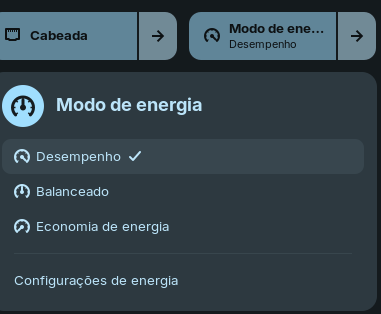
Hello everyone in the Community! Today I was testing the Z18 a bit on my main PC. I transferred my old HDD and everything ran great! Navigating through the options in the desktop tray, we now have the power mode option, in addition to balanced, economy mode, and performance mode. I really like this change!
Good evening everyone.
Excuse my English, please.
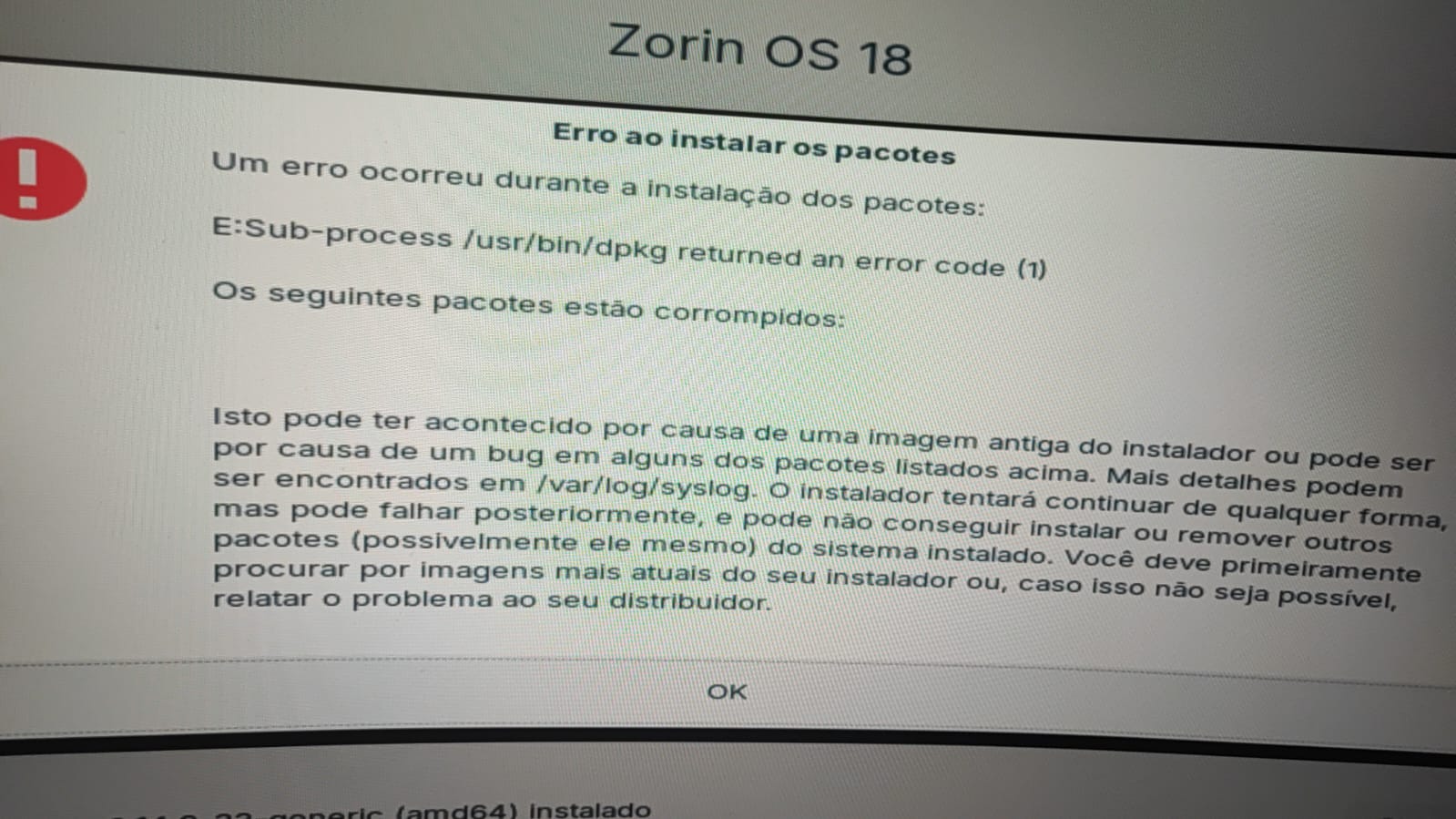
I've been trying to install Zorin 18 beta several times, but the following problem always occurs during installation.
Particularly after trying to configure the Nvidia driver during installation.
Can you help me?
The error is pretty generic and usually comes down to resolving a specific package.
That it happened during the OS install tells that most likely, either a package that was downloaded during the installation process was corrupted during packet transfer or that there is a corrupted file in the downloaded .iso file or its write to LiveUSB stick.
What you can do:
First, you might just try using the same LiveUSB stick - but this time, do not connect to the net. Do not check the box to install additional drivers. You can do this after install.
If that works, the .iso and LiveUSb were fine. You can then run
sudo apt update
and install any additional drivers or software you needed or wanted.
IF it does not work, download a fresh .iso and wipe, recreate the LiveUSB.
It's true that BTRFS is more efficient creating and restoring snapshots than Rsync, but at the end of the day the functionality is the same. For me, it's not worth the trouble to set it up just for this.
If you find yourself having to rollback often, then it might be worth looking into it, but it's also a good tell that there's another, bigger issue.
Exciting, thanks for the info. I also use Standard Moderate ext4 and LVM with encryption. Is there any other storage available besides Zorin's 2GB swap? In general, is this enough, considering I have 32GB of RAM? And what do you use for snapshots, directly from LVM or Timeshift?
Hi, good afternoon.
To complete the information for this topic, here's my hardware testing:
Intel i5-3570, HD2500 integrated graphics, 8GB DDR3, and a mechanical HDD.
NOTE: I usually play PCXS2 on the Z17,3 on an SSD in the same machine (vs. Flatpak). I downloaded it to the HDD (vs. AppImage), and my PS2 games run much better on the Z18 with an old HDD! It might be an effect of the clean install, but the SSD is orders of magnitude faster! Could it be the file format?
Probably several factors. SSD is faster in data transfer than HDD. But those speeds are only relevant if they were vastly different from operational speeds - GPU and CPU perforamance.
If the HDD can deliver the data at the same rate that the CPU can process it and the GPU can render - then doubling that speed from the HDD would not make any difference or change the result - it would bottleneck at the motherboard.
PS2Xs2 relies pretty heavily on Vulkan, which Zorin OS 18 has many improvements in due to the higher Mesa version.
And Flatpak is sandboxed and will slow things down. Switching away from that could show a speed improvement.
Speaking for myself Swarfendor. If it helps someone, like it did myself years ago, there will be another who will always think of you with a sense of eternal gratitude. Unofficial Manual 12 was a huge help to me transitioning to Zorin after doing some hopping, and learning back in 2018.