Will Zorin OS Lite with the XFCE desktop support all the features of Zorin OS 18?

1 Like
Because Lite and Core use different desktop Environments, they offer different features.
This is an important distinction because the reverse becomes true: Core does not support all the features in Lite.
It is more accurate to narrow this down to which specific features you are looking to be supported.
1 Like
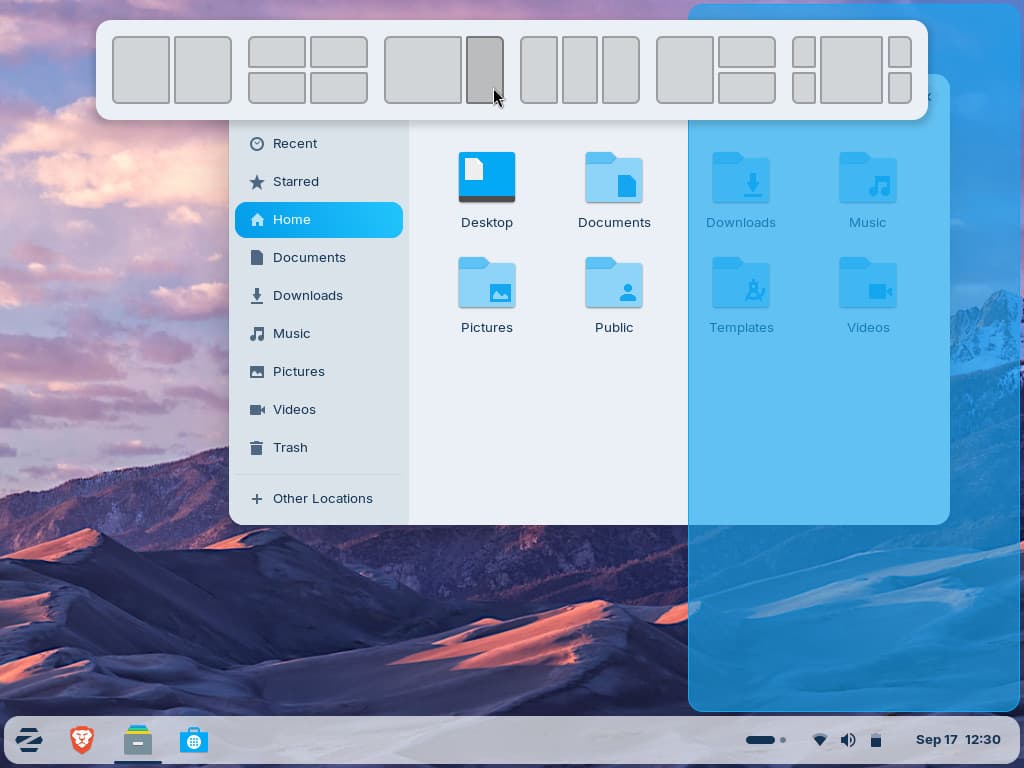

This is window tiling. This feature exists in XFCE4, the D.E. used in Lite, but it's appearance and activation look different. My answer would be "no" because even though I just said it exists...
- it would not look the same and meet your expectations as the Same Experience as on Core
- Historically, the ZorinGroup has not released Zorin OS Lite with full tiling. It has been up to the end user to set it up.
But it is present and I use the XFCE4 version (and admittedly, I prefer it. It is more automatic, rather than my selecting from a window - I just move the window to that general location and it snaps into place.)
Are you asking about the prompt to choose between LibreOffice and installing Zorin Windows App Support?
I am... not sure on this one.
Again, historically, the Zorin Lite release always included the prompt that offers to install Zorin Windows App Support. It is a smaller centered modal prompt.
Which makes sense because the one you show is integrated into the Gnome Shell.
On XFCE, things are modular and independent. It would not drop a Conversation Window off of the panel...
1 Like
Hi guys!
Wish to report another problem: icons in folder in the desktop does not appear as icons. This also happens in 17.3.
How to reproduce:
- Create a folder on a desktop
- Create shortcut of a program on a desktop
- Copy this shortcut to a folder
- "Firefox" shortcut turns into a file firefox_firefox.desktop
- When you copy file from folder back to desktop, it becomes a normal shortcut again.
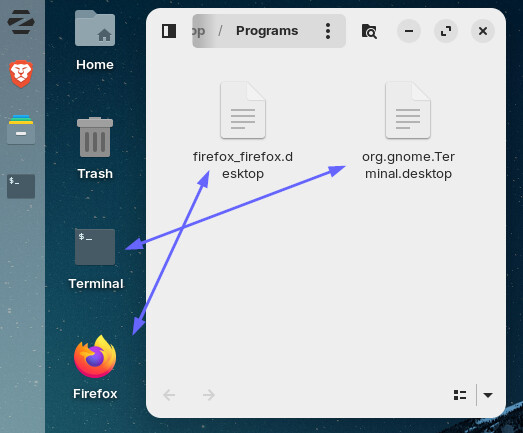
On the desktop, these are resolved as the Mimetype "Launcher".
But in the file manager, they are resolved as the Mimetype "File"... Because you would not ever put a launcher... inside of a file manager. You would put files inside of a file manager.
2 Likes
Sorry, I'm not sure I understand what you mean by this. Are you asking about file systems and/or partitions that are created by default?
As with so many other things: it depends 
If you find that you're running out of RAM regularly, the issue is that your use case for a computer simply requires more of it. In that case you should consider installing more directly in the hardware.
Swapping is a useful technique to help the system free some unused memory when it's running under heavy load. However, even today's SSD are much, much slower than RAM. Relying on this mechanism for extensive periods of time will come at a performance penalty, and also stress the drive unnecessarily.
If you play video games or do any other intensive tasks that consume a lot of memory, you can consider enabling ZSwap. The idea is basically the same as regular swapping, but instead of writing out to disk, it compresses the memory on the fly.
This avoids writing to disk, which is much faster, but with some additional overhead because of the compression. It also requires some processing power, but it's quite acceptable.
I don't take any snapshots, simply because I have no need for it with Debian (well, Devuan, at the moment). It's rock solid, no surprises.
Snapshots are more of a safety net anyway, they are not proper backups. If I need to, I just re-install from scratch. It sounds a bit extreme but it's the kind of thing that you can leave running while you do other tasks anyway, so it's not a problem for me.
4 Likes
Sorry, thank you for the great information. Yes, Debian himself is exciting, I think. I had only meant that with the swap partition, but whether the 2GB are sufficient, they are perfect. Have a good Time. 
1 Like
Be aware that Zorin 18 will be the last versions on Lite ...
We commit to making the Lite edition of Zorin OS available in the Zorin OS 17 and Zorin OS 18 release series. That means Zorin OS Lite will continue to be fully supported and maintained until at least June 2029.
We aim to sunset the Lite edition from Zorin OS 19 onwards, so it would no longer be actively developed as an official edition of Zorin OS. We recommend users to migrate to the standard non-Lite editions of Zorin OS (Core, Pro, or Education) to continue having a fully-supported and curated Zorin OS experience after this point.
Getting Zorin OS Lite - Zorin Help
3 Likes
Why will Zorin OS 18 Lite be the last XFCE release?
Are the reasons technical?
Here are some reasons mentioned:
It does not correspond to my own experience on Zorin 17. I think it is just easier to develop only one desktop as the Zorin team is small. On newer hardware the difference between lite and core is negligible and only few people have computers >10 years.
2 Likes
Ah, I see. Well, yes, I think 2 GB is enough for most use cases. If you have enough drive space, you can increase this to 8 GB to be extra safe if you want. In the past, people recommended setting the swap partition (or swap file nowadays) to at least twice the amount of RAM. But I don't think having more than 8 GB is going to help you. If you need to constantly swap that much memory, you should just upgrade the hardware.
1 Like
When will Zorin OS 18 be released?
When it is ready! 
18.beta was released on 19/09 Between 17.beta and 17.0 there where sixteen days ...
As support for WIN10 ends on 14/10 many people believe 18.0 will be released around that date, if not too many major bugs where reported by the early adaptors.
2 Likes
True, but it does prevent e-waste. As I've stated elsewhere I have m'lady's computer from 2006 running Q4OS Plasma. And they also have Trinity in 64-bit and 32-bit.
2 Likes
I have now decided to use btrfs because I have created my setup, which works under Zorin OS 18 Beta. However, only under VM with boxes. But I'm already thrilled; it's going quite well. I've been very busy with what you have to pay attention to and what you don't have to pay attention to. I find this very exciting because I used Zorin OS 17.3 Pro to do it normally via the installer. I also wrote my own guide for me to create everything perfectly with encryption.
4 Likes
Hi I did get this to work but I wonder if you can add this in the 18 repository please if possible. I got it working from here TP-Link Archer T2U Nano Driver Installation on Zorin OS • tutorialforlinux.com Thanks
2 Likes
I've only used BTRFS when it was the default for the distribution, with Fedora and Tumbleweed, and despite the many concerns about it, it performed quite well. Snapshots were also pretty fast and didn't get in the way of things so that was a big plus.
It's just the setting this up for another distro that I find too cumbersome  And I only ever needed to use snapshots because of those distributions use a rolling release model, which meant every now and then updates broke something in the system. For Debian- or Ubuntu-based distributions, this isn't an issue for me.
1 Like
I have to say myself that I still feel undecided because ext4 is damn stable and whether it's really worth it, I'm divisive. I'm really stupid right now. I thought that I could just experiment and maybe rely on btrfs in the future. I think this file system is really mega.
1 Like