Had a quick look on the Live USB on a MacBookPro. I do like that it seems Zorin have adopted the 6.14-29 Kernel which should launch quicker unlike 6.8 Still not sure about the subdued colour aspect of the Dark Themes and Yellow and Brown def not my cup of tea! Although I couldn't find which version of Gnome it has been upgraded to, it has introduced GTK4 Apps and the ngl renderer which causes flickering, skewed, distorted and tiny pull down menus on my Mac. There is a partial solution by switching back to gl via GSK_Renderer=gl (/etc/environment.d) but just wish Zorin could try to design their OS to work on as full a range of old and new computers as possible and the display renderer is an essential component!
Will i be able to upgrade from beta to stable?
If they follow the same approach as previous releases I would say yes.
Any hope hibernation mode will be working out of the box for Zorin 18?
As a converted Windows 10 user myself I'd say thats a big miss in usability in Zorin...
Thanks to all the people contributing and running this project!
With Zorin 17, I was able to use my external sound card multichannel without any problems.
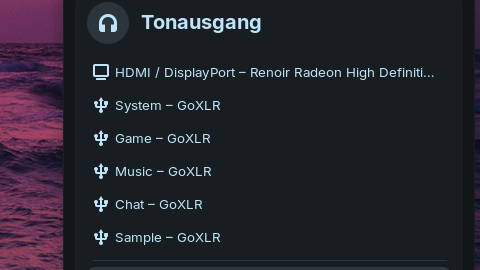
Zorin 18 has inherited the problem from Ubuntu 24.04 and no multichannel is displayed.
To fix this manually, first open /usr/share/alsa/ucm2/common/pcm/split.conf as root.
Find the line with the following content (should be around line 329):
Empty “${var:__Device}”
Replace it with:
Empty “${var:-__Device}”
I hope the Zorin team will check this and correct it in the final version.
2 Likes
It is Gnome 46. You can check that in the Terminal with the Command gnome-shell --version
Snap version is installed in place of Firefox APT package. Snap package is displayed in the version information. Is this related to uploading the incorrect package?

Welcome to the Forum.
No. This need an Explanation. On Zorin 17, there was the Mozilla-own Repo added to have Firefox as APT Package. But Zorin decides to switch to Brave as default Browser - and they didn't added the Mozilla Repo.
And now comes Ubuntu. On Ubuntu it is so that when You install Firefox, it only is availabe as Snap - and when you go over APT it bypasses that and installs the Snap Package, too.
To get Firefox as APT Package, You have to add the Mozilla Repo again:
2 Likes
This depends on your hardware. Not everyone has problems with suspend/hibernation in Zorin.
If you install Firefox with Software, the package options are Flatpak and Zorin OS APT. If you choose Zorin, you get a .deb package. No need to download from Mozilla.
1 Like
Okay, now I will give some Feedback, too:
- It is still not done but I would please You to do that: Label cearly the Option for Wayland and Xorg on the Login Screen. Name it directly ''Zorin Desktop on Wayland'' and ''Zorin Desktop on Xorg'' for both Options.
- Because of Firefox: I would suggest to say clear that Firefox isn't anymore the default Browser. I know, it was done before. But for this new Version, I would think it is neccessary and say clear that it is only available as Snap or Flatpak. And if someone wants a .deb Package link the Mozilla Instructions for it. Or: add at least the Mozilla Repo for Firefox.
- I like that on the Sceen for choosing between Try Zorin and Install Zorin the Try Option has an own Icon with Desktop-Look.
- I like the new default Mountain Picture.
2 Likes
When you choose the Zorin version of firefox a snap package of firefox gets installed although it is a .deb file first.
Really? I didn't check that. That's deceptive.
1 Like
Yes, in Zorin 17 it was the only Zorin package that installed a snap.
In this thread I got some information about this:
OK, here are my initial comments. More stuff may be noticed later.
I installed beta of Zorin 18 in qemu/kvm virtual machine. It is installed in BIOS mode. The 'Zorin on Xorg' session did not open to a desktop after login - just a black screen. Not unexpected, as this happens to me with most (but not all) OS installed as a qemu/kvm virtual machines.
So I am using the default session, which is Wayland.
I'm unfamiliar with Brave browser, so I installed Firefox from the default Software Store (called 'Software') . The default packaging choice was Flatpak, which I selected, since the Flatpak system was already installed by default, as Zorin themes are packaged as Flatpaks.
All the layouts seemed to work.
In my test session, Files crashed once; wound not restore from minimized. Otherwise, all appears good.
Negatives:
(Big Problem) The encryption plugin (seahorse-nautilus) for Files was missing from Zorin 18; it was available in Zorin 17. And it can't be installed - not in the Ubuntu repository.
(Minor) Libre Office Writer defaults to the Tabbed toolbar. I think it should use the Standard toolbar by default; It took a while to determine how to switch to Standard. Not obvious.
(Minor) The Zorin Appearance color selector seems to produce color text. I like white. No choice for white. I changed the Legacy theme and shell theme. One or both of those changed text color to white.
I choose the Zorin version. Snap is installed in place of the.deb package.
Wow. And you have the beta installed?
Thank you. I appreciate the explanation. I was aware that Ubuntu has been aggressively promoting Snap from version 23.10, and 24.04 LTS made it challenging to install .deb packages via App Center. I assumed Zorin would resolve this issue. As an app install option, I hope Team Zorin makes sure that Zorin 18 has .deb, snap, and flatpak enabled. I recently switched from Win10 to Linux and am now a full-time Zorin user since 17.2. Discovered that .deb packages function better with the system as a whole. I'll stick with Zorin 17, which is functioning well for me, until the snap issue is resolved.
3 Likes
This whole business with Snaps installing when people pick .DEB versions is worrisome. I don't like that AT ALL.
9 Likes