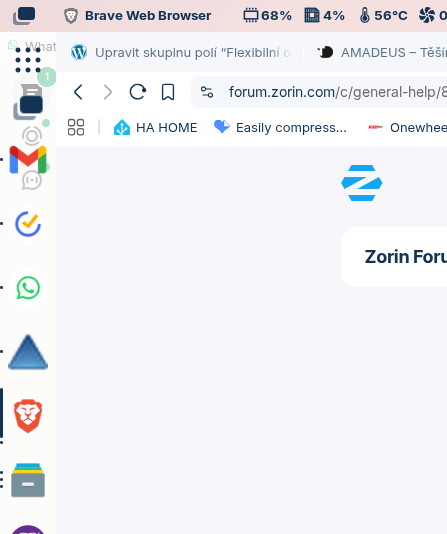
It often happens that when I wake up my laptop from sleep. All the windows that were maximized are under the taskbar. You can see in the picture that WhatsApp is under the Gmail icon... It's very annoying and frustrating. Does anyone have a similar experience and is there a solution?
This is on Wayland. It doesn't happen to me on Xorg, but I have other problems there.
Maybe it helps to enable wayland at brave flags >preferred ozone platform.
Wait a moment, I'll take a look if there is such one.
Edit: Sorry, I did not find this setting at the moment. It are so many settings there and I'm using LinuxMint, so I don't know if it is the same version as in Zorin. I only found Wayland UI scaling and Wayland session management.
If you go to Zorin Appearance → Interface → Taskbar Settings, and toggle Panel Intellihide on, and then back off again, does that fix the window positioning?
In that case, I suspect the reason might have something to do with these other issues linked below. Although, this would be the first time I'm seeing this affecting window positioning instead of just the desktop icons.
The cause is still unknown, but I'm pretty sure there's some sort of race condition whenever the desktop loads the different components.
What I think is happening is some sort of race condition where the desktop finishes loading components in such a way that calculations as to where things should be placed are wrong. By forcing a layout shift the calculation are done again with the taskbar now fully loaded.
This is all assuming that these two issues are related, but the behavior seems very consistent. Unfortunately, I still don't know of an actual fix to this.
For reference:
As a workaround, you can run a script that does this for you. Still annoying, but less so.
Create a new text file with the following contents:
Then maybe if this sort of thing is going on, perhaps it would be wise, for the Zorin bro's to install some sort of auto refresh system, if components are not loaded correctly?
It's probably just enough to have that run when layout shifts happen i.e., logging in, exiting programs in full screen, plugging in external monitors, changing resolutions, etc.
Another solution might be to enforce a certain order for Gnome shell extensions to startup, that would also work fine.