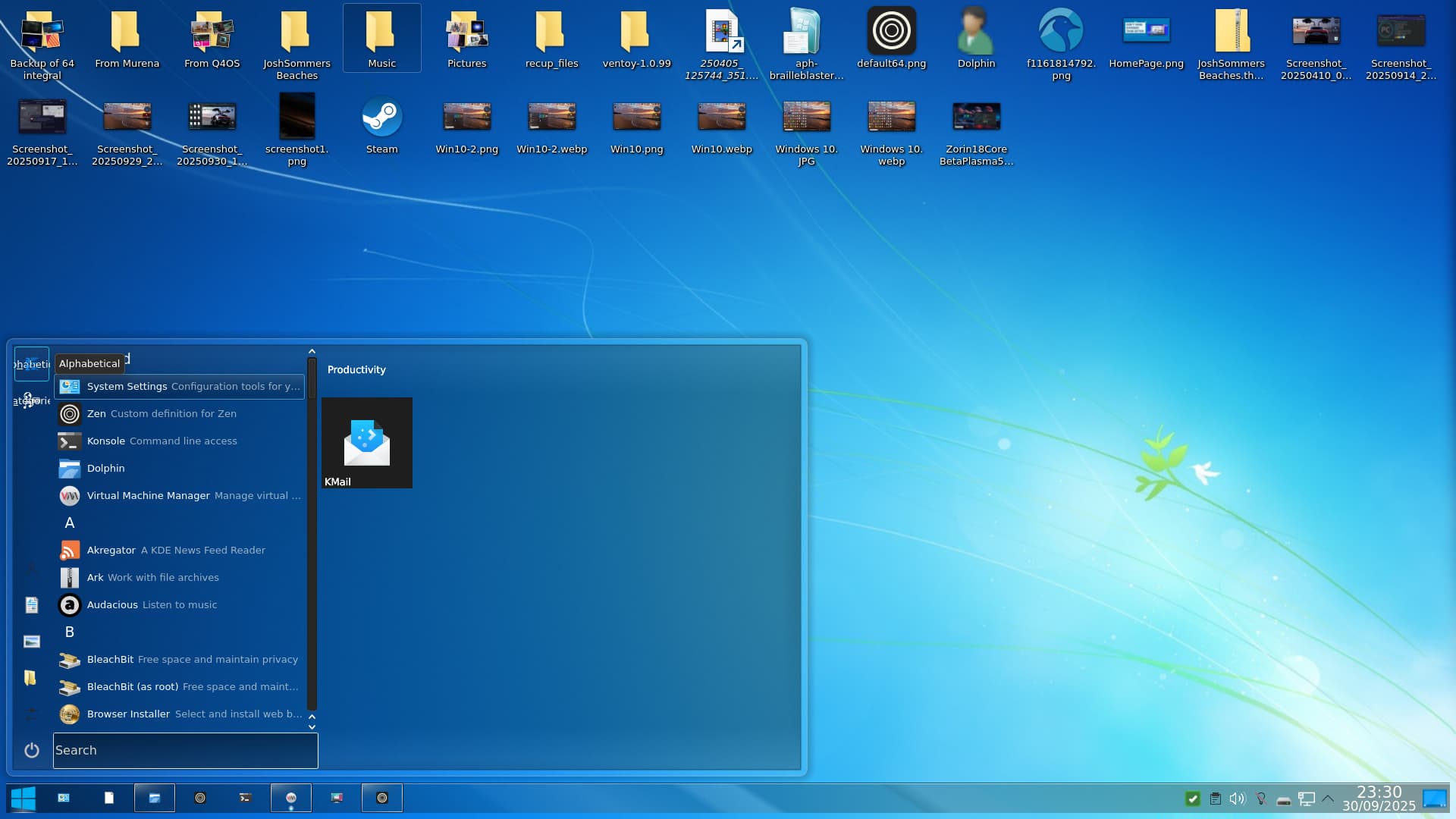
It was painful, but possible. Because Zorin 18 is based on Ubuntu 24.04 (Kubuntu stayed with Plasma 5.27), Zorin 18 has Plasma 5.27.12 which means you can now get animated wallpapers. This is what I have done to get Windows 10, having removed all things Zorin (apart from certain items), the VM boots straight into Plasma after login - no choices of Zorin Desktop (Wayland) or Zorin on xorg. Here is the end result:
Just spotted Brasero in that screenshot - removed it and replaced with superior K3b.
Compared with other distributions that have Plasma DE, they run out of the box. I would not want to spend time at a potential clients home struggling to get Plasma working as it would incur more cost than say installing Q4OS or PCLOS Debian; that said I have had some issues with PCLOS Debian and zren's reworked tiled menu for Plasma 6.x does not work as well as the version for Plasma 5.x.
KMail should be avoided as it is not as stable as Evolution. I installed gufw on this PCLOS Debian trixie release and it screwed up the Weather Applet, Add Widgets panel and couple of icons in the 'System Tray' - once disabled the desktop returned to normal!
I noticed that Zorin now has Zen browser in the Software store but it is flatpak, so I downloaded the tarball and installed it from that. I installed Stacer to get rid of the Brave repository, then uninstalled Brave. Replaced it with Epiphany-Browser to download Zen browser tarball.
Installing the VM I removed myself from the Censor Data thing, removed feedback, ignored updates during install and additional drivers. As much of Gnome and Zorin desktop was removed, including Zorin Appearance as you can get relatively enough tweaks in Plasma to modify your DE appearance to what you are familiar with. I also understand that Q4OS's Look Switcher can be applied to other distributions.
Also, other distros that install the Tiled Menu usually get Gmail shortcut (/url) which is pretty neat.
(Update: spotted that Flatpak is still present. Will remove that and see what happens.)
Why do you even choose Zorin OS to do something like that? A lot of people in the Linux community really like to make life difficult for themselves.
Personally, I find KDE and vanilla GNOME to be not good... The implementation of GNOME in Zorin OS is simply perfect, and version 18 continues this trend. Everything is consistent, looks good, and you don't have to spend time after installation installing add-ons that don't work properly anyway.
It was only after installing Zorin OS this year that I realized I could use Linux on a daily basis.
@Kwakx It's horses for courses. Plasma 5.27 is stable and better than 5.24 which is all that was available with Zorin 17. To prove my horses for courses theory I've been helping a forum member in Arizona remotely, first by installing a new printer to replace their two failed HP Printers with a brother printer, then advising on what usb ethernet dongle to purchase as that appeared to be failing, and finally they asked me to install Plasma which was limited to 5.24 so no Network icon like 5.27 and themed to be like XP and they were over the moon. They commented that they found Zorin confusing. I did not remove Gnome in that instance.
I have already posted that some Windows 10 users will be looking for a system that closely resembles the Desktop they left behind. Personally I only use distributions that are free of bloated systemd, have ALSA or are capable of it running, and no Pulse Audio. And as for making things difficult, it isn't if you know what you are doing and also have an easier time without snaps or flatpak, further bloatware, when Synaptic Package Manager can do the job well.
This is interesting because people don't expect MacOS to resemble Windows. I wonder if advertising as "Windows friendly" or similar can be counter-productive in those instances.
@AZorin , I found a little bug with text editor, and it happen only when a file is open in, if you try to reach preferences it crash an close after few seconds, and when you just open text editor empty the preferences work fine.
Please use the Feedback form that's pinned in the taskbar to report issues and other feedback. This would make it easier for the developers to stay organized.
I'd like to begin by thanking you for resolving the previous issue I reported regarding the taskbar. Installing the file you sent me resolved the issue completely.
The reason for this new post is to provide feedback on a behavior I've been observing in the Zorin OS 18 Beta version. My goal is purely collaborative, in the hope that this report can contribute to improving the system.
Since yesterday, my system has started experiencing complete and unexpected freezes, forcing me to turn off the laptop using the power button because the system becomes completely unresponsive. Yesterday, the problem occurred approximately four times, and today it has already happened once.
I've noticed that, on some occasions, before the complete freeze, the system shows signs of instability. Certain applications stop opening, and soon after, the entire desktop freezes.
I'd like to point out that this doesn't appear to be a problem related to a lack of RAM, as my hardware has 16 GB, and at the time of the freezes, I wasn't running many applications simultaneously.
I reiterate that this post is intended as constructive feedback for the Beta version. Thank you for your attention and congratulations on the excellent work you've been doing.
We recently published a software update to the gnome-shell package which includes a patch that should resolve some unstable behaviour on the desktop.
Could you please try installing the latest updates from the Software Updater (as of now) and restarting your computer to see if this improves your system's stability?
Hello friends, I have now tested it extensively again, and I noticed that it happens very by chance. Can you fix it somehow? I only saw that when I look at the sources, everything comes twice, but if it is not there in a user-defined way, the sources are normal. I've already reported it, but maybe someone else can report it again, because I'm not sure it has arrived. This only happens when you install Zorin OS, and it's very annoying that it happens by chance.
I want to highlight an issue that exist in Zorin for a long time already, I hope in release 18 this will be fixed?
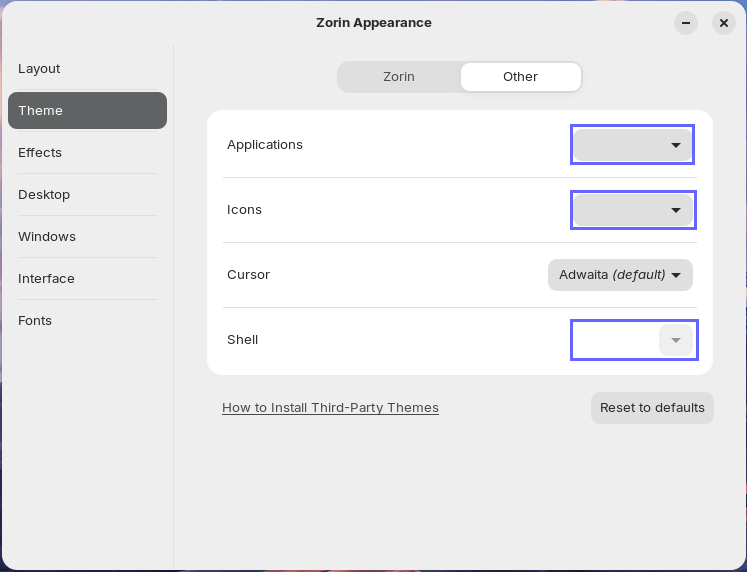
As a user, I want to understand what values for Applications, Icons and Shell are used right after the installation so that I can revert changes back to defaults.
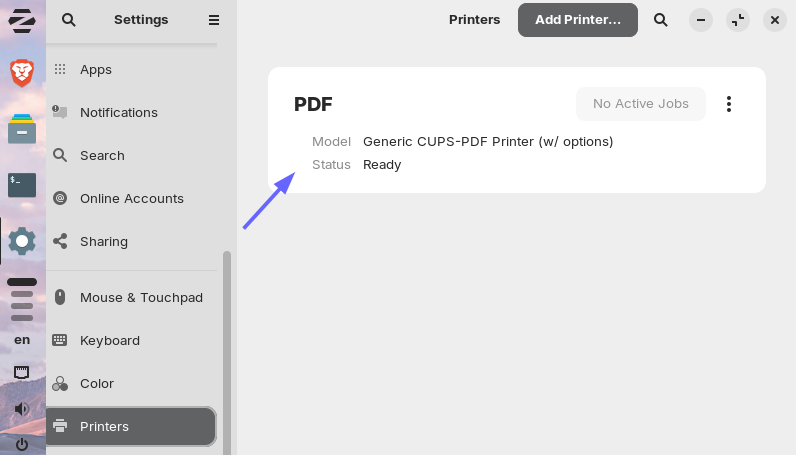
I propose to include "cups-pdf" package in default installation so that at least one printer is available. Windows 10, 11 already have this "Microsoft Print to PDF" printer out of the box.
First of all, I have to say I’m really impressed with the new version of ZorinOS — it looks fantastic, and it’s clear that a lot of attention went into the details
While exploring, I came across the new “Remote Login” option under Settings → System → Remote Desktop.
From what I understand, the difference compared to “Remote Sharing” is that Remote Sharing requires an active session, whereas Remote Login creates a new session and ends any active one. They also use different ports for connections.
My question is: is this behavior a limitation of GNOME, or could the two options potentially be unified?
As a former Windows user, I’m used to connecting via RDP on the default port (3389 - also used by the new “Remote Login”), where the behavior is more seamless: if a session is already active, it connects to it; if not, it simply starts a new one.
Re Zen, the vertical tabs aren't a problem on normal screens at all. There are other issues, which drive me nuts, but I just flip between browsers when that happens. It syncs with Firefox really well (or it did when I used FF regularly), and it was simple to move everything over to Brave. Give Zen a go as a back-up browser, you might be surprised. Oh, BTW, I did have issues with Brave and Wayland. The advice to switch to Xorg fixed the problems.
Good evening
I've completed the update available in the software updater. So far, the system has been operating normally and the crash I reported hasn't occurred. However, I didn't use the computer much today. I'll probably use it frequently tonight, and I'll report the resolution later.